Postproc:
Specific code to separate neural features
Examples functions include spike filtering, spike detection, spike binning, LFP filtering, and spectral power among others.
API
Base
- aopy.postproc.base.calc_reward_intervals(timestamps, values)[source]
Given timestamps and values corresponding to reward times and reward state, calculate the intervals (start, end) during which the reward was active
- Parameters:
timestamps (nt) – when the reward transitioned state
values (nt) – what the state was at each corresponding timestamp
- Returns:
during which the reward was active
- Return type:
(nt/2)
- aopy.postproc.base.get_calibrated_eye_data(eye_data, coefficients)[source]
Apply the least square fitting coefficients to segments of eye data
- Parameters:
eye_data (nt, nch) – data to calibrate. Typically 4 channels (left eye x, left eye y, right eye x, right eye y)
coefficients (nch, 2) – coefficients to use for calibration for each channel of data
- Returns:
calibrated data
- Return type:
(nt, nch) ndarray
- aopy.postproc.base.get_conditioned_trials_per_target(target_idx, trials_per_cond, cond_mask=None, replacement=False, seed=None)[source]
Get trial index to choose the same number of trials per target in removing trials by a certain condition. The trial index is evenly aligned like [1,2,3,1,2,3,1,2,3,…]. trials_per_cond can be taken from ‘get_minimum_trials_per_target’ function.
- Parameters:
target_index (ntr) – target index
trials_per_cond (int) – minimum trial across conditions to get the same number of trials per condition
cond_mask (ntr) – boolean array to remove trials
replacement (bool) – whether to allow replacement in choosing trials. This can be used for bootstrapping.
seed (int) – random seed
- Returns:
trial index to extract the same number of conditioned trials for each target
- Return type:
(ntr)
- aopy.postproc.base.get_inst_target_dir(trial_aligned_pos, targetpospertrial)[source]
This function calculates the instantaneous direction from the cursor to the target at each time point across each trial. This function is specific to the 2D case at the moment with X coordinates being the horizontal dimension and Y coordinates being the vertical dimension.
- Parameters:
trial_aligned_pos (ntime, ntrials, 2) – Position of the cursor in X and Y coordinates.trial_aligned_pos[:,:,0] corresponds to the X cursor positions and trial_aligned_pos[:,:,1] to the Y cursor positions.
targetpospertrial (ntrials, 2) – X and Y pos of target.
- Returns:
Array including instantaneous direction to the target from the cursor [rad]
- Return type:
(ntime, ntrials)
- aopy.postproc.base.get_minimum_trials_per_target(target_idx, cond_mask=None)[source]
Get the minimum number of trials per target after restricting trials
- Parameters:
target_index (ntr) – target index
cond_mask (ntr) – boolean array to remove trials
- Returns:
minimum number of trials per target
- Return type:
(int)
- aopy.postproc.base.get_relative_point_location(ref_point_pos, new_point_pos)[source]
This function calculates the relative location (angle and position) of a point compared to a reference point. Assumes angle 0 starts from the direciton of vector [1, 0]. This function is specific to the 2D case at the moment but can handle a single point entry or multiple.
- Parameters:
ref_point_pos (nxpts, nypts) – Point position of reference point in spatial coordinates
new_point_pos (nxpts, nypts) – Point position of new point in spatial coordinates
- Returns:
- relative_new_point_angle (float): Absolute angle between cursor and target position [rad]relative_new_point_pos (float): Absolute position of the target relative to the cursor
- Return type:
A tuple containing
- aopy.postproc.base.get_trial_targets(trials, targets)[source]
Organizes targets from each trial into a trial array of targets. Essentially reshapes the array, but sometimes? there can be more or fewer targets in certain trials than in others
- Parameters:
trials (ntargets) – trial number for each target presented
targets (ntargets, 3) – target locations
- Returns:
list of targets in each trial
- Return type:
(ntrials list of (ntargets, 3))
- aopy.postproc.base.mean_fr_inst_dir(data, trial_aligned_pos, targetpos, data_binwidth, ntarget_directions, data_samplerate, cursor_samplerate)[source]
This function takes trial aligned neural data, cursor position, and target position then calculates the mean firing rate per target location. Each target location is the instantaneous target direction from the current cursor position, and therefore has multiple values during a single trial. The target locaitons are determined by calling aopy.postproc.get_inst_target_dir. The target directions are assumed to be evenly spaced around the origin and the 0’th target starts directly horizontal from the origin. This function is specific to the 2D case at the moment with X coordinates being the horizontal dimension and Y coordinates being the vertical dimension.
- Parameters:
data (ntime, nunit, ntrial) – Trial aligned data
trial_aligned_pos (ntime, ntrials, 2) – Position of the cursor in X and Y coordinates.trial_aligned_pos[:,:,0] corresponds to the X cursor positions and trial_aligned_pos[:,:,1] to the Y cursor positions.
targetpos (ntrial, 2) – Target position for each trial. First column is x target position, second column is y target position.
data_binwidth (float) – Bin size for neural data and cursor position. Can not be smaller than allowed by cursor position sampling rate.
ntarget_directions (float) – Number of directions to bin instantaneous direction into.
data_samplerate (int) – Sampling rate for data
cursor_samplerate (int) – Sampling rate for cursor position
- Returns:
Average firing rate per unit per direction bin. [spikes/s]
- Return type:
(nunit, ntarget_directions)
- aopy.postproc.base.rotate_spatial_data(spatial_data, new_axis, current_axis)[source]
Rotates data about the origin into a new coordinate system based on the relationship between ‘new_axis’ and ‘current_axis’. If ‘current_axis’ and ‘new_axis’ point in the same direction, the code will return ‘spatial_data’ with a warning that the vectors point in the same direction.
This function was written to rotate spatial data but can be applied to other data of similar form.
- Parameters:
spatial_data (nt, ndim) – Array of spatial data in 2D or 3D
new_axis (ndim) – vector pointing along the desired orientation of the data
current_axis (ndim) – vector pointing along the current orientation of the dat
- Returns:
new reach trajectory rotated to the new axis
- Return type:
output_spatial_data (nt, ndim)
Updates: July 2023 : updated function to work when new_axis is not a unit vector
- aopy.postproc.base.sample_events(events, times, samplerate)[source]
Converts a list of events and timestamps to a matrix of events where each column is a different event and each row is a sample in time. For example, if we have events ‘reward’ and ‘penalty’, and we want them as separate rasters:
>>> events = ["reward", "reward", "penalty", "reward"]
>>> times = [0.3, 0.5, 0.7, 1.0]
>>> samplerate = 10
>>> frame_events, event_names = sample_events(events, times, samplerate)
>>> print(frame_events)
[[False, False],
 [False, False],
 [False, False],
 [False, True ],
 [False, False],
 [False, True ],
 [False, False],
 [ True, False],
 [False, False],
 [False, False],
 [False, True ]]
>>> print(event_names)
["penalty", "reward"]
- Parameters:
events (list) – list of event names or numbers
times (list) – list of timestamps for each event
samplerate (float) – rate at which you want to sample the events
- Returns:
- tuple containing:
- frame_events (nt, n_events): logical index of ‘events’ at the given sampling rateevent_names (n_events): list of event column names (sorted alphabetically)
- Return type:
tuple
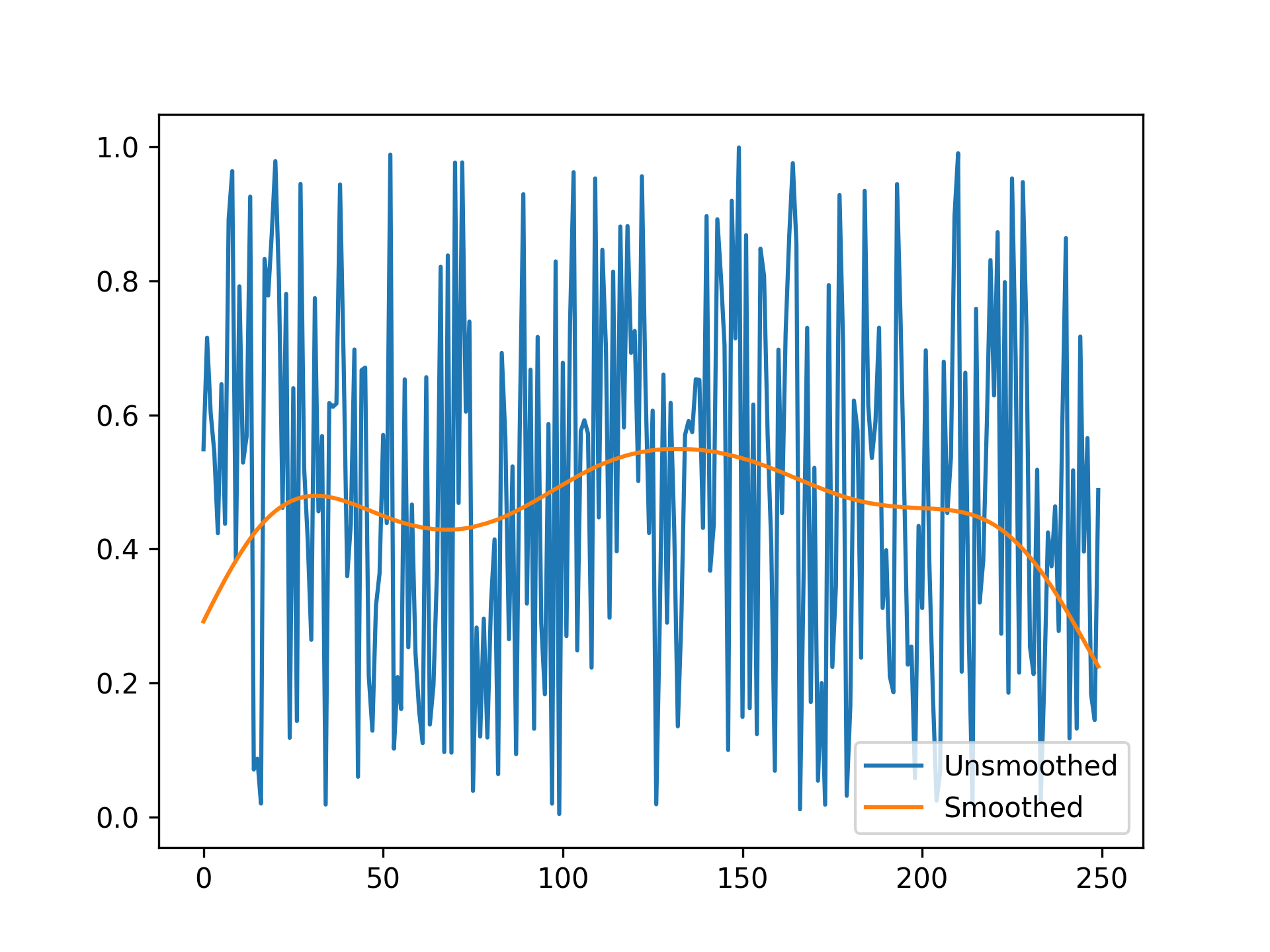
- aopy.postproc.base.smooth_timeseries_gaus(timeseries_data, sd, samplerate, nstd=3, conv_mode='same', return_kernel=False)[source]
Smooths a time series by convolving it with a user-defined Gaussian kernel. The length of the kernel is computed using integers in the following range:
\[x = [\frac{-nstd*sd*samplerate}{1000}, \frac{nstd*sd*samplerate}{1000}]\]The Gaussian kernel is then defined by the following equation:
\[g(x) = \frac{1}{\sigma\sqrt{2\pi}}e^{\frac{-x^{2}}{2\sigma^{2}}}\]- Parameters:
timeseries_data (ndarray) – The input time series data to be smoothed (i.e. binned firing rates). This can be an array with any number of dimensions, but the smoothing is applied along the first axis (time).
sd (float) – The width of the standard deviation of the Gaussian filter in time [ms].
samplerate (int) – The sample rate of the time series data [Hz].
nstd (float or int, optional) – The number of standard deviations to be used in the filter calculation. Default is 3.
conv_mode (str, optional) – The convolution mode, which defines the size of the output. If the default input of ‘same’ is used, the edges will be computed with zero padding. Accepts ‘full’, ‘valid’, or ‘same’. Default is ‘same’. See scipy.signal.convolve for full documentation on the modes.
return_kernel (bool, optional) – If True, this function returns the kernel used in convolution. Otherwise, only the smoothed data is returned.
- Returns:
- The smoothed time series data. The shape of the output matches the input data, except in
the case of ‘valid’ or ‘full’ convolution modes where the output may be smaller depending on the filter size.
- Return type:
ndarray
Example
timeseries_data = np.random.randn(1000) # Example time series data smoothed_data = smooth_timeseries_gaus(timeseries_data, 1000, 50)
- aopy.postproc.base.translate_spatial_data(spatial_data, new_origin)[source]
Shifts 2D or 3D spatial data to a new location.
- Parameters:
spatial_data (nt, ndim) – Spatial data in 2D or 3D
new_origin (ndim) – Location of point that will become the origin in cartesian coordinates
- Returns:
new reach trajectory translated to the new origin
- Return type:
new_spatial_data (nt, ndim)
Eye
- aopy.postproc.eye.get_relevant_saccade_idx(onset_target, offset_target, saccade_distance, target_idx)[source]
For a given set of saccades, finds the index of the saccade that starts at the center target and ends at the given peripheral target. onset_target and offset_target can be obtained by get_saccade_target_index. If there are multiple relevant saccades, choose the saccade whose distance is the largest among other saccades If there is no relevant saccades, the saccade index becomes -1
- Parameters:
onset_target (nsaccade) – target index at saccade start in a given trial
offset_target (nsaccade) – target index at saccade end in a given trial
saccade_distance (nsaccade) – eye movement distance in a given trial
target_idx (int) – target index in a given trial
- Returns:
relevant saccade index with the largest distance among saccades. index becomes -1 if there is no relevant saccades.
- Return type:
(int)
- aopy.postproc.eye.get_saccade_event(onset_times, duration, event_times, event_codes)[source]
Returns event codes corresponding to times in which the start and end of each given saccade falls.
- Parameters:
onset_times (nsaccade) – saccade onset times (in seconds)
duration (nsaccade) – saccade duration (in seconds) of saccades in the onset_times list
event_times (nevent) – list of event times (in seconds)
event_codes (nevent) – event codes corresponding to the given event_times
- Returns:
- tuple containing:
- onset_event (nsaccade): event in which each saccade startsoffset_event (nsaccade): event in which each saccade ends
- Return type:
tuple
- aopy.postproc.eye.get_saccade_pos(eye_pos, onset_times, duration, samplerate)[source]
Returns the coordinates of the start and end of each given saccade
- Parameters:
eye_pos (nt,nch) – eye position data
onset_times (nsaccade) – saccade onset times (in seconds) generated in a trial segment.
duration (nsaccade) – saccade duration (in seconds) of saccades generated in a trial segment
samplerate (float) – sampling rate
- Returns:
- tuple containing:
- onset_pos (nsaccade,nch): eye positions when saccades start in a given trialoffset_pos (nsaccade,nch): eye positions when saccades end in a given trial
- Return type:
tuple
- aopy.postproc.eye.get_saccade_target_index(onset_pos, offset_pos, target_pos, target_radius)[source]
Determines a target index a subject looked at during a saccade. When the subject looked at irrelevant areas, the target index is -1.
- Parameters:
onset_pos (nsaccade, 2) – eye positions when saccades start in a given trial
offset_pos (nsaccade, 2) – eye positions when saccades end in a given trial
target_pos (ntarget, 2) – target positions, e.g. center and peripheral targets
target_radius (float) – radius around the target center to search
- Returns:
- tuple containing:
- onset_target (nsaccade): target index at saccade startoffset_target (nsaccade): target index at saccade end
- Return type:
tuple
Neuropixel
- aopy.postproc.neuropixel.apply_noise_cutoff_thresh(template_amps, bin_width=0.2, low_bin_thresh=0.1, uhq_std_thresh=5, min_spikes=10)[source]
From the IBL white paper. This analyzes if each unit has a Gaussian distribution of template amplitudes. If a unit doesn’t, spikes were likely removed by the intenal Kilosort noise threshold and may bias analysis. For a unit to pass this metric, its histogram of template amplitudes must satisfy two criteria:
The count in the lowest bin in the histogram must be less than or equal to 10% of bin with the highest count.
The lowest bin must be <= 5 standard deviations (sd) away from the mean. The mean and sd are compute from upper quartile of template amplitudes.
Laboratory, International Brain (2022). Spike sorting pipeline for the International Brain Laboratory. figshare. Online resource. https://doi.org/10.6084/m9.figshare.19705522.v4
- Parameters:
template_amps (dict) – A dictionary of template amplitudes with each entry corresponding to a unit.
bin_width (float) – Bin width for computing the histogram of template amplitudes.
low_bin_threshold (float) – The count in the lowest bin must be below this proportion of the count of the highest bin.
uhq_std_thresh (float) – How many standard deviations away from the mean the lowest bin must be to be acceptable. the mean and sd are computed only from the upper quartile (>75%) bins
min_spikes (int) – Minimum number of spikes for a unit for this analysis to be applied. If a unit has below this number of spikes it is not included in the good units that are output.
- Returns:
- A tuple containing:
good_unit_labels (ngoodunit long list of str): List of unit labels for units with a peak-to-peak amplitude greater than the specified threshold.
low_bin_perc (nunits): What percentage the lowest bin is of the maximum (criteria 1)
cutoff_metric (nunits): How many upper quartile sd away from the upper quartile mean the lowest bin is (criteria 2)
- Return type:
tuple
- aopy.postproc.neuropixel.calc_presence_ratio(data, min_trial_prop=0.9, return_details=False)[source]
Find which units are active on a high proportion of trials.
- Parameters:
data (ntime, nunit, ntrials) – trial aligned binned spikes
min_trial_prop (float) – proportion of trials a unit must have a spike on
- Returns:
Proportion of trials that have a spike for each unit present_units (nunit): Binary mask if a unit is present or not presence_details (ntrials, nunit): Optional if ‘return_details=True’ Identifies which trials each unit is active on
- Return type:
presence_ratio (nunit)
- aopy.postproc.neuropixel.extract_ks_template_amplitudes(preproc_dir, subject, te_id, date, port, data_source='Neuropixel', start_time=0, end_time=None)[source]
Extract the template amplitude for each spike from each unit. The template amplitude for a single spike is the amplitude of the projection of the waveform onto PC1 of the waveform template (chosen by kilosort).
- Parameters:
preproc_dir (str) – The directory containing the preprocessed data.
subject (str) – The subject name.
te_id (int) – The experiment task entry number.
date (date) – The date of the experiment.
port (int) – The port number identifying which probe to look at data from.
start_time (float, optional) – Start time (in seconds) for the time window to consider spikes (default is 0).
end_time (float, optional) – End time (in seconds) for the time window to consider spikes (default is None, meaning all spikes after start_time are considered).
- Returns:
Dictionary of template amplitudes for each spike. Each key is a unit label string and each value is a 1D array of template amplitudes for each spiek..
- Return type:
dict
- aopy.postproc.neuropixel.get_high_amplitude_units(preproc_dir, subject, te_id, date, port, amp_thresh=50, start_time=0, end_time=None, include_bad_unit_wfs=False)[source]
Identifies which units pass the waveform amplitude threshold. Calculates peak to peak amplitude for each unit across all channels the unit is recorded on, then ony returns units whose amplitude passes the threshold.
- Parameters:
preproc_dir (str) – The directory containing the preprocessed data.
subject (str) – The subject name.
te_id (int) – The experiment task entry number.
date (date) – The date of the experiment.
port (int) – The port number identifying which probe to look at data from.
amp_thresh (float, optional) – The amplitude threshold (in microvolts) used to filter out units with low peak-to-peak amplitudes. Defaults to 50.
start_time (float, optional) – Start time (in seconds) for the time window to consider spikes (default is 0).
end_time (float, optional) – End time (in seconds) for the time window to consider spikes (default is None, meaning all spikes after start_time are considered).
include_bad_unit_wfs (bool, optional) – If the waveforms of bad units should be included in the output array/
- Returns:
- A tuple containing:
good_unit_labels (ngoodunit long list of str): List of unit labels for units with a peak-to-peak amplitude greater than the specified threshold.
amplitudes (ngoodunit): Computed amplitude of each unit.
mean_wfs (ntime, ngoodunit or nunit): The mean waveform taken from the channel with the highest peak-to-peak amplitude for each unit that passes the amplitude threshold.
- Return type:
tuple
- aopy.postproc.neuropixel.get_units_without_refractory_violations(spike_times, ref_perc_thresh=1, min_ref_period=1, start_time=0, end_time=None)[source]
Identify units with refractory period violations from spike times.
This function loads spike data from the preprocessed directory, calculates the number of refractory period violations for each unit, and returns the units whose percentage of violations are above a specified threshold.
- Parameters:
spike_times (dict) – Loaded using data.load_preproc_spike_data(). Each key in the dictionary is a unit label string and the value is the 1D array of spike times.
ref_perc_thresh (float, optional) – Threshold for the percentage of spikes that are allowed to violate the refractory period (default is 1%).
min_ref_period (float, optional) – The minimum refractory period in milliseconds (default is 1 ms).
start_time (float, optional) – Start time (in seconds) for the time window to consider spikes (default is 0).
end_time (float, optional) – End time (in seconds) for the time window to consider spikes (default is None, meaning all spikes after start_time are considered).
- Returns:
- A tuple containing:
good_unit_labels (ngoodunit long list of str): List of unit labels (IDs) that have an acceptable number of refractory period violations.
ref_violations (numpy.ndarray): An array of the percentage of refractory period violations for each unit.
- Return type:
tuple
BMI3D
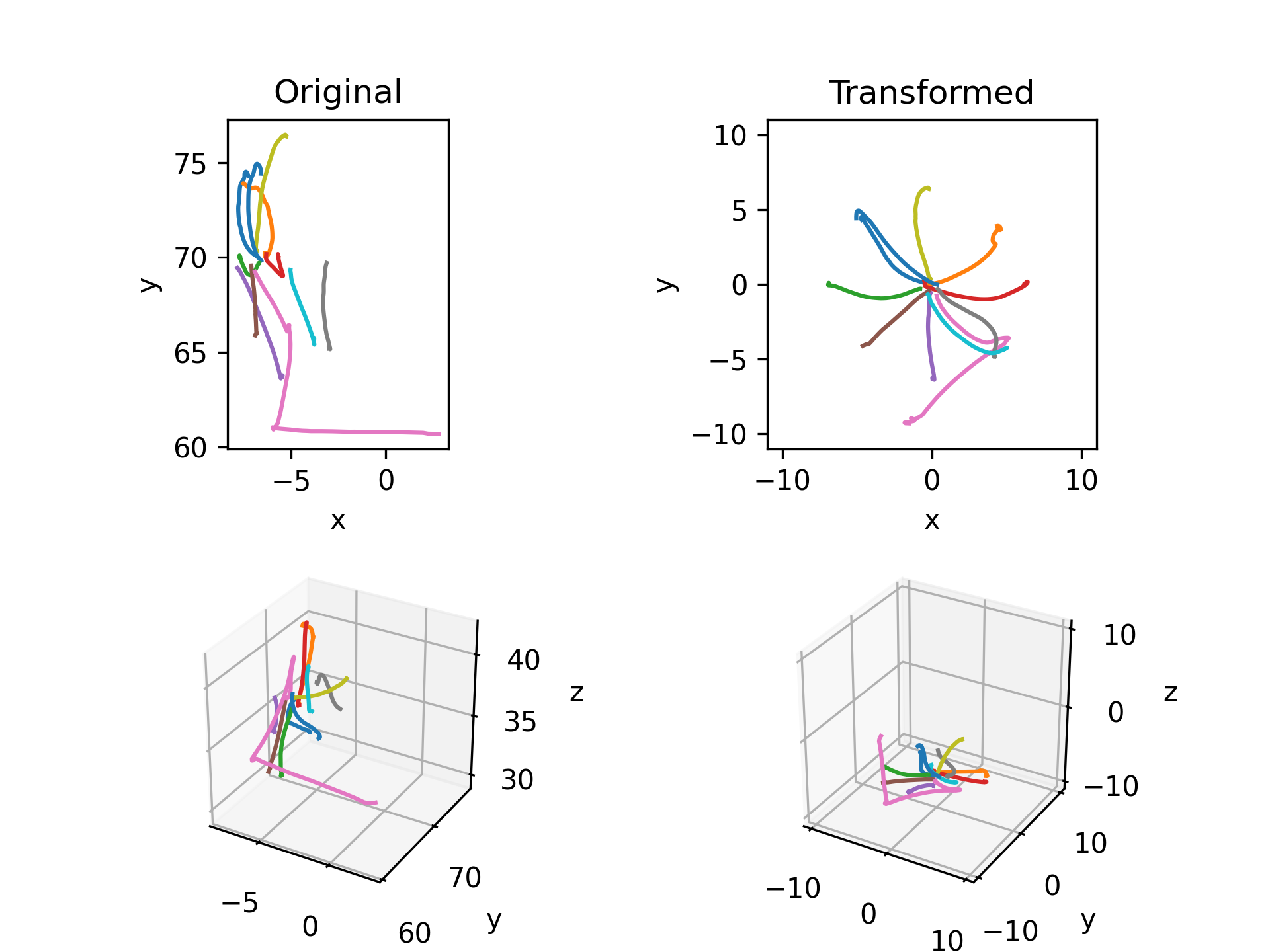
- aopy.postproc.bmi3d.convert_raw_to_world_coords(manual_input, rotation, offset, scale=1)[source]
Transforms 3D manual input to 3D centered world coordinates for BMI3D tasks. For example, for optitrack input, raw coordinates are in the form (x: forward/backward, y: up/down, z: right/left). This function applies the BMI3D offset and scale to the coordinates, then transforms the coordinates to world coordinates (x: right/left, y: forward/backward, z: up/down) and reorders them to be more intuitive (x: right/left, y: up/down, z: forward/backward). For joystick input, the coordinates are in the form (x: left/right, y: backward/forward, z: nothing) and the scale is -1. Thus the output is always in the form (x: right/left, y: up/down, z: forward/backward) if the inputs are copied directly from exp_metadata.
- Parameters:
manual_input (nt, 3) – manual input coordinates from bmi3d, e.g. exp_data[‘task’][‘manual_input’]
rotation (str) – rotation metadata from exp_metadata[‘rotation’]
offset (3-tuple) – x,y,z offset for the manual input from exp_metadata[‘offset’]
scale (float, optional) – scaling factor for cursor movement from exp_metadata[‘scale’]. Default 1.
- Returns:
manual input in world coordinates (x: right/left, y: up/down, z: forward/backward)
- Return type:
(nt, 3)
Examples
Load manual input data from an experiment and transform it to world coordinates using the metadata from the experiment. Then segment the data into trials and plot a comparison of the raw input and transformed input.
subject = 'beignet'
id = 5974
date = datetime.date(2022, 7, 1)
exp_data, exp_metadata = aopy.data.load_preproc_exp_data(data_dir, subject, id, date)

original = exp_data['task']['manual_input']
input = aopy.postproc.bmi3d.convert_raw_to_world_coords(original, exp_metadata['rotation'], exp_metadata['offset'])

go_cue = 32
trial_end = 239
print(exp_data['bmi3d_events']['code'], exp_data['bmi3d_events']['time'])
segments, times = aopy.preproc.get_trial_segments(exp_data['bmi3d_events']['code'], exp_data['bmi3d_events']['time'],
                                        [go_cue], [trial_end])
segments_original = aopy.preproc.get_data_segments(original, times, 1)
segments_input = aopy.preproc.get_data_segments(input, times, 1)

plt.figure()
plt.subplot(2,2,1)
aopy.visualization.plot_trajectories(segments_original)
plt.title('Raw input')
plt.subplot(2,2,2)
aopy.visualization.plot_trajectories(segments_input, bounds=[-10,10,-10,10])
plt.title('Transformed')
plt.subplot(2,2,3, projection='3d')
aopy.visualization.plot_trajectories(segments_original)
plt.subplot(2,2,4, projection='3d')
aopy.visualization.plot_trajectories(segments_input, bounds=[-10,10,-10,10,-10,10])
- aopy.postproc.bmi3d.get_incremental_world_to_screen_mappings(start, stop, step, bmi3d_axis='y', exp_rotation='none', exp_gain=1, baseline_rotation='none')[source]
Returns the mappings \(M\) that transform 3D centered user input from world to screen coordinates for an incremental rotation experiment. World coordinates (x: right/left, y: up/down, z: forward/backward) and screen coordinates (x: right/left, y: up/down, z: into/out of the screen) differ only in that the screen may be placed arbitrarily in the world. However the mapping \(M\) can arbitrarily rotate and scale the user input before projecting it to the screen.
- Parameters:
start (float) – starting angle in degrees
stop (float) – ending angle in degrees
step (float) – step size in degrees
bmi3d_axis (str, optional) – axis about which to rotate the hand. Default ‘y’.
exp_rotation (str, optional) – desired experimental rotation from exp_metadata[‘rotation’]. Default ‘none’.
exp_gain (float, optional) – gain scaling factor of the mapping from exp_metadata[‘exp_gain’]. Default 1.
- Returns:
list of mappings from centered world coordinates to screen coordinates
- Return type:
list
- aopy.postproc.bmi3d.get_world_to_screen_mapping(exp_rotation='none', x_rot=0, y_rot=0, z_rot=0, exp_gain=1, baseline_rotation='none')[source]
Returns the mapping \(M\) that transforms 3D centered user input from world to screen coordinates. World coordinates (x: right/left, y: up/down, z: forward/backward) and screen coordinates (x: right/left, y: up/down, z: into/out of the screen) differ only in that the screen may be placed arbitrarily in the world. However the mapping \(M\) can arbitrarily rotate and scale the user input before projecting it to the screen. The mapping \(M\) is related to the exp_rotation mapping \(M_{q}\) used by bmi3d, but with axes swapped through multiplication with \(T_{q\rightarrow w} = T_{w\rightarrow q}\), the transformation that converts bmi3d coordinates to world coordinates (it happens to be its own inverse). The full mapping \(M\) returned by this function is: \(M = T_{w\rightarrow q} M_q T_{q\rightarrow w}\)
- Parameters:
exp_rotation (str, optional) – desired experimental rotation from exp_metadata[‘rotation’]. Default ‘none’.
x_rot (float, optional) – rotation about x-axis in degrees from exp_metadata[‘x_perturbation_rotation’]. Default 0.
y_rot (float, optional) – rotation about y-axis in degrees from exp_metadata[‘pertubation_rotation’]. Default 0.
z_rot (float, optional) – rotation about z-axis in degrees from exp_metadata[‘z_perturbation_rotation’]. Default 0.
exp_gain (float, optional) – gain scaling factor of the mapping from exp_metadata[‘exp_gain’]. Default 1.
- Returns:
mapping from centered world coordinates to screen coordinates
- Return type:
(3, 3)
Examples
To reproduce how the mapping was used online, multiply position data in world coordinates (\(r_w\)) by the mapping \(M\) to get coordinates in screen space (\(r_s\); x is up on the screen, y is right on the screen, z is into the screen).
\[r_{s} = r_{w} M\]Alternatively, to transform screen space coordinates to world coordinates, multiply by the inverse mapping \(M^{-1}\):
\[r_{w} = r_{s} M^{-1}\]This can be useful for example to find the plane on which the user data should have been moving if the mapping was correctly learned.