Utils:
Utility functions for aopy data management and analysis
This module contains functions for ancillary but extracategorical tasks commonly emerging in neural data analysis tasks.
API
Utils base
- aopy.utils.base.calc_euclid_dist_mat(pos)[source]
Calculates a matrix of euclidean distance. Each entry in the matrix is the distance between ith and jth position
- Parameters:
pos (nch,2) – x, y position list, e.g. for each electrode
- Returns:
distance between each given position
- Return type:
(nch, nch) array
- aopy.utils.base.calc_radial_dist(pos, origin=(0, 0))[source]
Calculates a matrix of radial distance from a given origin. Each entry in the matrix is the distance between ith and jth electrode channel
- Parameters:
pos (nch,2) – x, y position list, e.g. for each electrode
origin (2,) – point from which to calculate radial distance
- Returns:
radius between each given position and the origin
- Return type:
(nch,) array
- aopy.utils.base.compute_pulse_duty_cycles(edge_pairs)[source]
- Parameters:
edge_pairs (npulse, 2) – start, end times from a series of pulses
- Returns:
duty cycle of each pulse. Pulse period assumed to be constant.
- Return type:
duty_cycle (npulse)
- aopy.utils.base.convert_analog_to_digital(analog_data, thresh=0.3)[source]
This function takes analog data and converts it to digital data given a threshold. It scales the analog to between 0 and 1 and uses thres as a
- Parameters:
analog_data (nt, 1) – Time series array of analog data
thresh (float, optional) – Minimum threshold value to use in conversion
- Returns:
Array of 1’s or 0’s indicating if the analog input was above threshold
- Return type:
(nt, nch)
- aopy.utils.base.convert_channels_to_digital(data_channels)[source]
Converts binary channels from eCube into 64-bit digital data.
- Parameters:
data_channels (n, 64) – where channel 0 is least significant bit
- Returns:
masked 64-bit data, little-endian
- Return type:
- aopy.utils.base.convert_channels_to_mask(channels)[source]
Helper function to take a range of channels into a bitmask
- Parameters:
channels (int array) – 0-indexed channels to be masked
- Returns:
binary mask of the given channels
- Return type:
int
- aopy.utils.base.convert_digital_to_channels(data_64_bit)[source]
Converts 64-bit digital data from eCube into channels.
- Parameters:
data_64_bit (n) – masked 64-bit data, little-endian
- Returns:
where channel 0 is least significant bit
- Return type:
(n, 64)
- aopy.utils.base.convert_port_number(port_number, datatype='ap')[source]
convert port_number to directory name made by openephys
- Parameters:
port_number (int) – port number which a probe connected to. natural number from 1 to 4.
datatyoe (str, optional) – datatype of neuropixel. ‘ap’ or ‘lfp’
- Returns:
Probe directory name that contains AP data
- Return type:
probe_dir (str)
- aopy.utils.base.copy_edges_forwards(data, n_steps, truncate_edges=False, copy_per_step=False, axis=0)[source]
Forces pulses to have a fixed width of eactly n_steps. First, find the rising edges of the data, then copy them forwards n_steps times. Works across multiple channels simulatenously.
- Parameters:
data ((nt,) or (nt, nch)) – digital data
n_steps (int) – how many timesteps should pulses be
truncate_edges (bool, optional) – if True, then edges will always be set to n_steps length. If false, then edges that are longer than n_steps will remain the same length. Default False.
copy_per_step (bool, optional) – copy edges one step at a time or one edge at a time; changes processing time but output stays the same. If there are long edges, the default option False is faster. If there are a lot of short edges, then setting copy_per_step=True will be faster. Default False.
axis (int, optional) – along which axis to copy edges. Default 0.
- Returns:
digital data but with fixed pulse widths
- Return type:
(nt,) or (nt, nch)
Note
Only works for 1- or 2-D arrays
- aopy.utils.base.count_repetitions(arr, diff_thr=0)[source]
Counts the number of repetitions in an array. Always counts the first and last element of the array as different from before and after the array.
- Parameters:
arr (nt,) – The input array. Only supports 1d arrays.
diff_thr (numeric, optional) – Minimum step size in the data.
- Returns:
A tuple of two numpy arrays: | repetitions (nt,): Lengths of the repetitions in the input array, | change_idx (nt,): Indices where the repetitions start
- Return type:
tuple
- aopy.utils.base.count_unique_symbols(files)[source]
Utility for counting how many times each unique symbol is listed in the given list and ranking them by descending number of uses.
- Parameters:
files (list) – list of filenames containing symbols generated by vscode ‘List Symbols’
- Returns:
- tuple containing:
- unique_symbols (list): list of unique symbolscounts (list): list of counts for each unique symbol
- Return type:
tuple
- aopy.utils.base.derivative(x, y, norm=True)[source]
Computes the derivative of y along x.
- Parameters:
x (nt) – independent variable, e.g. time
y (nt, ...) – dependent variable, e.g. position
norm (bool, optional) – also compute the norm of y if it is multidimensional (default True). Set to false to output component wise derivative.
- Returns:
derivative of y
- Return type:
nt
- aopy.utils.base.detect_edges(digital_data, samplerate, rising=True, falling=True, check_alternating=True, min_pulse_width=None)[source]
Finds the timestamp and corresponding value of all the bit flips in data. Assumes the first element in data isn’t a transition
By default, also enforces that rising and falling edges must alternate, always taking the last edge as the most valid one. For example:
>>> data = [0, 0, 3, 0, 3, 2, 2, 0, 1, 7, 3, 2, 2, 0]
>>> ts, values = detect_edges(data, fs)
>>> print(values)
[3, 0, 3, 0, 7, 0]
- Parameters:
digital_data (ntime x 1) – masked binary data array
samplerate (int) – sampling rate of the data used to calculate timestamps
rising (bool, optional) – include low to high transitions
falling (bool, optional) – include high to low transitions
check_alternating (bool, optional) – if True, enforces that rising and falling edges must be alternating. An edge is valid when it is no longer rising or falling.
min_pulse_width (float, optional) – if not None, makes sure rising edges are followed by a minimum pulse width before calculating edge values
- Returns:
- tuple containing:
- timestamps (nbitflips): when the bits flippedvalues (nbitflips): corresponding values for each change
- Return type:
tuple
- aopy.utils.base.digitize_by_angle(vectors, start_angle=0.7853981633974483, clockwise=True, bins=4)[source]
Bin 2D vectors into angular bins.
- Parameters:
vectors (ntarg) – List or array of 2D vectors.
start_angle (float, optional) – Starting angle for binning in radians. Default is -pi/4.
clockwise (bool, optional) – If True, bins are assigned in clockwise order. The first bin is ahead of the start angle in this direction. Default is True.
bins (int, optional) – Number of angular bins. Default is 4.
- Returns:
Array of bin indices corresponding to each vector.
- Return type:
(ntarg,) int
- aopy.utils.base.extract_barcodes_from_times(on_times, off_times, inter_barcode_interval=30, bar_duration=0.017, barcode_duration_ceiling=2, nbits=32)[source]
Read barcodes from timestamped rising and falling edges. This function came from the openephys repository
Notes
ignores first code in prod (ok, but not intended) ignores first on pulse (intended - this is needed to identify that a barcode is starting)
- Parameters:
on_times (ndarray) – Timestamps of rising edges on the barcode line
off_times (ndarray) – Timestamps of falling edges on the barcode line
inter_barcode_interval (float) – Minimun duration of time between barcodes.
bar_duration (float) – A value slightly shorter than the expected duration of each bar
barcode_duration_ceiling (float) – The maximum duration of a single barcode
nbits (int) – The bit-depth of each barcode
- Returns:
- tuple containing:
- barcode_start_times (list): For each detected barcode, the time at which that barcode startedbarcodes (list of int): For each detected barcode, the value of that barcode as an integer.
- Return type:
tuple
- aopy.utils.base.extract_bits(data, mask)[source]
Apply bit mask and shift data to the least significant set bit in the mask. For example, extract_bits(0001000011110000, 1111111100000000) => 00010000 extract_bits(0001000011110000, 0000000011111111) => 11110000 extract_bits(0001000011001100, 0000001111001111) => 00111100
- Parameters:
data (ntime) – digital data
mask (int) – which bits to filter
- Returns:
masked and shifted data
- Return type:
(nt)
- aopy.utils.base.first_nonzero(arr, axis=0, all_zeros_val=-1)[source]
Helper function to find the first non-zero element in an array
- Parameters:
arr (ndarray) – array containing zeros
axis (int, optional) – axis along which to compute the first nonzero. Defaults to 0.
all_zeros_val (float, optional) – value to indicate no nonzero elements were found. Defaults to -1.
- Returns:
array of indices with one less dimension than the input
- Return type:
ndarray
- aopy.utils.base.generate_multichannel_test_signal(duration, samplerate, n_channels, frequency, amplitude)[source]
Generate sine waves offset in phase by 2*pi/n_channels at the given amplitude and frequency
- Parameters:
duration (float) – time in seconds
samplerate (int) – sampling rate of the signal in Hz
n_channels (int) – number of channels to generate
frequency (float) – frequency in Hz
amplitude (float) – amplitude of each sine wave
- Returns:
timeseries data across channels
- Return type:
(nt, nch) array
- aopy.utils.base.generate_poisson_timestamps(mu, max_time, min_time=0.0, refractory_period=0.0)[source]
Generate timestamps following a Poisson process with mean time between events mu, with a specified minimum refractory period, and that fall within a specified time window. The number of timestamps generated is determined by the time window and the mean time between events and cannot be specified directly. The generated timestamps are random but can be repeated by setting the random seed using np.random.seed().
- Parameters:
mu (float) – Mean time between events in seconds.
max_time (float) – End time of the window in seconds.
min_time (float, optional) – Start time of the window in seconds. Default 0.
refractory_period (float, optional) – Minimum refractory period between events in seconds. Default 0.
- Returns:
Array of timestamps within the specified time window.
- Return type:
np.ndarray
Note
The distribution is not guaranteed to be poisson when the refractory period is nonzero. As the refractory period increases, the distribution will approach a uniform distribution.
- aopy.utils.base.generate_test_signal(duration, samplerate, frequencies, amplitudes, noise_amplitude=0.0)[source]
Generates a test time series signal with multiple frequencies, specified in freq, for T timelength at a sampling rate of fs
- Parameters:
duration (float) – time period in seconds
samplerate (int) – sampling frequency in Hz
frequencies (1D array) – list of frequencies to be mixed in the test signal
amplitudes (1D array) – list of amplitudes for each frequency
noise_amplitude (float, optional) – amplitude of noise added on top of test signal
- Returns:
- Tuple containing:
- x (1D array): cosine wave with multiple frequencies (and noise)t (1D array): time vector for x
- Return type:
tuple
- aopy.utils.base.get_consecutive_days(dates)[source]
Find consecutive days in a list of dates.
- Parameters:
dates (list of datetime) – list of dates to check for consecutive days
- Returns:
each sublist contains a list of consecutive dates
- Return type:
list of lists
- aopy.utils.base.get_edges_from_onsets(onsets, pulse_width)[source]
This function calculates the values and timepoints corresponding to a given time series of pulse onsets (timestamp corresponding to the rising edge of a pulse). :param onsets: Time point corresponding to a pulse onset. :type onsets: nonsets :param pulse_width: Pulse duration :type pulse_width: float
- Returns:
- tuple containing:
- timestampes (2*nonsets + 1): Timestamps of the rising and falling edges. Always starts at 0.values (2*nonsets + 1): Values corresponding to the output timestamps.
- Return type:
tuple
- aopy.utils.base.get_first_last_times(barcode_on_times, barcode_on_times_main, barcode, barcode_main)[source]
Get the first and last time when barcodes (sync pulses) come to each stream.
- Parameters:
barcode_on_times (n_times) – the times at which barcode comes to the auxiliary stream
barcode_on_times_main (k_times) – the times at which barcode comes to the main stream
barcode (n-length list) – Unique barcode number in the auxiliary stream
barcode_main (k-length list) – Unique barcode number in the main stream
- Returns:
- tuple containing:
- first_last_times (2): barcode on_times that corresponds to the first and last barcode in the recordingfirst_last_times (2): barcode on_times in the main stream that corresponds to the first and last barcode in the recording
- Return type:
tuple
- aopy.utils.base.get_pulse_edge_times(digital_data, samplerate)[source]
- Parameters:
digital_data (nt, 1) – array of data from ecube digital panel
samplerate (numeric) – data sampling rate (Hz)
- Returns:
start and end times from each detected pulse
- Return type:
edge_times (npulse, 2)
- aopy.utils.base.max_repeated_nans(a)[source]
Utility to calculate the maximum number of consecutive nans
- Parameters:
a (ndarray) – input sequence
- Returns:
max consecutive nans
- Return type:
int
- aopy.utils.base.multiply_mat_batch(data, mat, save_path, scale=1, max_memory_gb=1.0, dtype='int16', min_batch_size=0)[source]
Multiply a matrix to data in each batch to save memory. The result is saved in save_path. This function can be used to multiply an inverse matrix by spike band time series.
- Parameters:
data (nt, nch) – neural data. This should be a memory mapping array.
mat (anysize, nch) – matrix to multiply by data
save_path (str) – file path to save destriped lfp data
scale (float, optional) – Scaling factor to multiply by data. 1/200 is necessary for whitened data in kilosort4. default is 1.
max_memory_gb (float) – memory size in GB to determine batch size. default is 1.0 GB.
dtype (str, optional) – dtype for data. default is int16.
min_batch_size (int) – the number of size in integer to ensure that batch size is more than min_batch_size. default is 0.
- Returns:
None
- aopy.utils.base.nextpow2(x)[source]
Next higher power of 2. It is often useful for finding the nearest power of two sequence length for FFT operations.
- Parameters:
x (int or float) – input number
- Returns:
the first P such that 2**P >= abs(x).
- Return type:
int
- aopy.utils.base.print_progress_bar(count, total, status='')[source]
- Parameters:
count (num) – current progress count
total (int) – total count, i.e. what count is at 100%
status (str, optional) – printed status message. Defaults to ‘’.
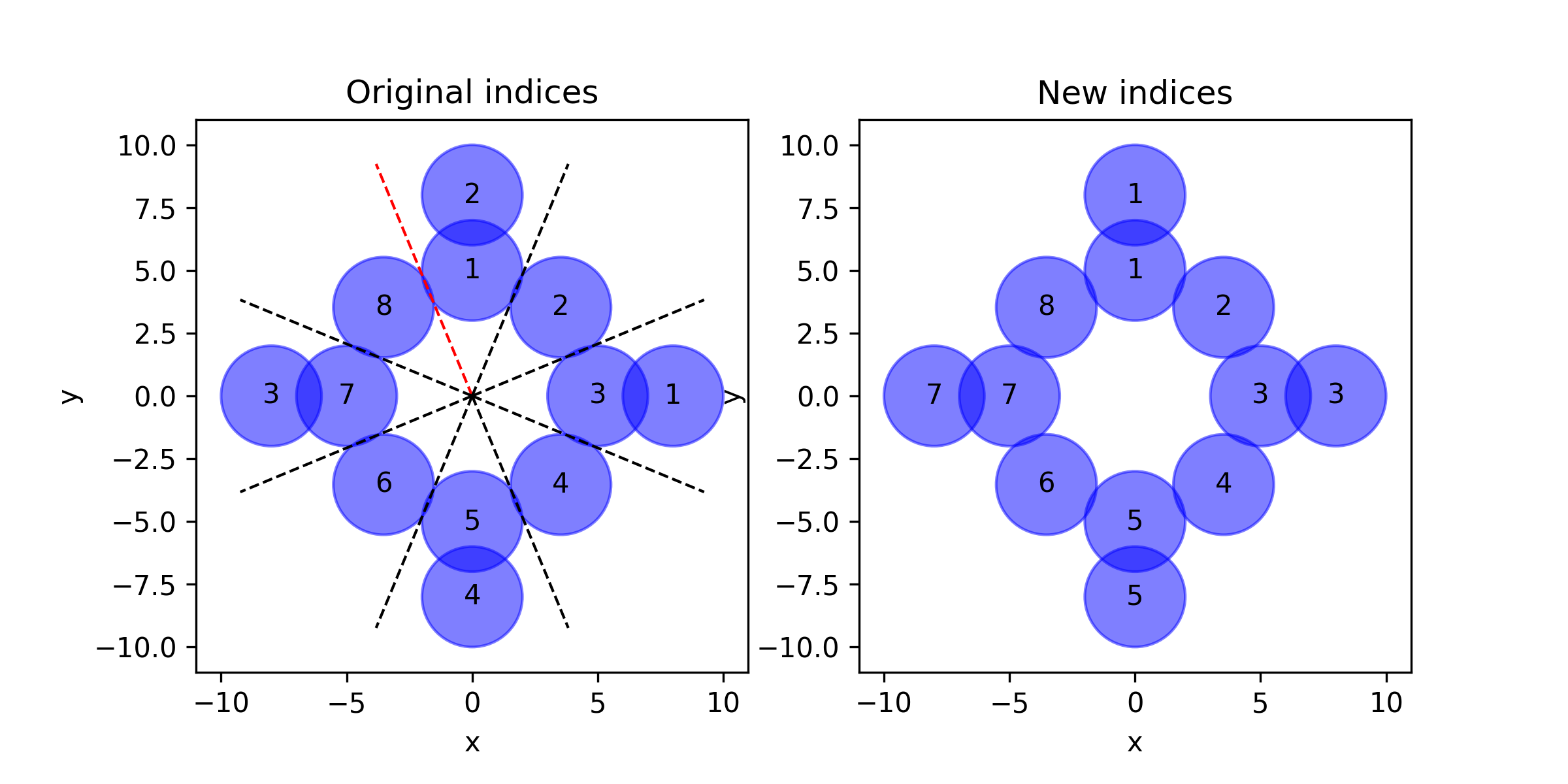
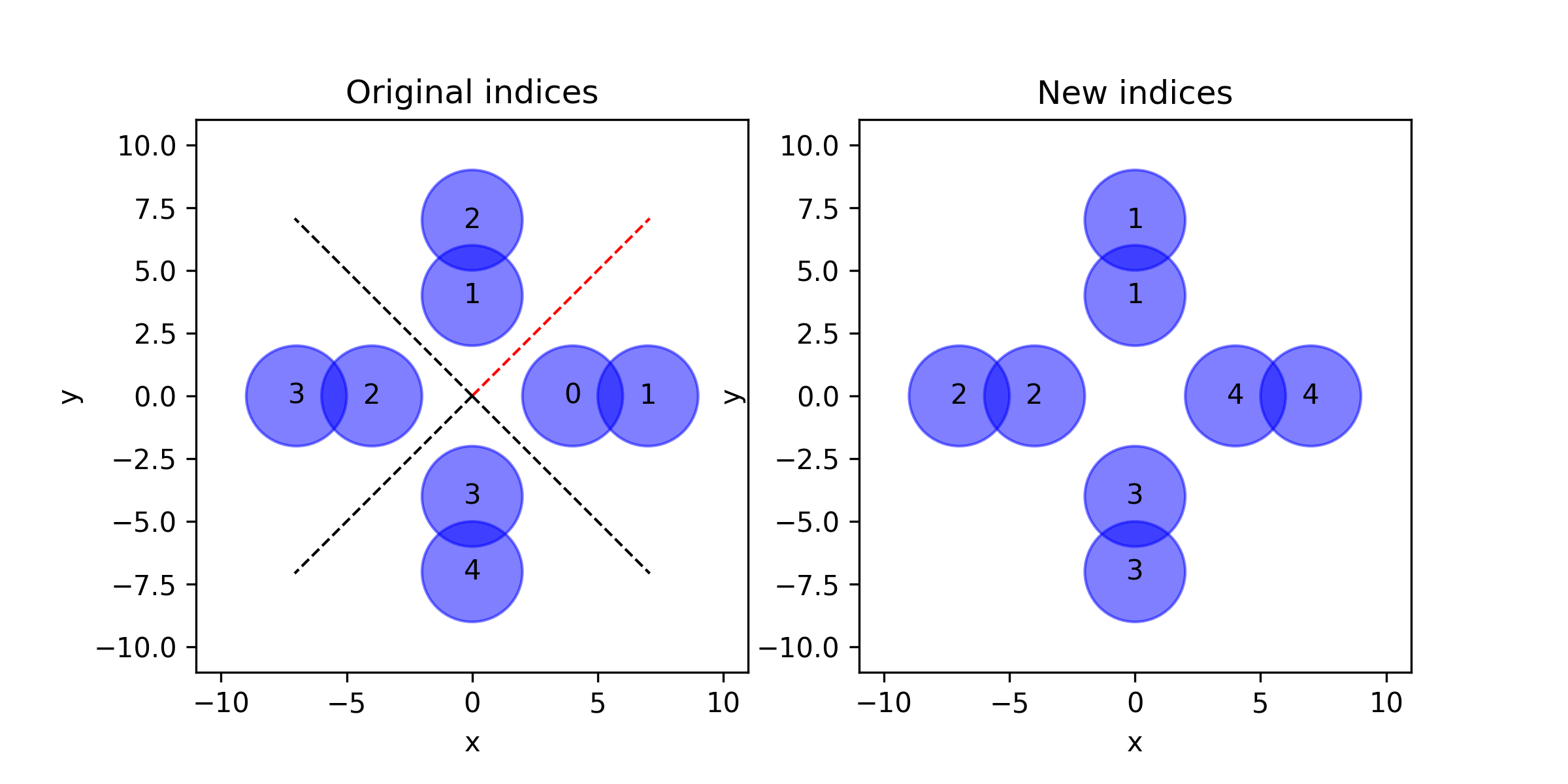
- aopy.utils.base.reindex_targets(target_locations, target_idxs, start_angle=1.9634954084936207, clockwise=True, bins=8, debug=True)[source]
Reindex target indices based on their angular location. Default behavior is to place target 1 at the top and index a total of 8 targets clockwise.
- Parameters:
target_locations (ntarg, 2) – List or array of 2D target locations
target_idxs (ntarg,) – Original target indices
start_angle (float, optional) – Starting angle for binning in radians. Default is -3pi/4.
clockwise (bool, optional) – If True, bins are assigned in clockwise order. The first bin is ahead of the start angle in this direction. Default is True.
bins (int, optional) – Number of angular bins. Default is 8.
debug (bool, optional) – If True, plot the original and new target indices. Default is True.
- Returns:
Array of new bin indices corresponding to each target location.
- Return type:
(ntarg,) int
Examples
Given a set of target locations and their original indices, reindex them based on their angular location and plot the original and new indices.
target_locations = [[5,0], [3.53, 3.53], [0,5], [-3.53,3.53],
                            [-5,0], [-3.53,-3.53], [0,-5], [3.53,-3.53],
                            [8,0], [0,8], [-8,0], [0,-8]]
target_idxs = np.array([3,2,1,8,7,6,5,4,1,2,3,4])
reindex_targets(target_locations, target_idxs)
target_locations = [[4,0], [0,4], [-4,0], [0,-4],
                            [7,0], [0,7], [-7,0], [0,-7]]
target_idxs = np.array([0,1,2,3,1,2,3,4])
reindex_targets(target_locations, target_idxs,
                start_angle=np.pi/4, clockwise=False, bins=4)
- aopy.utils.base.save_test_signal_ecube(data, save_dir, voltsperbit, datasource='Headstages')[source]
Create a binary file with eCube formatting using the given data
- Parameters:
data (nt, nch) – test_signal to save
save_dir (str) – where to save the file
voltsperbit (float) – gain of the data you are creating
datasource (str) – eCube source from which you want the data to be labeled (i.e. Headstages, AnalogPanel, or DigitalPanel)
- Returns:
filename of the new data
- Return type:
str
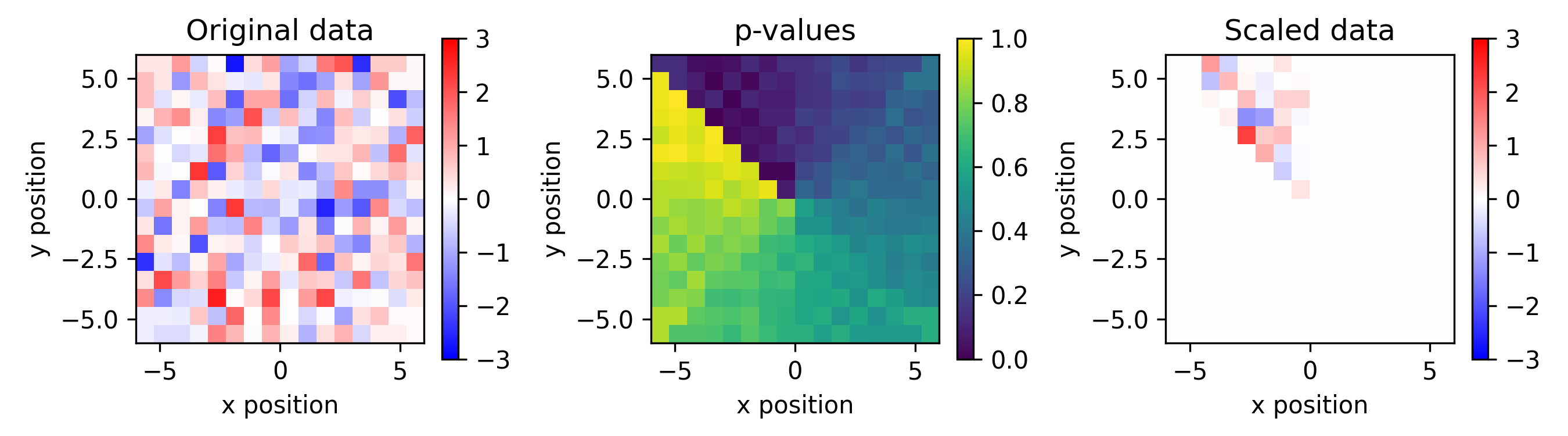
- aopy.utils.base.scale_data_by_p_value(data, p, k=100, p0=0.08)[source]
Scale data by a sigmoid function of p-value. Useful for visualizing data maps generated with p-values, to emphasize significant values. See https://www.science.org/doi/full/10.1126/scitranslmed.aay4682 for an example.
- Parameters:
data (nch,) – per-channel data to scale
p (nch,) – p-values corresponding to data
k (float, optional) – steepness of the sigmoid. Default 100.
p0 (float, optional) – midpoint of the sigmoid. Default 0.08.
- Returns:
scaled data
- Return type:
(nch,) array
Examples
Given a 240-channel map of p-values and corresponding data from an ECoG array, plot the original data, p-values, and scaled data
p = np.linspace(0, 1, 240)
data = np.random.randn(240)
scaled_data = scale_data_by_p_value(data, p, k=100, p0=0.08)

plt.figure(figsize=(9,2.5))
plt.subplot(1,3,1)
im = aopy.visualization.plot_ECoG244_data_map(data, elec_data=True)
im.set_clim(-3, 3)
plt.colorbar(im)
plt.title("Original data")
plt.subplot(1,3,2)
im = aopy.visualization.plot_ECoG244_data_map(p, cmap='viridis', elec_data=True)
plt.colorbar(im)
plt.title("p-values")
plt.subplot(1,3,3)
im = aopy.visualization.plot_ECoG244_data_map(scaled_data, elec_data=True)
im.set_clim(-3, 3)
plt.colorbar(im)
plt.title("Scaled data")
plt.tight_layout()
- aopy.utils.base.segment_array(arr, category, duplicate_endpoints=False)[source]
Segments an array into subarrays based on a corresponding category array.
- Parameters:
arr (nt,) – The array to segment.
category (nt,) – An array of the same length as arr containing a category label for each element in the corresponding array.
duplicate_endpoints (bool, optional) – if True, each subsequent subarray will start with the last element of the preceding subarray.
- Returns:
- Tuple containing:
- segments (list of arrays): A list of subarrays of arr, where each subarray corresponds to a unique value in category.segmented_category (list of arrays): An array of the same length as segments, where each element corresponds to the category label for the corresponding subarray in segments.
- Return type:
tuple
- aopy.utils.base.sync_timestamp_offline(timestamp, on_times, on_times_main)[source]
Synchroniza timestamps with timestamps in another stream
- Args
timestamps (nt) : timestamps in the auxiliary stream that should be synchronized to main stream on_time (2) : the first and last times when sync pulses come to the auxiliary stream in the recording on_time_main (2) : the first and last times when sync pulses come to the main stream in the recording
- Retuen:
- tuple: tuple containing:
- sync_timestamps (nt): synchronized timestampsscaling (float): scaling factor between streams
Memory
- aopy.utils.memory.get_memory_available_gb()[source]
Get the available system memory in gigabytes. Only works on linux platforms.
Note
The results of this function are equivalent to the terminal commands: * “grep MemAvailable /proc/meminfo” -> available memory * “grep MemTotal /proc/meminfo” -> total memory
- Returns:
number of gigabytes of available system memory
- Return type:
int
- aopy.utils.memory.get_memory_limit_gb()[source]
Get the memory resource limit in gigabytes. Only works on linux platforms.
- Returns:
upper limit of memory available to python in gigabytes
- Return type:
int or None
- aopy.utils.memory.release_memory_limit()[source]
Unset any memory resource limit that may have been applied. Only works on linux platforms.
- aopy.utils.memory.set_memory_limit_gb(size_gb)[source]
Set a memory resource limit in gigabytes. Only works on linux platforms.
Note
This function sets a soft limit, not a hard limit. The soft limit is a value upon which the operating system will restrict memory usage by the process (python, in this case). A true upper bound on the memory values can be defined by the hard limit. However, although the hard limit can be lowered, it can never be raised by user processes (even if the process lowered itself) and is controlled by a system-wide parameter set by the system administrator. Nevertheless, the soft limit should serve to raise a MemoryError whenever python exceeds the setting.
- Parameters:
size_gb (int) – upper limit of memory that will be made available to python in gigabytes