Precondition:
Code for cleaning and preparing neural data for users to interact with, for example: down-sampling, outlier detection, and initial filtering, among others.
API
Base
- aopy.precondition.base.bin_spike_times(spike_times, time_before, time_after, bin_width)[source]
Computes binned spikes (spike rate) [spikes/s]. The input data are 1D spike times in seconds. Binned spikes are calculated at each bin whose width is determined by bin_width.
Example
>>> spike_times = np.array([0.0208, 0.0341, 0.0347, 0.0391, 0.0407])
>>> spike_times = spike_times.T
>>> time_before = 0
>>> time_after = 0.05
>>> bin_width = 0.01
>>> binned_unit_spikes, time_bins = precondition.bin_spike_times(spike_times, time_before, time_after, bin_width)
>>> print(binned_unit_spikes)
    [  0.   0. 100. 300. 100.]
>>> print(time_bins)
    [0.005 0.015 0.025 0.035 0.045]
- Parameters:
spike_times (nspikes) – 1D array of spike times [s]
time_before (float) – start time to easimate spike rate [s]
time_after (float) – end time to estimate spike rate (Estimation includes endpoint)[s]
bin_width (float) – width of time-bin to use for estimating spike rate [s]
- Returns:
spike rate [spikes/s]. time_bins : the center of the time-bin over which firing rate is estimated. [s]
- Return type:
binned_unit_spikes (nbin, nch)
- aopy.precondition.base.bin_spikes(data, fs, bin_width)[source]
Computes binned spikes [spikes/s]. The input data is the sampled thresholded data (0 or 1 data). Binned spikes are calculated at each bin whose width is determined by bin_width.
Example
>>> data = np.array([[0, 1, 0, 0, 1, 0, 0, 1, 0, 1, 0, 1, 1, 1, 0, 0, 0, 1],[1, 1, 1, 0, 0, 0, 1, 0, 0, 1, 0, 0, 0, 1, 1, 0, 1, 0]])
>>> data_T = data.T
>>> fs = 100
>>> binned_spikes = precondition.bin_spikes(data_T, fs, .05)
>>> print(binned_spikes)
    [[200. 300.]
    [200. 200.]
    [300. 200.]
    [100. 100.]]
- Parameters:
data (nt, nch) – time series spike data with multiple channels.
fs (float) – sampling rate of data [Hz]
bin_width (float) – [s] Spikes are summed within ‘bin_width’ then devided by ‘fs’
- Returns:
binned spikes [spikes/s].
- Return type:
binned_spikes (nbin, nch)
- aopy.precondition.base.butterworth_filter_data(data, fs, cutoff_freqs=None, bands=None, order=None, filter_type='bandpass')[source]
Apply a digital butterworth filter forward and backward to a timeseries signal.
- Parameters:
data (nt, ...) – neural data
fs (int) – sampling rate (in Hz)
cutoff_freqs (float) – list of cut-off frequencies (in Hz); only for ‘high pass’ or ‘low pass’ filter. Use bands for ‘bandpass’ filter
bands (list) – frequency bands should be a list of tuples representing ranges e.g., bands = [(0, 10), (10, 20), (130, 140)] for 0-10, 10-20, and 130-140 Hz
order (int) – Order of the butterworth filter. If no order is specified, the function will find the minimum order of filter required to maintain +3dB gain in the bandpass range.
filter_type (str) – Type of filter. Accepts one of the four values - {‘lowpass’, ‘highpass’, ‘bandpass’, ‘bandstop’}
- Returns:
- Tuple containing:
- filtered_data (list): output bandpass filtered data in the form of a list. Each list item is filtered data in corresponding frequency bandWn (list): frequency bands
- Return type:
tuple
- aopy.precondition.base.butterworth_params(cutoff_low, cutoff_high, fs, order=4, filter_type='bandpass')[source]
Design Nth-order digital Butterworth filter and return the filter coefficients.
- Parameters:
cutoff_low (int) – lower cut-off frequency (in Hz)
cutoff_high (int) – higher cutoff frequency (in Hz)
fs (int) – sampling rate (in Hz)
order (int) – Order of the butter worth filter
filter_type (str) – Type of filter. Accepts one of the four values - {lowpass, highpass, bandpass, bandstop}
- Returns:
bandpass filter parameters
- Return type:
tuple (b,a)
- aopy.precondition.base.calc_ks_waveforms(raw_data, sample_rate, spike_times_unit, templates, channel_pos, waveforms_nch=10, time_before=1000.0, time_after=1000.0)[source]
Calculate waveforms, waveform channels, and positions of units, using templates from kilosort This function does not account for drift correction
- Parameters:
raw_data (nt,nch) – time series neural data to detect spikes and extract waveforms from.
sample_rate (float) – sampling rate (Hz)
spike_times_unit (dict) – spike times for each unit identified by kilosort
templates (n_unit, n_points, nch) – templates that kilosort used to detect spikes
channel_pos (nch, 2) – channel positions
waveforms_nch (int, optional) – the number of channels with large amplitude of templates
time_before (float, optional) – time (us) to include before the start of each trial
time_after (float, optional) – time (us) to include after the start of each trial
- Returns:
- tuple containing:
- unit_waveforms (dict): waveforms for each unit. The shape is (nspikes, m_points, waveforms_nch)unit_waveforms_ch (n_unit, waveforms_nch): large amplitude channels in templatesunit_pos (dict): channel positions of each unit
- Return type:
tuple
- aopy.precondition.base.calc_spike_threshold(spike_filt_data, high_threshold=True, rms_multiplier=3)[source]
Use the RMS of each channel to set a different threshold for each channel. Sadtler et al. 2014 set threshold to 3.0x RMS value for each channel, which is the default for this function. The threshold value will be calculated with the mean subtracted, then the mean for each signal will be added back to the threshold value.
- Parameters:
spike_filt_data (nt, ...) – Filtered time series data.
high_threshold (bool) – If the threshold should allow spikes to be detected above the threshold (True) or below the threshold (False). Defaults to true.
rms_multiplier (float) – Value to multiply the rms value of each time series by.
- Returns:
Threshold values along the first axis. Output dimensions will be the same non-time dimensions as the input signal.
- Return type:
threshold_values
- aopy.precondition.base.compute_bp_filter(tapers, fs=1, f0=0)[source]
Generates a bandpass filter using the multitaper method
- Parameters:
tapers ((n, k) array) – data tapers
fs (float) – sampling rate
f0 (float) – center frequency of filiter
- Returns:
a bandpass filter
- Return type:
X (1, 2*N*fs)
- aopy.precondition.base.convert_taper_parameters(n, w)[source]
Converts tapers in [n, w] form to [n, p, k] form. It’s wise to print out the number of tapers (k) to check that there will be enough frequency resoltuion in the filter. P is computed by N*W and K is given by math.floor(2*P-1)
- Parameters:
n (float) – time window for analysis (in seconds)
w (float) – half bandwith of tapers (in hz)
- Returns:
[n, p, k] taper parameters
- Return type:
tuple
- aopy.precondition.base.detect_spikes(spike_filt_data, samplerate, threshold, above_thresh=True, wf_length=1000, tbefore_wf=200)[source]
This function calculates spike times based on threshold crossing of the input data and returns the waveforms if ‘wf_length’ is not None. If the threshold desired is a negative value (i.e. extracellular recordings) set ‘above_thresh’ to False. Data must exceed the threshold instead of equaling it.
- Parameters:
spike_filt_data (nt, nch) – Time series neural data to detect spikes and extract waveforms from.
samplerate (float) – Sampling rate [Hz]
threshold (nch) – Threshold that input data must cross to indicate a spike for each channel. Must have same non time dimensions as spike_filt_data.
above_thresh (bool) – If True, only spikes above the threshold will be detected. If false, only spikes below threshold will be detected.
wf_length (float) – Length of waveforms to output \([\mu s]\). Actual length will be rounded up. If set to ‘None’, waveforms will not be returned. Defaults to 1000 \(\mu s\)
tbefore_wf (float) – Length of waveform to include before spike detection time \([\mu s]\). Defaults to 200 \(\mu s\)
- Returns:
- Tuple containing:
- spike_times (list of spike times): List of nspike length arrays with each list element corresponding to a channel. Spike times are in seconds.spike_waveforms (list of waveforms): List of (nspike, nwf_pts) arrays with each list element corresponding to a channel. Returns NaN if there aren’t enough data points to retreive a full waveform.
- Return type:
tuple
- aopy.precondition.base.detect_spikes_chunk(spike_filt_data, samplerate, threshold, chunksize, above_thresh=True, wf_length=1000, tbefore_wf=200)[source]
This function is based on detect_spikes and calculates spike times while dividing data into chunks to deal with memory issues. This may work for numpy memmap array
- Parameters:
spike_filt_data (nt,nch) – Time series neural data to detect spikes and extract waveforms from.
samplerate (float) – Sampling rate [Hz]
threshold (float) – Threshold that input data must cross to indicate a spike for each channel.
chunksize (int) – Chunk size to process data by chunk
above_thresh (bool) – If True, only spikes above the threshold will be detected. If false, only spikes below threshold will be detected.
wf_length (float) – Length of waveforms to output \([\mu s]\). Actual length will be rounded up. If set to ‘None’, waveforms will not be returned. Defaults to 1000 \(\mu s\)
tbefore_wf (float) – Length of waveform to include before spike detection time \([\mu s]\). Defaults to 200 \(\mu s\)
- Returns:
- Tuple containing:
- spike_times (list of spike times): List of nspike length arrays with each list element corresponding to a channel. Spike times are in seconds.spike_waveforms (list of waveforms): List of (nspike, nwf_pts) arrays with each list element corresponding to a channel. Returns NaN if there aren’t enough data points to retreive a full waveform.
- Return type:
tuple
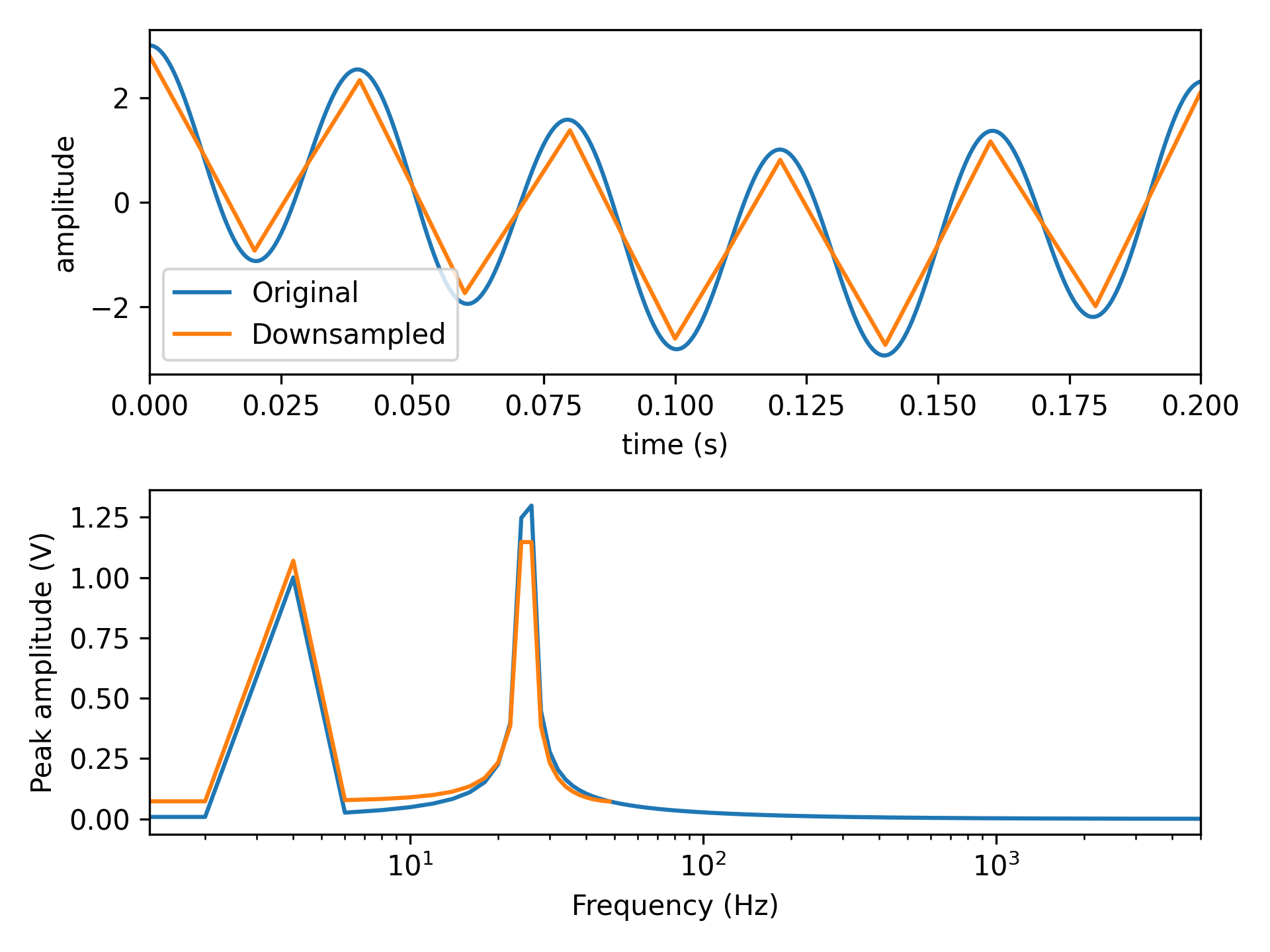
- aopy.precondition.base.downsample(data, old_samplerate, new_samplerate)[source]
Downsample by averaging. Computes a downsample factor based on old_samplerate/new_samplerate. If the downsample factor is fractional, then first upsamples to the least common multiple of the two sampling rates. Finally, pads data to be a multiple of the downsample factor and averages blocks into the new samples.
- Parameters:
data (nt, ...) – timeseries data to be downsampled. Can be 1D or 2D.
old_samplerate (int) – the current sampling rate of the data
new_samplerate (int) – the desired sampling rate of the downsampled data
- Returns:
(nt, …) downsampled data
- aopy.precondition.base.dp_proj(tapers, fs=1, f0=0)[source]
Generates a prolate projection operator
- Parameters:
tapers ((n, k) array) – data tapers
fs (float) – sampling rate
f0 (float) – center frequency of filiter
- Returns:
projection operator in [time, K] form
- Return type:
dp_proj (nt, K)
- aopy.precondition.base.dpsschk(n, p, k)[source]
Computes the Discrete Prolate Spheroidal Sequences (DPSS) array based on input tapers
- Parameters:
n (float) – window length in number of samples
p (float) – standardized half bandwidth in hz
k (int) – number of DPSS tapers to use
- Returns:
K DPSS windows v ((k,) array): The concentration ratios for the K windows
- Return type:
e ((n, k) array)
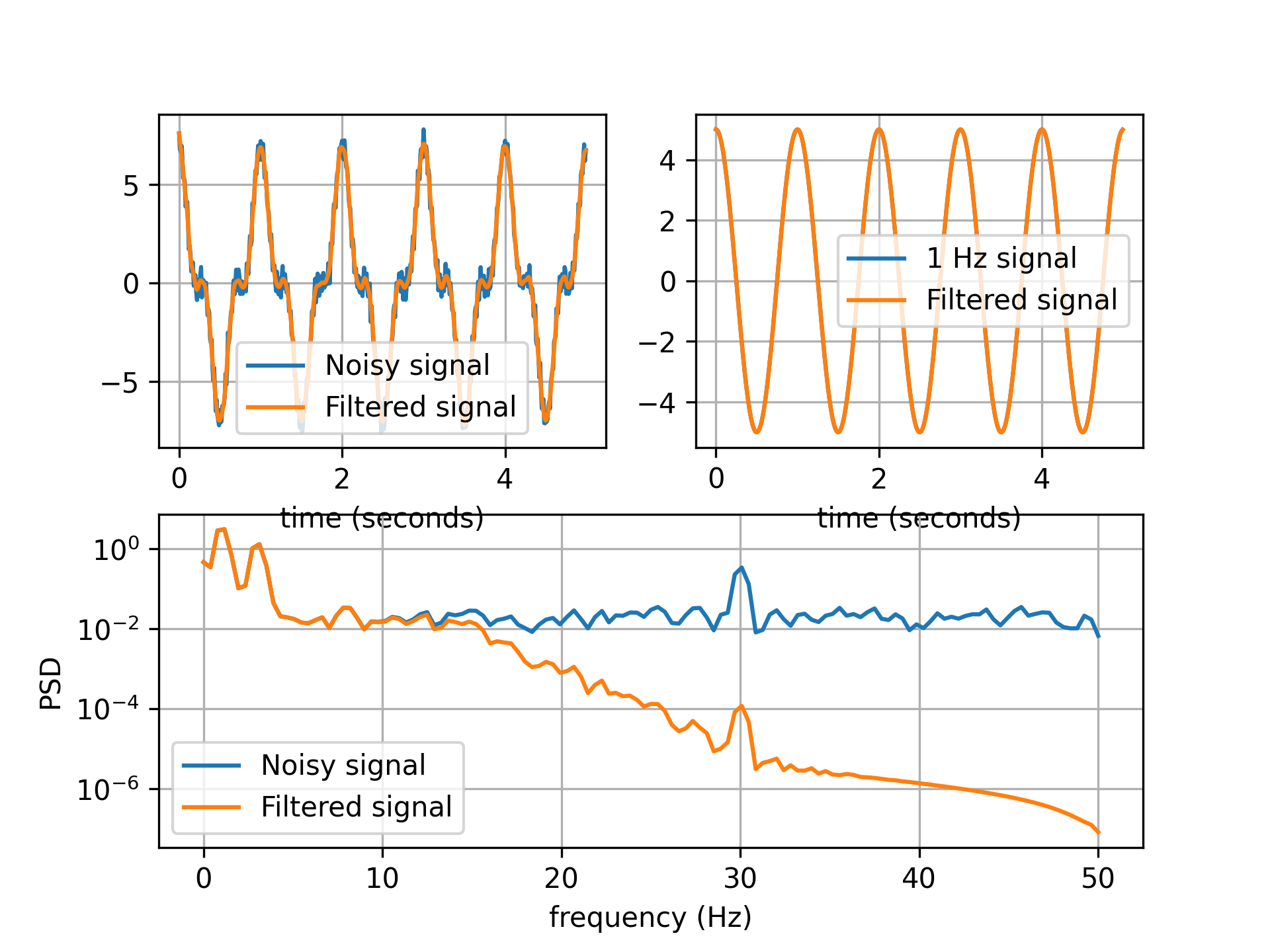
- aopy.precondition.base.filter_kinematics(kinematic_data, samplerate, low_cut=15, buttord=4, deriv=0, savgol_window_ms=50, savgol_polyorder=3, norm=False)[source]
Low-pass filter kinematics data to below 15 Hz by default. Filter parameters taken from Bradberry, et al., 2009 https://doi.org/10.1016/j.neuroimage.2009.06.023
- Parameters:
kinematic_data (nt, ...) – raw hand data, e.g.
samplerate (float) – sampling rate of the raw data
low_cut (float, optional) – cutoff frequency for low-pass filter. Defaults to 15 Hz
buttord (int, optional) – order for butterworth low-pass filter. Defaults to 4.
deriv (int, optional) – apply a derivative to the data using Savitzky-Golay filter. Default is 0, no derivative.
savgol_window_ms (float, optional) – window length for Savitzky-Golay filter in milliseconds. Default is 50 ms. If the window length is too small, it will be set to 3 samples.
savgol_polyorder (int, optional) – polynomial order for Savitzky-Golay filter. Default is 3.
norm (bool, optional) – if True, return the norm of the filtered data. Default is False.
- Returns:
- tuple containing:
- filtered_data (nt, …): filtered kinematics datasamplerate (float): sampling rate of the kinematics data
- Return type:
tuple
Examples
fs = 100
x_single, t = utils.generate_test_signal(T=5, fs, 1, 5)
x_noise, t = utils.generate_test_signal(T=5, fs=fs, freq=[1,3,30], a=[5, 2, 0.5], noise=0.2)
x_filt, _ = precondition.filter_kinematics(x, fs, low_cut=15, buttord=4)
fig, ax = plt.subplot_mosaic([['A', 'B'],['C', 'C']])

ax['A'].plot(t, x_noise, label='Noisy signal')
ax['A'].plot(t, x_filt, label='Filtered signal')
ax['A'].set_xlabel('time (seconds)')

x_filt_simple = filt_fun(x_single)
ax['B'].plot(t, x_single, label=f'{freq[0]} Hz signal')
ax['B'].plot(t, x_filt_simple, label='Filtered signal')
ax['B'].set_xlabel('time (seconds)')

f_noise, psd_noise = analysis.get_psd_welch(x_noise, fs)
f_filt, psd_filt = analysis.get_psd_welch(x_filt, fs)
ax['C'].semilogy(f_noise, psd_noise, label='Noisy signal')
ax['C'].semilogy(f_filt, psd_filt, label='Filtered signal')
ax['C'].set_xlabel('frequency (Hz)')
ax['C'].set_ylabel('PSD')
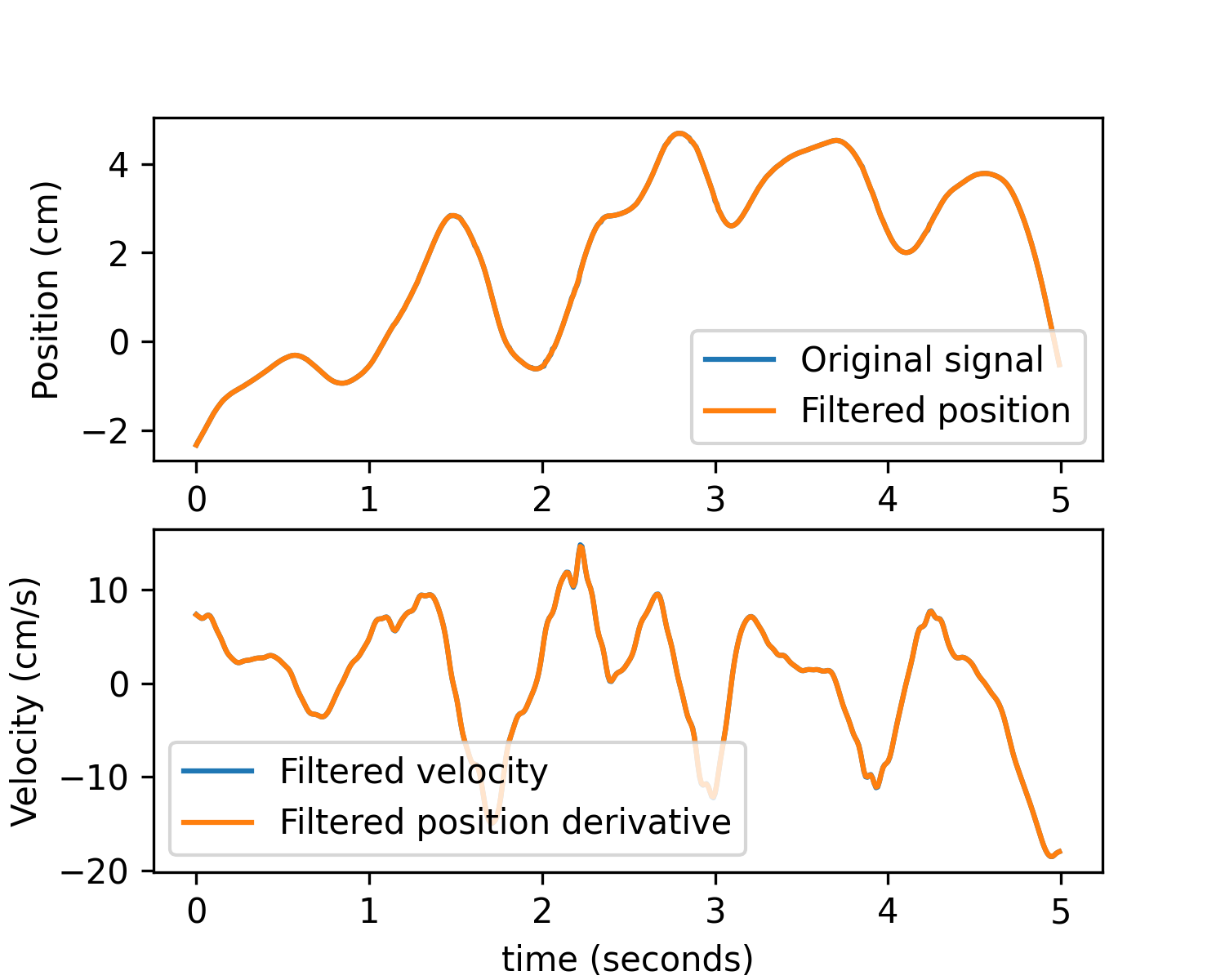
Apply a derivative to obtain velocity or acceleration:
subject = 'test'
id = 8461
date = '2023-02-25'
exp_data, exp_metadata = aopy.data.base.load_preproc_exp_data(data_dir, subject, id, date)
x = aopy.data.get_interp_task_data(exp_data, exp_metadata, datatype='cursor', samplerate=fs)[30*fs:35*fs,1]
t = np.arange(len(x)) / fs
x_filt_pos, _ = precondition.filter_kinematics(x, fs, low_cut=15, buttord=4, deriv=0)
x_filt_vel, _ = precondition.filter_kinematics(x, fs, low_cut=15, buttord=4, deriv=1)

# Compare to a simple derivative of the filtered position
x_filt_pos_deriv = utils.derivative(t, x_filt_pos, norm=False)

plt.figure(figsize=(5, 4))
plt.subplot(2,1,1)
plt.plot(t, x, label='Original signal')
plt.plot(t, x_filt_pos, label='Filtered position')
plt.ylabel('Position (cm)')
plt.legend()
plt.subplot(2,1,2)
plt.plot(t, x_filt_vel, label='Filtered velocity')
plt.plot(t, x_filt_pos_deriv, label='Filtered position derivative')
plt.xlabel('time (seconds)')
plt.ylabel('Velocity (cm/s)')
plt.legend()
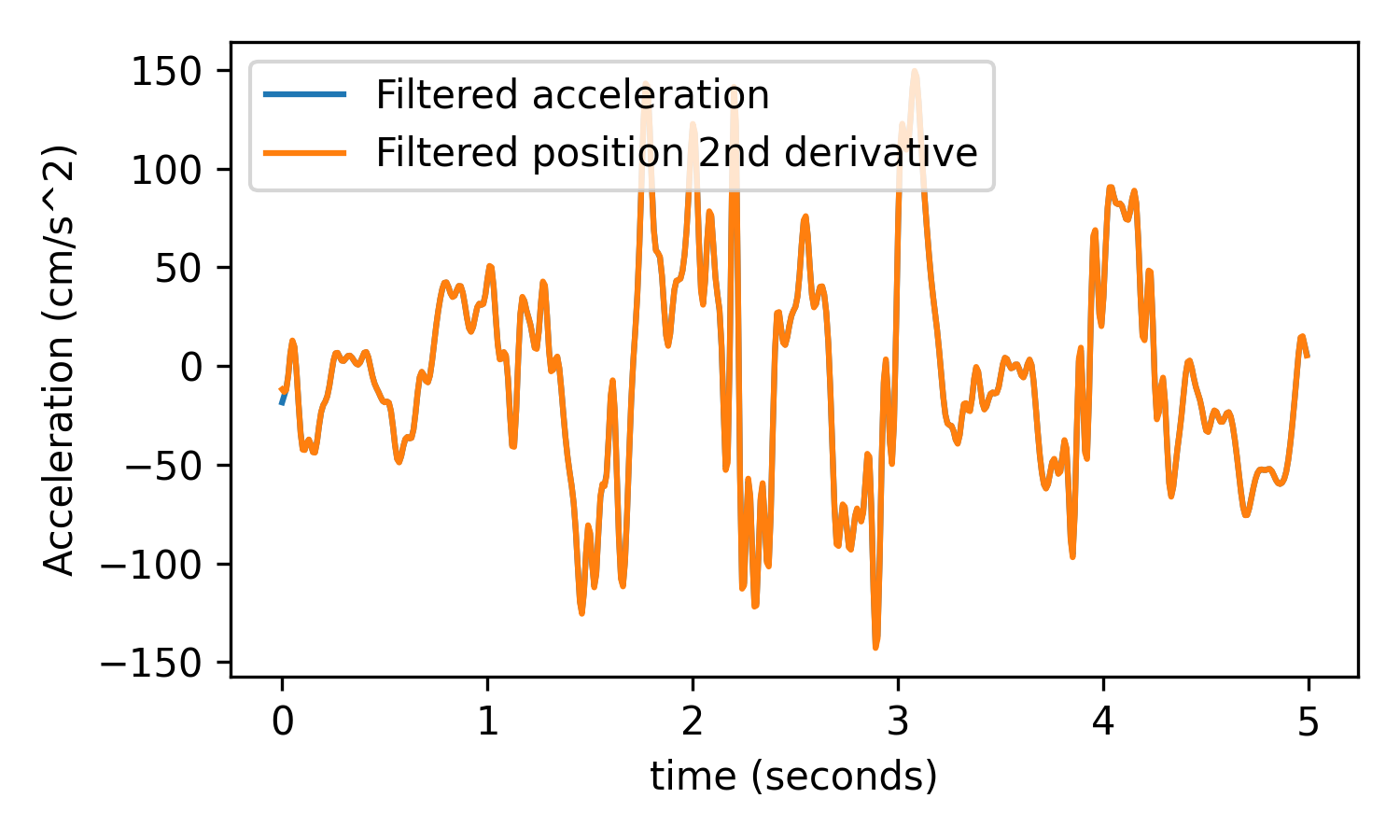
# Test acceleration
x_filt_acc, _ = precondition.filter_kinematics(x, fs, low_cut=15, buttord=4, deriv=2)
x_filt_pos_deriv_deriv = utils.derivative(t, x_filt_pos_deriv, norm=False)

plt.figure(figsize=(5, 3))
plt.plot(t, x_filt_acc, label='Filtered acceleration')
plt.plot(t, x_filt_pos_deriv_deriv, label='Filtered position 2nd derivative')
plt.xlabel('time (seconds)')
plt.ylabel('Acceleration (cm/s^2)')
plt.legend()
plt.tight_layout()
- aopy.precondition.base.filter_lfp(broadband_data, broadband_samplerate, lfp_samplerate=1000.0, low_cut=500.0, buttord=4)[source]
Low-pass filter and return downsampled version of broadband data at default 1000 Hz. Default filter parameters taken from Stavisky, Kao, et al., 2015
- Parameters:
broadband_data (nt, ...) – raw headstage data, e.g.
broadband_samplerate (float) – sampling rate of the raw data
lfp_samplerate (float, optional) – sampling rate of the LFP data. Defaults to 1000.
low_cut (float, optional) – cutoff frequency for low-pass filter. Defaults to 500 Hz
buttord (int, optional) – order for butterworth low-pass filter. Defaults to 4.
- Returns:
- tuple containing:
- lfp_data (nt’, …): downsampled filtered lfp datasamplerate (float): sampling rate of the lfp data
- Return type:
tuple
- aopy.precondition.base.filter_spike_times(spike_times, refractory_period=100)[source]
This function takes spike times and filters them to remove spikes within the refractory period of the preceding spike. This function always assumes the first threshold crossing is a good spike. This function works by jumping to and recording the next spike time after the refractory period ends from the current spike.
- Parameters:
spike_times (nspikes) – 1D array of spike times.
refractory_period (float) – Length of time after a spike is detected before another spike can be detected \([\mu s]\). Defaults to 100 \(\mu s\) .
- Returns:
- A tuple containing:
- filtered_spike_times (ngoodspikes): Spikes times after preliminary filtering to remove spikes within the refractory period of the preceding spike.filtered_spike_idx (ngoodspikes): Indices corresponding to accepted spike times
- Return type:
tuple
- aopy.precondition.base.filter_spike_times_fast(spike_times, refractory_period=100)[source]
This function takes spike times and filters them to remove spikes within the refractory period of the preceding spike. This function always assumes the first threshold crossing is a good spike. Note: This function will remove spikes that are in the refractory period of the preceding spike even if the the preceding spike is in the refractory period of its preceding spike even though that spike shouldn’t be removed. For example if the refractory period is set to 100 \(\mu s\) and there are spikes at 50 \(\mu s\), 125 \(\mu s\), and 200 \(\mu s\), the spikes at 125 \(\mu s\) and 200 \(\mu s\) will be removed even though only the 125 \(\mu s\) spike should be removed. If the refractory period is small enough this shouldn’t be a problem. For more thorough spike time filter use aopy.precondition.filter_spike_times although it takes ~50x longer.
- Parameters:
spike_times (nspikes) – 1D array of spike times.
refractory_period (float) – Length of time after a spike is detected before another spike can be detected \([\mu s]\). Defaults to 100 \(\mu s\).
- Returns:
- A tuple containing:
- filtered_spike_times (ngoodspikes): Spikes times after preliminary filtering to remove spikes within the refractory period of the preceding spike.filtered_spike_idx (ngoodspikes): Indices corresponding to accepted spike times
- Return type:
tuple
- aopy.precondition.base.filter_spikes(broadband_data, samplerate, low_pass=500, high_pass=7500, buttord=3)[source]
Band-pass filter broadband data at default 500-7500 Hz. Default filtering parameters taken from Stavisky, Kao, et al., 2015
- Parameters:
broadband_data (nt, ...) – raw headstage data, e.g.
samplerate (float) – sampling rate of the raw data
low_pass (float, optional) – low-cut frequency, default 500 Hz
high_pass (float, optional) – high-cut frequency, default 7500 Hz
buttord (int, optional) – order for butterworth band-pass filter. Default 3
- Returns:
spike filtered data
- Return type:
(nt, …)
- aopy.precondition.base.mt_bandpass_filter(data, band, taper_len, fs, verbose=True, **kwargs)[source]
Wrapper around mtfilter that auto-generates [n, p, k] and f0 parameters based on the band of interest, length of the tapers, and the sampling rate. See
mtfilter()for more details.- Parameters:
data (nt, nch) – time series array
band ((2,) tuple) – low and high frequencies to band-pass
taper_len (float) – length of the tapers (in seconds)
fs (float) – sampling rate of the data
verbose (bool, optional) – if True, print out the n, k parameters.
kwargs (dict) – additional keyword-arguments to pass to mtfilter
- Returns:
filtered time-series data
- Return type:
(nt, nch)
- aopy.precondition.base.mt_lowpass_filter(data, lowcut, taper_len, fs, verbose=True, **kwargs)[source]
Wrapper around mtfilter that auto-generates [n, p, k] and f0 parameters based on the lowpass of interest, length of the tapers, and the sampling rate. See
mtfilter()for more details.- Parameters:
data (nt, nch) – time series array
lowcut (float) – low-pass cutoff frequency
taper_len (float) – length of the tapers (in seconds)
fs (float) – sampling rate of the data
verbose (bool, optional) – if True, print out the n, k parameters.
kwargs (dict) – additional keyword-arguments to pass to mtfilter
- Returns:
filtered time-series data
- Return type:
(nt, nch)
- aopy.precondition.base.mtfilter(data, n, p, k, fs=1, f0=0, center_output=True, complex_output=False, use_fft=True)[source]
Bandpass-filter a time series data using the multitaper method. Tapers are calculated using [n, p, k] parameters (see
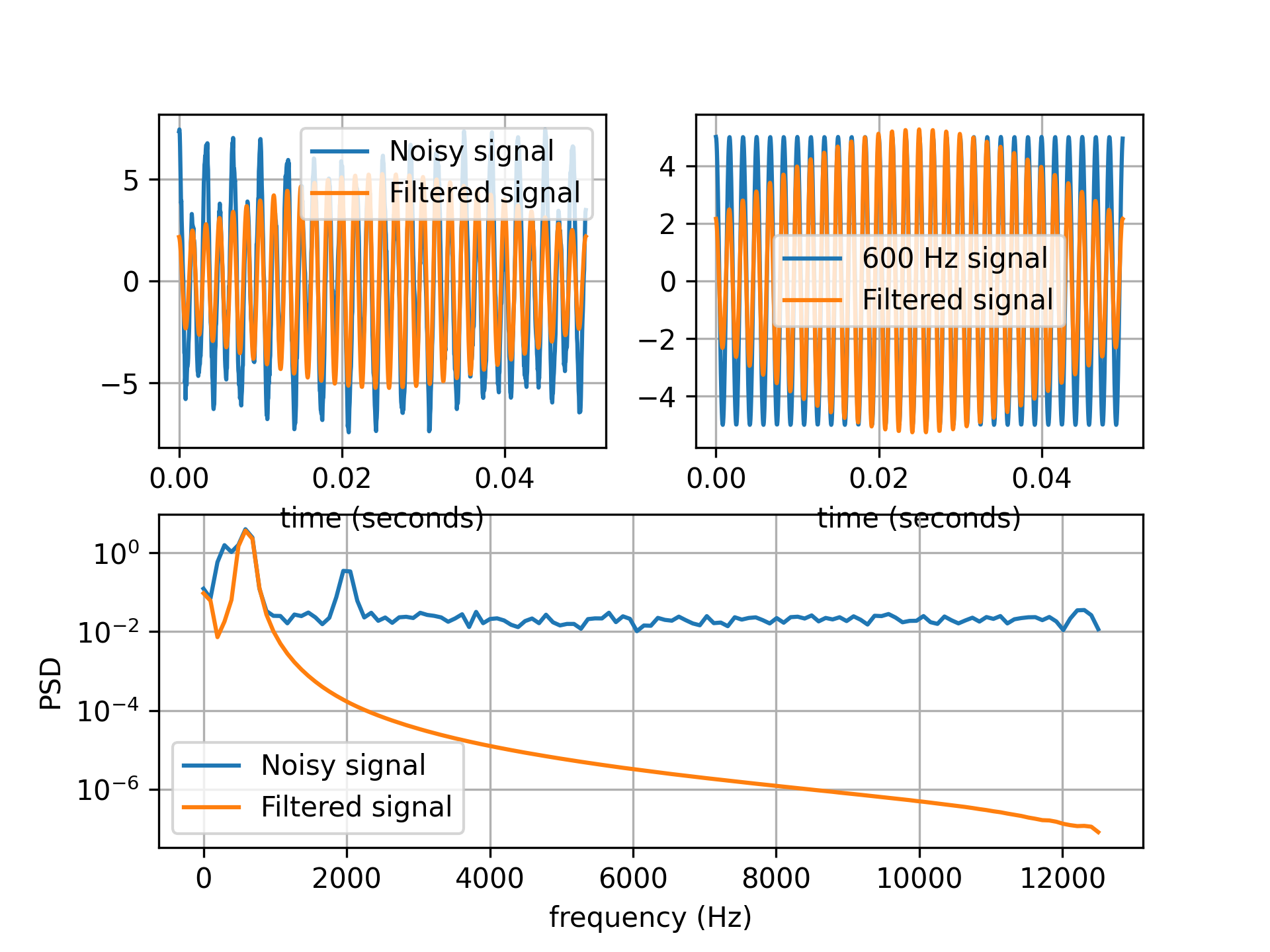
convert_taper_parameters()). Be careful to set these parameters to control temporal and spectral properties of the filter. The parameters you pick will depend on the time-scale of questions you’re interested in. You get better estimates by smoothing across more time, but at the cost of temporal resolution. For example, if responses that happen quickly, you’ll want to keep the taper length relatively small whenever possible. But that then blurs your frequency resolution, so you need to play around with the bandwidth and taper length to find the lowest temporal resolution you can get away with for a given frequency range goal.Example
band = [575, 625] # signals within band can pass
N = 0.1
NW = (band[1]-band[0])/2
f0 = np.mean(band)
n, p, k = convert_taper_parameters(N, NW)
print(f"Using {k} tapers of half bandwidth {p:.2f}")

T = 0.05
fs = 25000
x, t = utils.generate_test_signal(T, fs, freq=[600, 312, 2000], a=[5, 2, 0.5], noise=0.2)

x_mtfilter = precondition.mtfilter(x, tapers, fs=fs, f0=f0)
- Parameters:
data (nt, nch) – time series array
n (float) – window length in seconds
p (float) – standardized half bandwidth in hz
k (int) – number of DPSS tapers to use
fs (float) – sampling rate
f0 (float, optional) – center frequency of filiter. Default 0.
center_output (bool, optional) – if True, output data is centered. Default True.
complexflag (bool, optional) – if False, output data becomes real. Default False.
use_fft (bool, optional) – if True, use FFT to convolve data with filter, should be faster. Default True.
- Returns:
filtered time-series data
- Return type:
(nt, nch)
Eye
- aopy.precondition.eye.classify_eye_events(eye_trajectory, clf_params, preproc_params, screen_half_height, viewing_dist, samplerate)[source]
Classifies eye behavior based on a single trial eye trajectory using the REMoDNaV algorithm.
- Parameters:
eye_trajectories (nt, n_features) – array of eye trajectories, Where ‘nt’ is the number of timepoints, ‘n_features’ are the x,y coordinates for one eye. Note: n_features shape must = 2.
clf_params (dict) – Dictionary of classifier parameters to be passed to the REMoDNaV EyegazeClassifier.
preproc_params (dict) – Dictionary of preprocessing parameters to be passed to the classifier’s preproc method.
screen_half_height (float) – Half the height of the screen in cm.
viewing_dist (float) – The viewing distance in cm.
samplerate (int, optional) – Sampling rate of the eye tracker in Hz.
- Returns:
- list of dictionaries containing classified eye movement events
where one list per trial containing multiple dictionaries, and each dictionary contains the following keys:
’id’: event identifier.
’label’: Type of eye movement (e.g., saccade, fixation, pursuit).
’start_time’: Start time of the event in seconds.
’end_time’: End time of the event in seconds.
’start_x’: Start x-coordinate of the event.
’start_y’: Start y-coordinate of the event.
’end_x’: End x-coordinate of the event.
’end_y’: End y-coordinate of the event.
’amplitude’: Amplitude of the eye movement in degrees.
’peak_velocity’: Peak velocity of the eye movement in degrees/second.
’med_velocity’: Median velocity of the eye movement in degrees/second.
’avg_velocity’: Average velocity of the eye movement in degrees/second.
- Return type:
List
Example
Detecting saccades on the first 5 seconds of test data from beignet block 5974 (included in /tests/data/beignet)
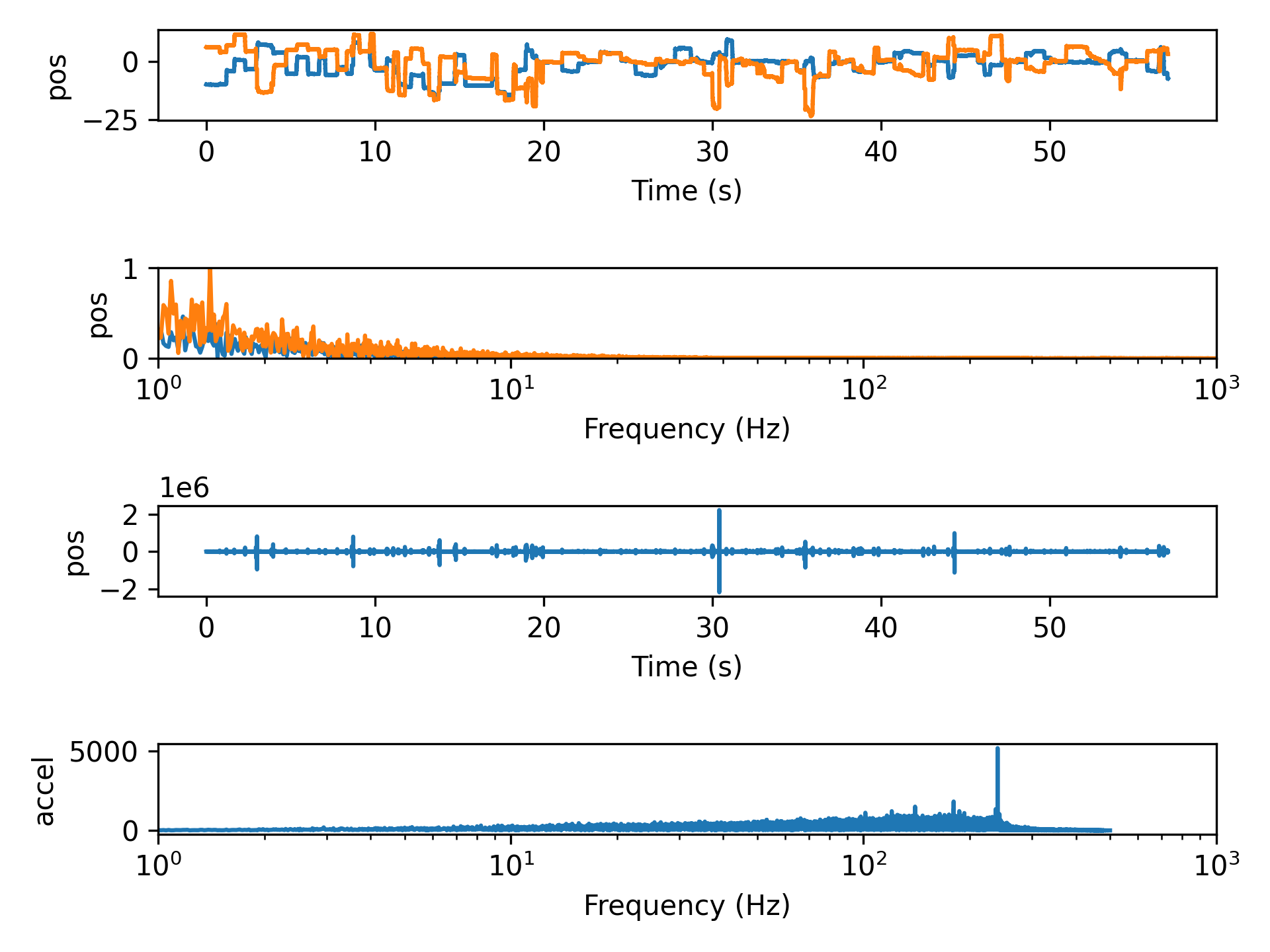
- aopy.precondition.eye.convert_pos_to_accel(eye_pos, samplerate)[source]
Differentiate twice to get acceleration from eye position.
- Parameters:
eye_pos (nt, nch) – eye position data, e.g. from oculomatic
samplerate (float) – sampling rate of the eye data
- Returns:
eye acceleration
- Return type:
(nt, nch) array
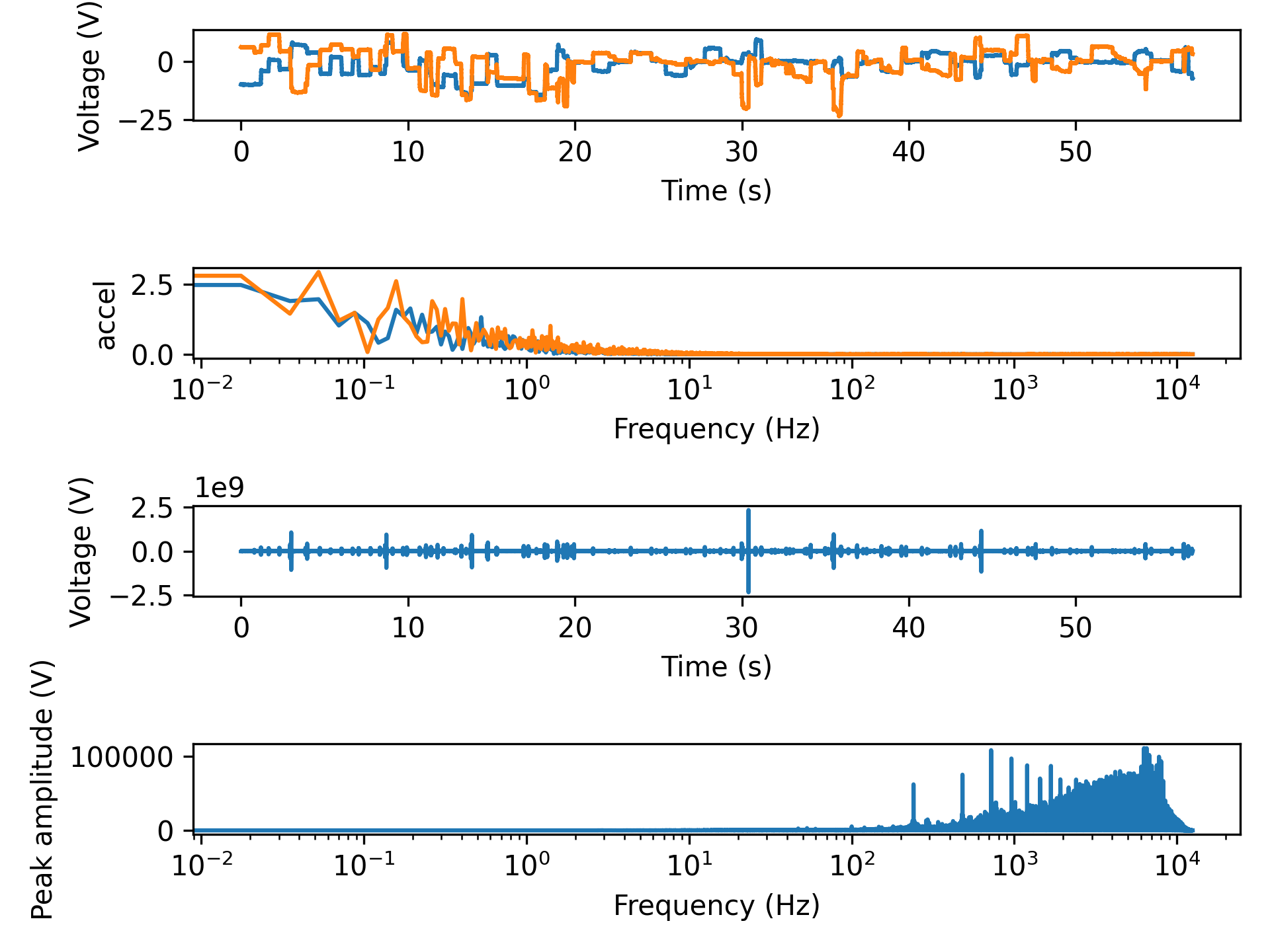
- aopy.precondition.eye.convert_pos_to_speed(eye_pos, samplerate)[source]
Differentiate to get speed from eye position.
- Parameters:
eye_pos (nt, nch) – eye position data, e.g. from oculomatic
samplerate (float) – sampling rate of the eye data
- Returns:
eye speed
- Return type:
(nt, nch) array
Examples
- aopy.precondition.eye.detect_eye_events(eye_trajectory, event_label, clf_params, preproc_params, screen_half_height, viewing_dist, samplerate)[source]
Extracts the start and end times and x,y positions of specified events from a single eye trajectory. You must select a specific eye event to extract. Choose from following options using the event_label parameter. Options for event labels:
‘SACC’: Saccadic eye movements.
‘PURS’: Smooth pursuit eye movements.
‘FIXA’: Fixation events.
‘HPSO’: High velocity post saccadic oscillations.
‘LPSO’: Low velocity post saccadic oscillations.
‘IHPS’: High velocity post inter-saccadic oscillations.
‘ILPS’: Low velocity post inter-saccadic oscillations.
- Parameters:
eye_trajectories (nt, n_features) – array of eye trajectories, Where ‘nt’ is the number of timepoints, ‘n_features’ are the x,y coordinates for each eye.
event_label (str) – The label of the event to extract. (e.g., ‘SACC’, ‘PURS’, ‘FIXA’)
clf_params (dict) – Dictionary of classifier parameters to be passed to the REMoDNaV EyegazeClassifier.
preproc_params (dict) – Dictionary of preprocessing parameters to be passed to the classifier’s preproc method.
screen_half_height (float) – Half the height of the screen in cm.
viewing_dist (float) – The viewing distance in cm.
samplerate (int, optional) – Sampling rate of the eye tracker in Hz.
- Returns:
- A tuple containing
times (ndarray): An array of start and end times in seconds for each event.
start_positions (ndarray): An array of start positions (x, y) for each event.
end_positions (ndarray): An array of end positions (x, y) for each event.
- Return type:
tuple
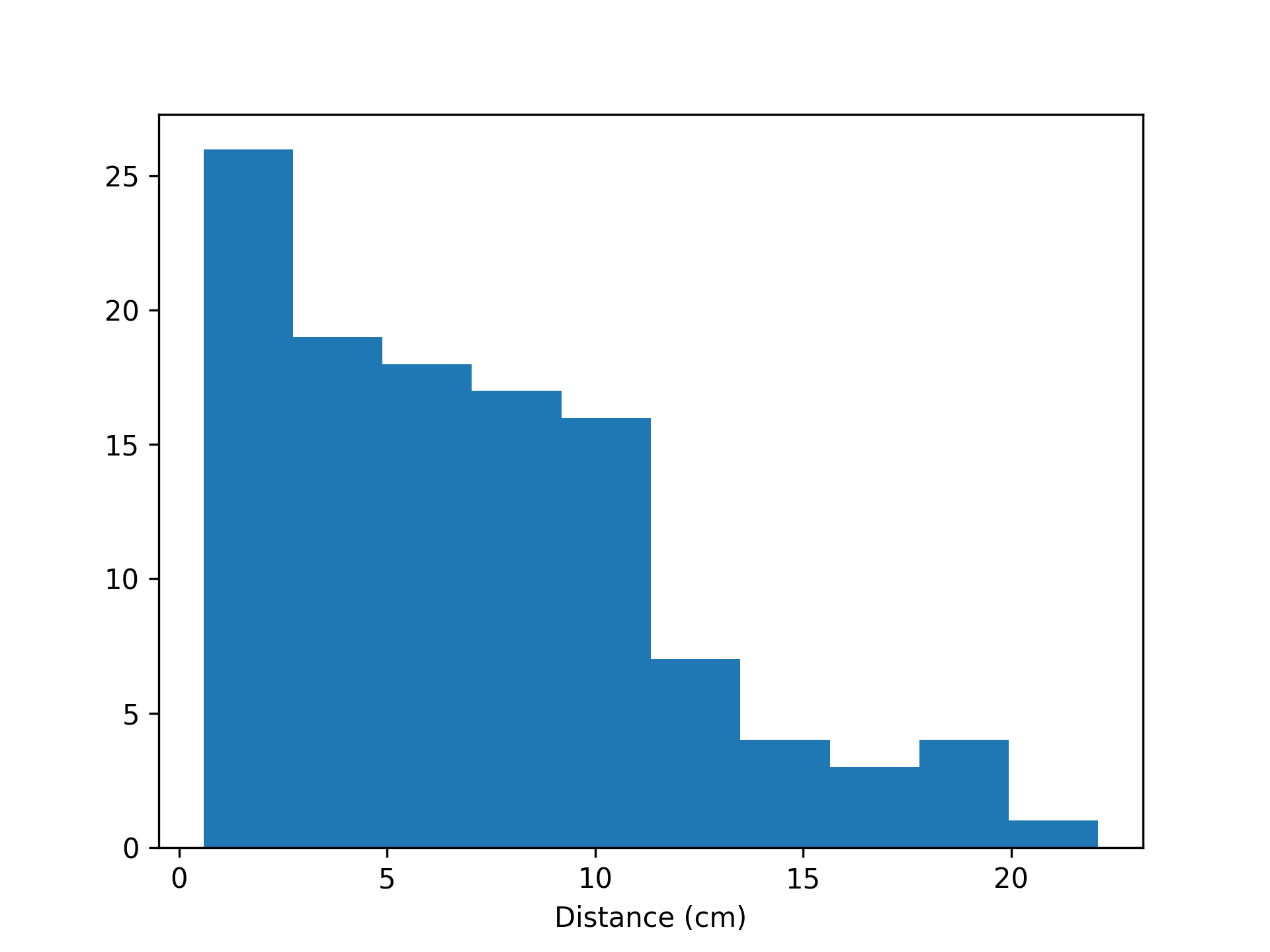
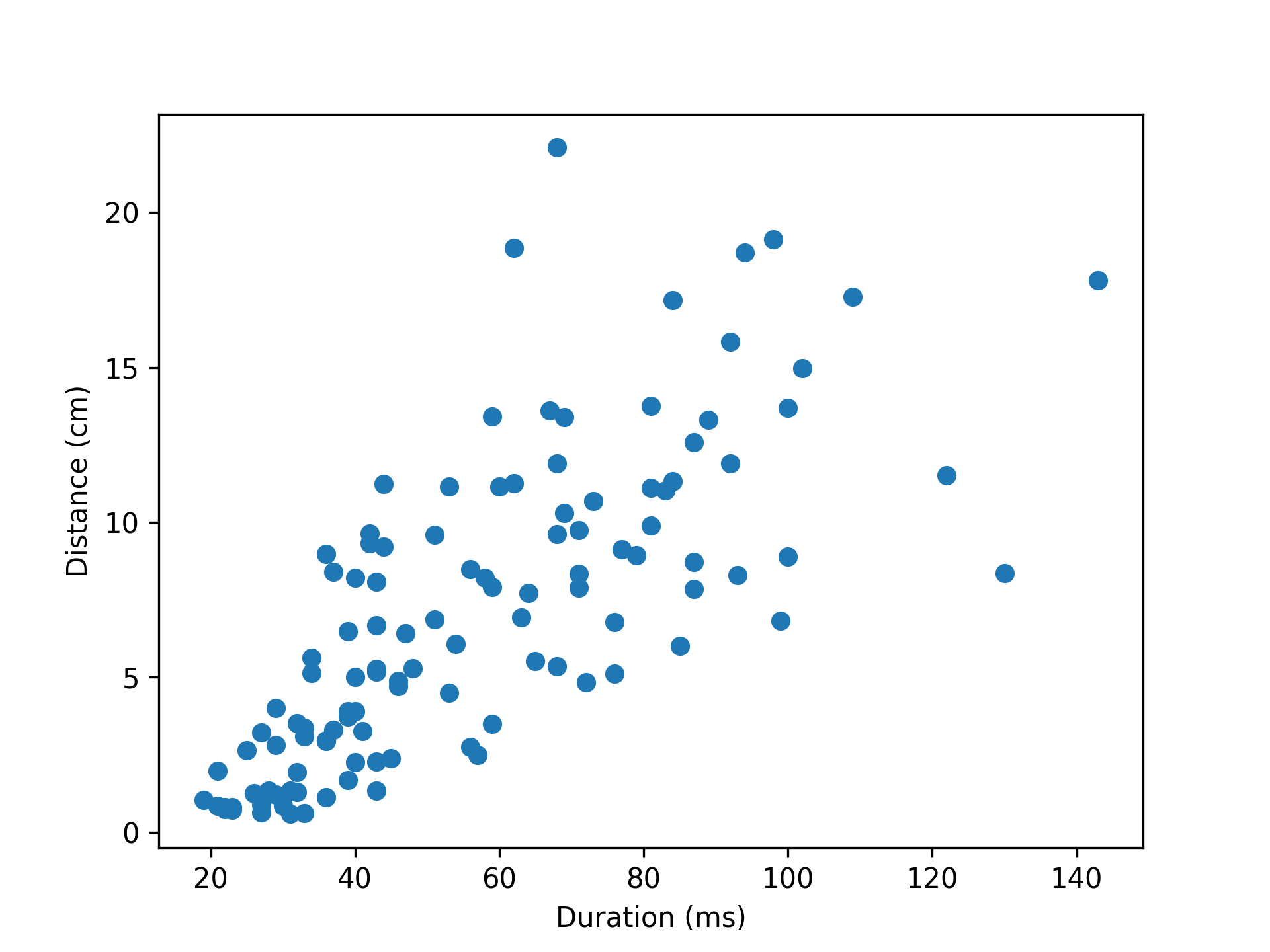
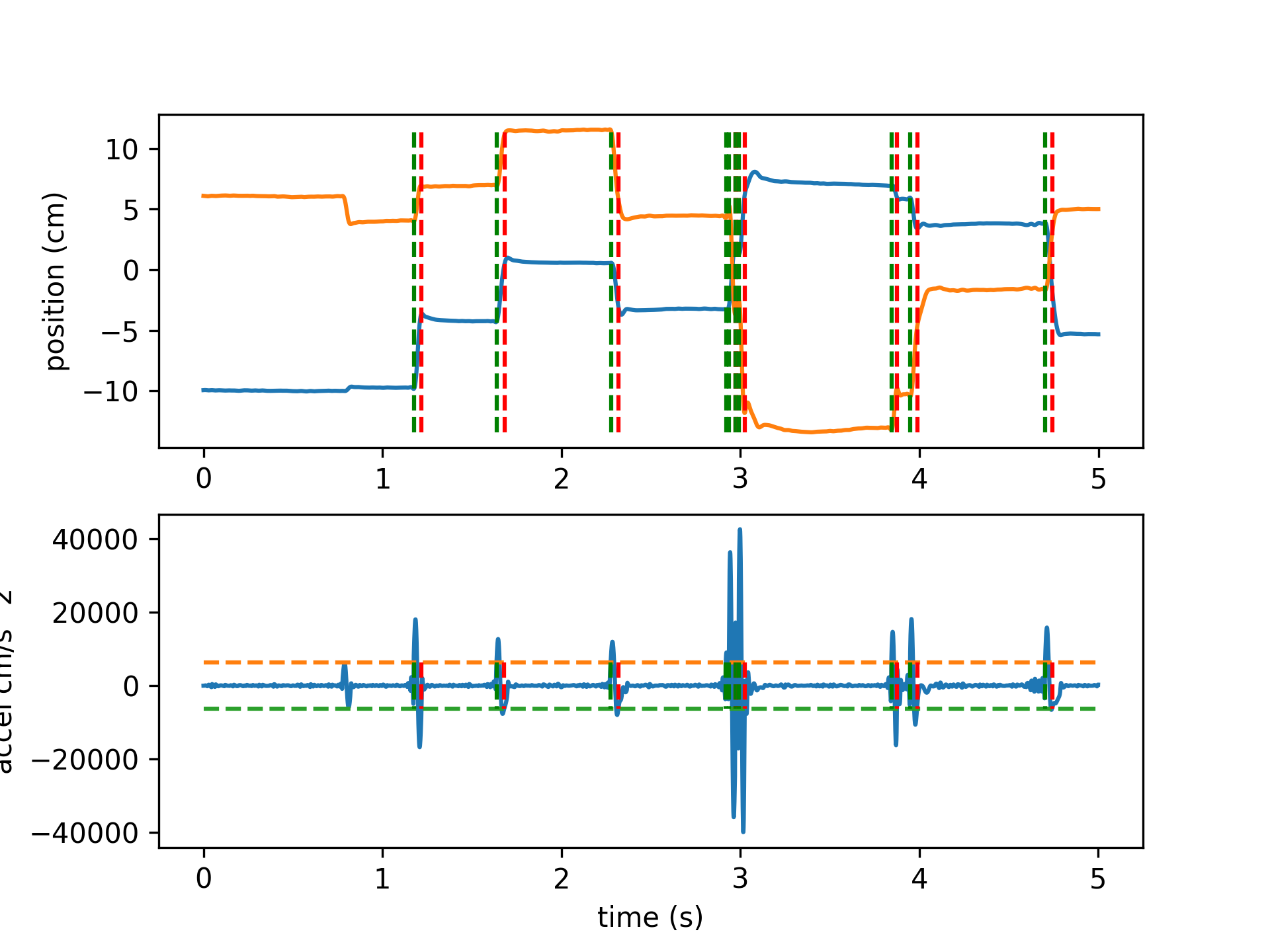
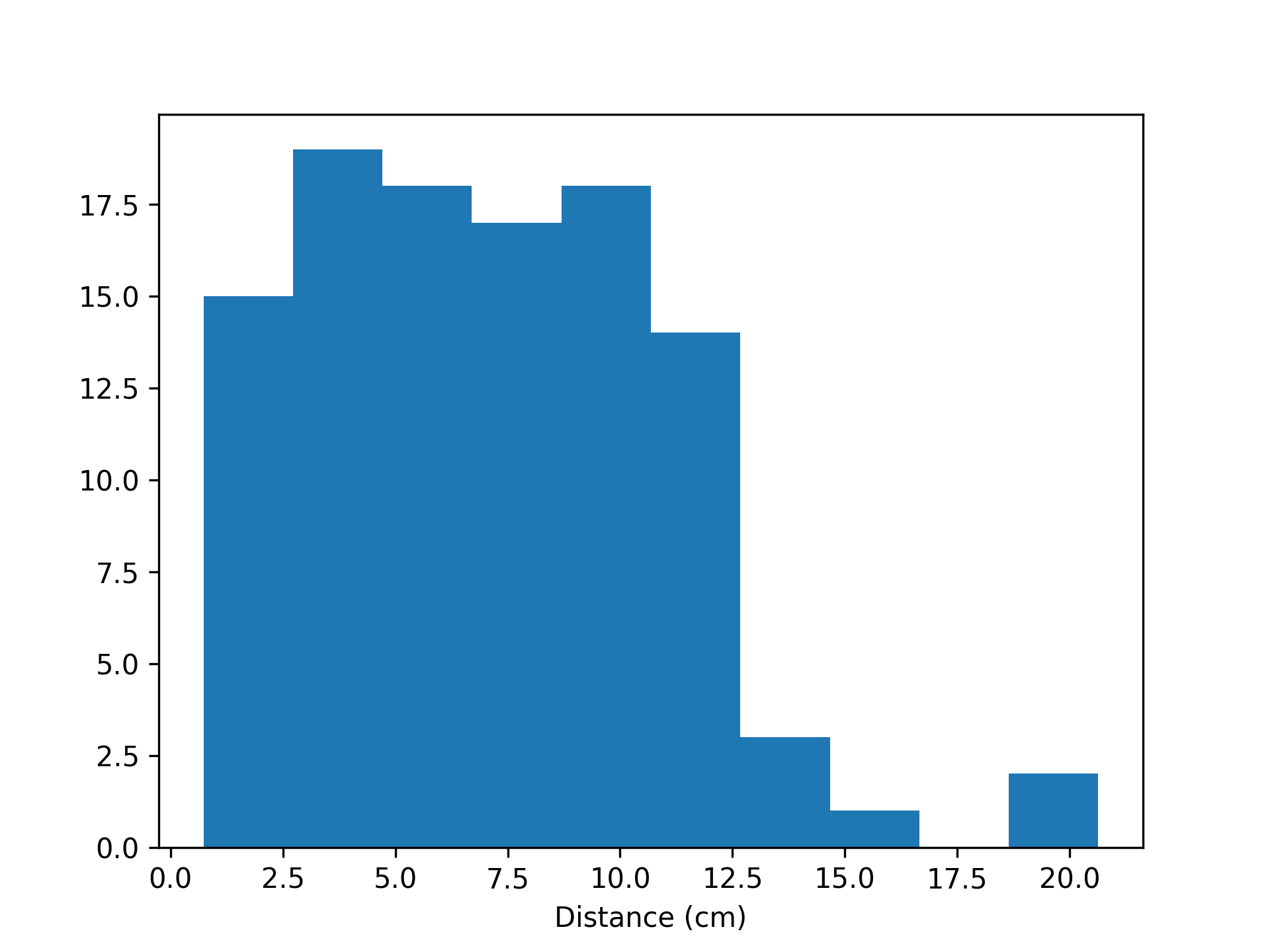
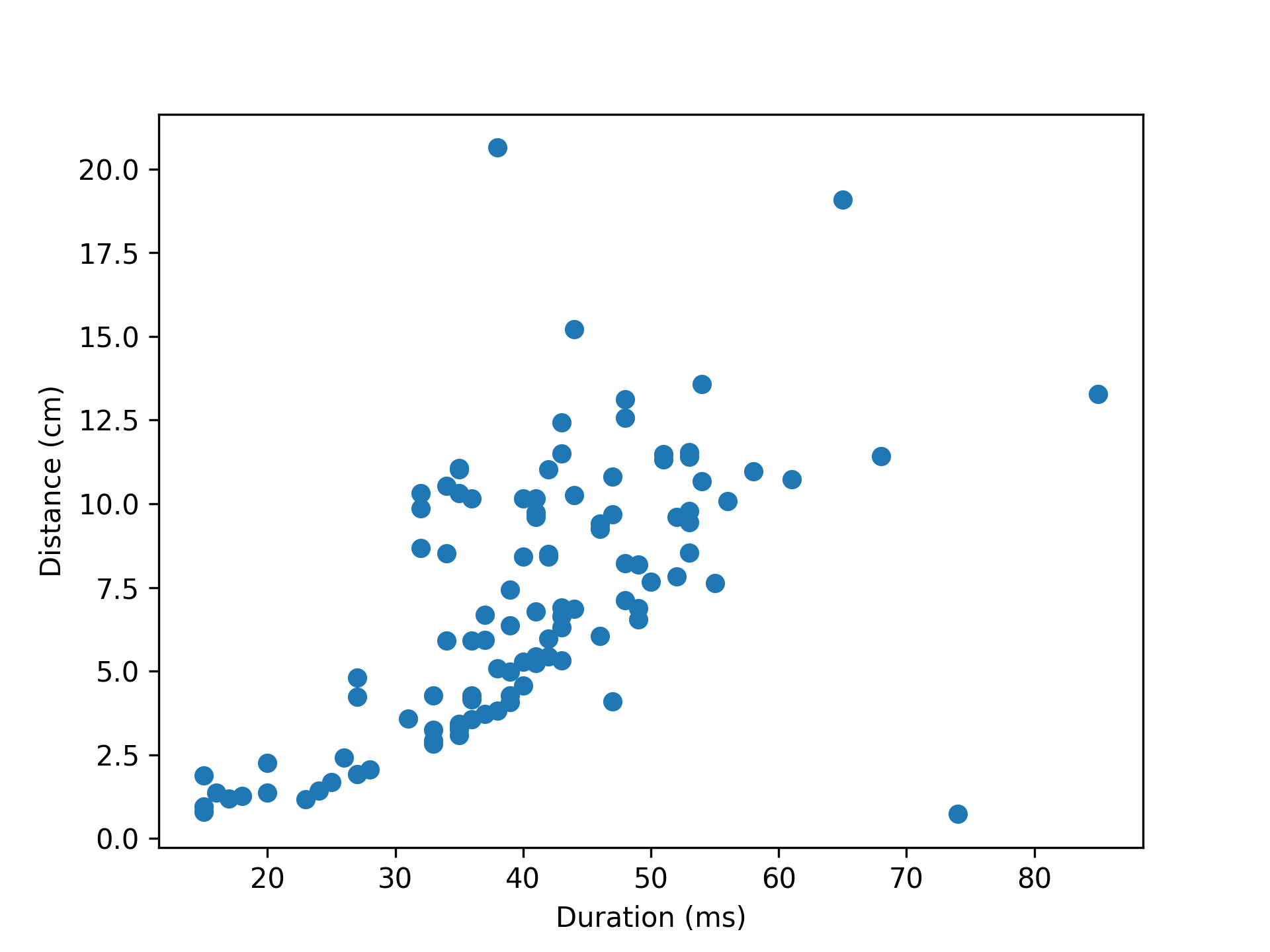
- aopy.precondition.eye.detect_saccades(eye_pos, samplerate, thr=None, num_sd=1.5, intersaccade_min=None, min_saccade_duration=0.015, max_saccade_duration=0.16, lowpass_filter_freq=30, debug=False, debug_window=(0, 2))[source]
Detect saccades from eye kinematics data. Uses thresholding of the kinematics to find putative saccades, then ensures that saccades are spaced by some minimum intersaccade time, and finally only considers events with both positive and negative crossings within the minimum saccade time. Optional plots can be generated showing threshold crossings in position, velocity, and acceleration.
Minimum and maximum saccade durations can be enforced to remove events that are biologically implausible. Default minimum and maximum saccade durations from Dorr et al., 2010 https://doi.org/10.1167/10.10.28
A minimum intersaccade interval can also be set to prevent the categorization of potential overshoot components as saccadic events. Default intersaccade minimum from Sinn & Engbert, 2016 https://doi.org/10.1016/j.visres.2015.05.012
Example
Detecting saccades on the first 5 seconds of test data from beignet block 5974 (included in /tests/data/beignet)
- Parameters:
eye_kinematics (nt, nch) – eye kinematics data, e.g. velocity or acceleration for one eye
samplerate (float) – sampling rate of the eye data
thr ((high,low) tuple) – positive and negative threshold values for acceleration, if desired. If None (default), thresholds will be automatically chosen based on num_sd above the mean.
num_sd (float, optional) – number of standard deviations above zero to threshold acceleration
intersaccade_min (float, optional) – minimum time (in seconds) allowed between saccades (from offset to next onset)
min_saccade_duration (float, optional) – minimum time (in seconds) that a saccade can take (inclusive)
max_saccade_duration (float, optional) – maximum time (in seconds) that a saccade can take (exclusive)
lowpass_filter_freq (float, optional) – frequency in Hz to low-pass filter. If None, no filtering will take place. Default 30 Hz.
debug (bool, optional) – if True, display a figure showing the threshold crossings
debug_window (tuple, optional) – (start, end) time (in seconds) for the debug figure
- Returns:
- tuple containing:
- onset (nsaccade): onset time (in seconds) of each detected saccadeduration (nsaccade): duration (in seconds) of each detected saccadedistance (nsaccade): distance (same units as eye_pos) of each detected saccade
- Return type:
tuple
- aopy.precondition.eye.filter_eye(eye_pos, samplerate, downsamplerate=1000, low_cut=200, buttord=4)[source]
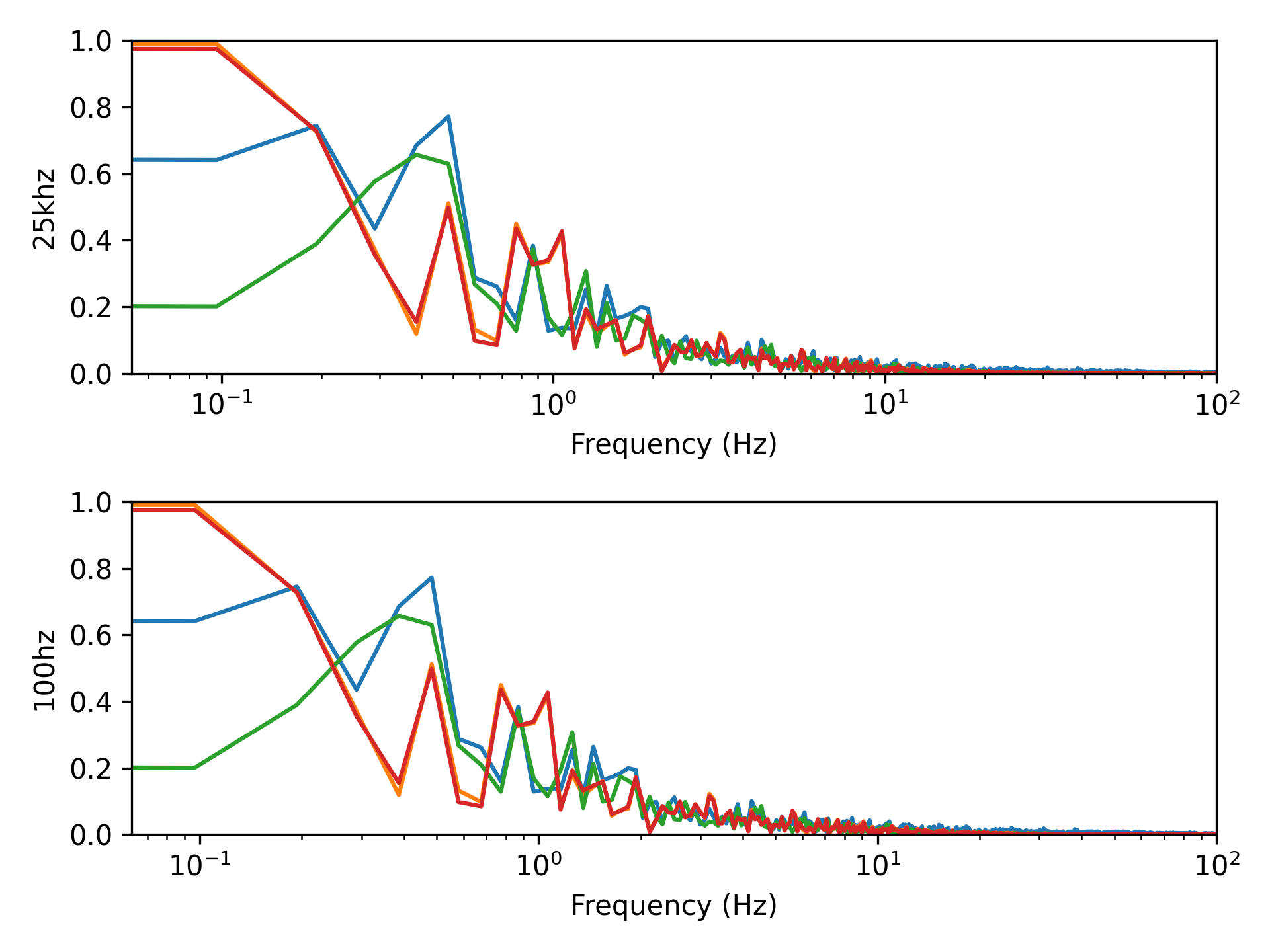
Filter and downsample eye data.
- Parameters:
eye_pos (nt, nch) – eye position data, e.g. from oculomatic
samplerate (float) – original sampling rate of the eye data
downsamplerate (float, optional) – sampling rate at which to return eye data
lowpass_freq (float, optional) – low cutoff frequency to limit analysis of saccades
taper_len (float, optional) – length of tapers to use in multitaper lowpass filter
- Returns:
- tuple containing:
- eye_pos (nt, nch): eye position after filtering and downsamplingsamplerate (float): sampling rate of the returned eye data
- Return type:
tuple
- aopy.precondition.eye.get_default_parameters(pursuit_velthresh=5.0, noise_factor=5.0, velthresh_startvelocity=300.0, min_intersaccade_duration=0.04, min_saccade_duration=0.01, max_initial_saccade_freq=2.0, saccade_context_window_length=1.0, max_pso_duration=0.04, min_fixation_duration=0.04, min_pursuit_duration=0.04, lowpass_cutoff_freq=4.0, min_blink_duration=0.02, dilate_nan=0.01, median_filter_length=0.05, savgol_length=0.019, savgol_polyord=2, max_vel=2000.0)[source]
Returns default parameters required for behavior analysis using REMoDNaV (Dar et al., 2021) https://doi.org/10.3758/s13428-020-01428-x
- Parameters:
pursuit_velthresh (float) – Velocity threshold to distinguish periods of pursuit from periods of fixation. Default is 5.0.
noise_factor (float) – Factor to account for noise in the data. Default is 5.0.
velthresh_startvelocity (float) – Start value for velocity threshold algorithm. Default is 300.0.
min_intersaccade_duration (float) – No saccade classification is performed in windows shorter than twice this value plus minimum saccade and PSO duration. Default is 0.04.
min_saccade_duration (float) – Minimum duration of a saccade event candidate in seconds. Default is 0.01.
max_initial_saccade_freq (float) – Maximum frequency for initial saccade detection. Default is 2.0.
saccade_context_window_length (float) – Size of a window centered on any velocity peak for adaptive determination of saccade velocity threshold. Default is 1.0.
max_pso_duration (float) – Maximum duration of post-saccadic oscillations in seconds. Default is 0.04.
min_fixation_duration (float) – Minimum duration of fixation event candidate in seconds. Default is 0.04.
min_pursuit_duration (float) – Minimum duration of pursuit event candidate in seconds. Default is 0.04.
lowpass_cutoff_freq (float) – Cutoff frequency for lowpass filtering. Default is 4.0.
min_blink_duration (float) – Missing data windows shorter than this duration will not be considered for dilate nan. Default is 0.02.
dilate_nan (float) – Duration for which to replace data by missing data markers either side of a signal-loss window. Default is 0.01.
median_filter_length (float) – Smoothing median filter size in seconds. Default is 0.05.
savgol_length (float) – Size of the Savitzky-Golay filter for noise reduction in seconds. Default is 0.019.
savgol_polyord (int) – Polynomial order of the Savitzky-Golay filter for noise reduction. Default is 2.
max_vel (float) – Maximum velocity threshold, will replace values above designated maximum. Default is 2000.0.
- Returns:
- A tuple containing two dictionaries:
clf_params: Parameters needed for event classification.
preproc_params: Parameters needed for preprocessing.
- Return type:
tuple
- aopy.precondition.eye.get_eye_event_trials(preproc_dir, subject, te_id, date, start_events, end_events, event_label, clf_params, preproc_params, screen_half_height, viewing_dist, samplerate=1000)[source]
Extracts event times and positions from eye movement data for a given session. You must select a specific eye event to extract. Choose from following options using the event_label parameter. Options for event labels:
‘SACC’: Saccadic eye movements.
‘PURS’: Smooth pursuit eye movements.
‘FIXA’: Fixations.
‘HPSO’: High velocity post saccadic oscillations.
‘LPSO’: Low velocity post saccadic oscillations.
‘IHPS’: High velocity post inter-saccadic oscillations.
‘ILPS’: Low velocity post inter-saccadic oscillations.
- Parameters:
preproc_dir (str) – Base directory where file lives
subject (str) – Subject name.
te_id (int) – Block number of task entry object.
date (str) – Date of the recording.
start_events (list) – List of numeric codes representing the start of a trial.
end_events (list) – List of numeric codes representing the end of a trial.
event_label (str) – The label of the event to extract. (e.g., ‘SACC’, ‘PURS’, ‘FIXA’)
clf_params (dict) – Dictionary of classifier parameters to be passed to the REMoDNaV EyegazeClassifier.
preproc_params (dict) – Dictionary of preprocessing parameters to be passed to the classifier’s preproc method.
screen_half_height (float) – Half the height of the screen in degrees of visual angle.
viewing_dist (float) – The viewing distance in cm.
samplerate (int, optional) – Sampling rate of the eye tracker in Hz. Default is 1000.
- Returns:
- A tuple containing
- start_end_times (ntrials):
List of (nevents, 2) arrays containing (start, end) times of detected events for each trial in seconds.
- start_pos (ntrials):
List of (nevents, 2) arrays containing start (x,y) positions of detected events for each trial.
- end_pos (ntrials):
List of (nevents,2) arrays containing end (x,y) positions of detected events for each trial.
- Return type:
tuple