Preproc:
Code for preprocessing neural data (reorganize data into the needed form) including parsing experimental files, trial sorting, and subsampling
Preprocessed data format
Preprocessed BMI3D data takes the form of HDF files containing several datasets. Each dataset is labeled as
either _data or _metadata depending on its source. Datasets with the data suffix typically contain numpy structured arrays while those denoted metadata
contain simple data types.
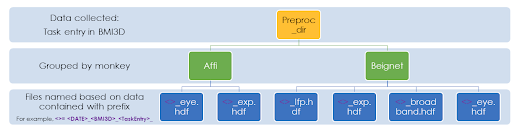
On our lab server, preprocessed data is stored in /data/preprocessed/. Use aopy.data.get_preprocessed_filename() to get the filename of any preprocessed file.
Or use aopy.data.load_preproc_exp_data(), aopy.data.load_preproc_eye_data(), aopy.data.load_preproc_broadband_data(), aopy.data.load_preproc_lfp_data() to
load the various preprocessed datasets directly.
Dataset |
Contents |
|---|---|
|
The experimental data. It contains all the information about timing, position, state, events, etc. |
|
Metadata explaining the experimental data, e.g. information about the subject, date, and experimental parameters |
|
The eye data, including position and a mask for the eyes being closed. |
|
Metadata about the eye tracking, including labels for which channel corresponds to which eye, sampling rate, etc. |
|
Motion capture data |
|
Metadata explaining the motion capture data |
|
Unfiltered raw neural data |
|
Neural data that has been low-pass filtered at 500 Hz and downsampled to 1000 Hz |
|
TBD |
Experimental data
clock
[shape: (13132,), type: [(‘time’, ‘<u8’), (‘timestamp_bmi3d’, ‘<f8’), (‘timestamp_sync’, ‘<f8’), (‘timestamp_measure_online’, ‘<f8’), (‘timestamp_measure_offline’, ‘<f8’)]]
A record of the time at which each cycle in the bmi state machine loop occurred.
Field |
Contents |
|---|---|
|
Integer cycle number |
|
Uncorrected timestamps recorded by bmi3d |
|
Corrected timestamps sent from bmi3d digital output and recorded by eCube digital input. |
|
Corrected timestamps measured from the screen and digitized offline |
|
Corrected timestamps measured from the screen and digitized online |
The figure below shows what each timestamp information is captured by each variable.
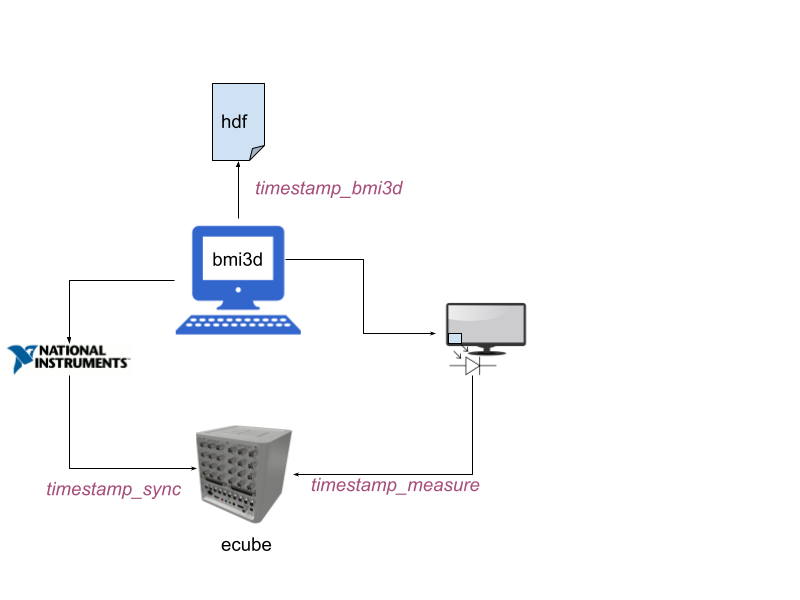
From the experiment computer a clock is recorded in three ways:
Directly into the HDF record – this clock is inaccurate but nice to have as backup
As a digital signal from a NIDAQ DIO card – for accurate sync of BMI3D cycles
By measuring a flickering square on the screen with a photodiode – for accurate measurement of displayed frame timestamps
The preprocessed timestamp_measure_offline field should be used for aligning data to things that appear on the screen. However, in some cases
there may not be anything appearing on the screen, such as when aligning to laser onset or movement kinematics. In these cases, the timestamp_sync will be
more accurate.
“Corrected” timestamps have been run through the function get_measured_clock_timestamps(), which searches for measured timestamps within a given
radius from a known set of timestamps. For sync timestamps, the “known” timestamps are the ones from BMI3D. For measure timestamps, the “known” timestamps
are the sync timestamps.
events
[shape: (223,), type: [(‘code’, ‘u1’), (‘timestamp’, ‘<f8’), (‘event’, ‘S32’), (‘data’, ‘<u4’)]]
Information needed to reconstruct the structure of the experiment. This data comes from digital output via the ecube. It is sent as integer codes and then decoded into event names.
Field |
Contents |
|---|---|
|
Raw event code |
|
Name of the event |
|
The corresponding data, e.g. which target or which trial type |
|
Time at which the event was received by the neural data system. |
bmi3d_events
[shape: (223,), type: [(‘time’, ‘<u8’), (‘event’, ‘S32’), (‘data’, ‘<u4’), (‘code’, ‘u1’)]]
BMI3D’s internal record of events, sometimes useful in case you want different timing on events, as described below.
Field |
Contents |
|---|---|
|
Integer cycle number |
|
Name of the event |
|
The corresponding data, e.g. which target or which trial type |
|
Raw event code |
Events can be used in one of three ways:
Directly use the
eventsfrom the neural data system.Apply sync clock timestamps to the
timefield ofbmi3d_eventsApply measured clock timestamps to the
timefield ofbmi3d_events
The above each illustrated with an image of alignment between the events and target onset as measured by a photodiode:
event_timestamps = data['events']['timestamp']
flash_times = event_timestamps[np.logical_and(16 <= data['events']['code'], data['events']['code'] < 32)]
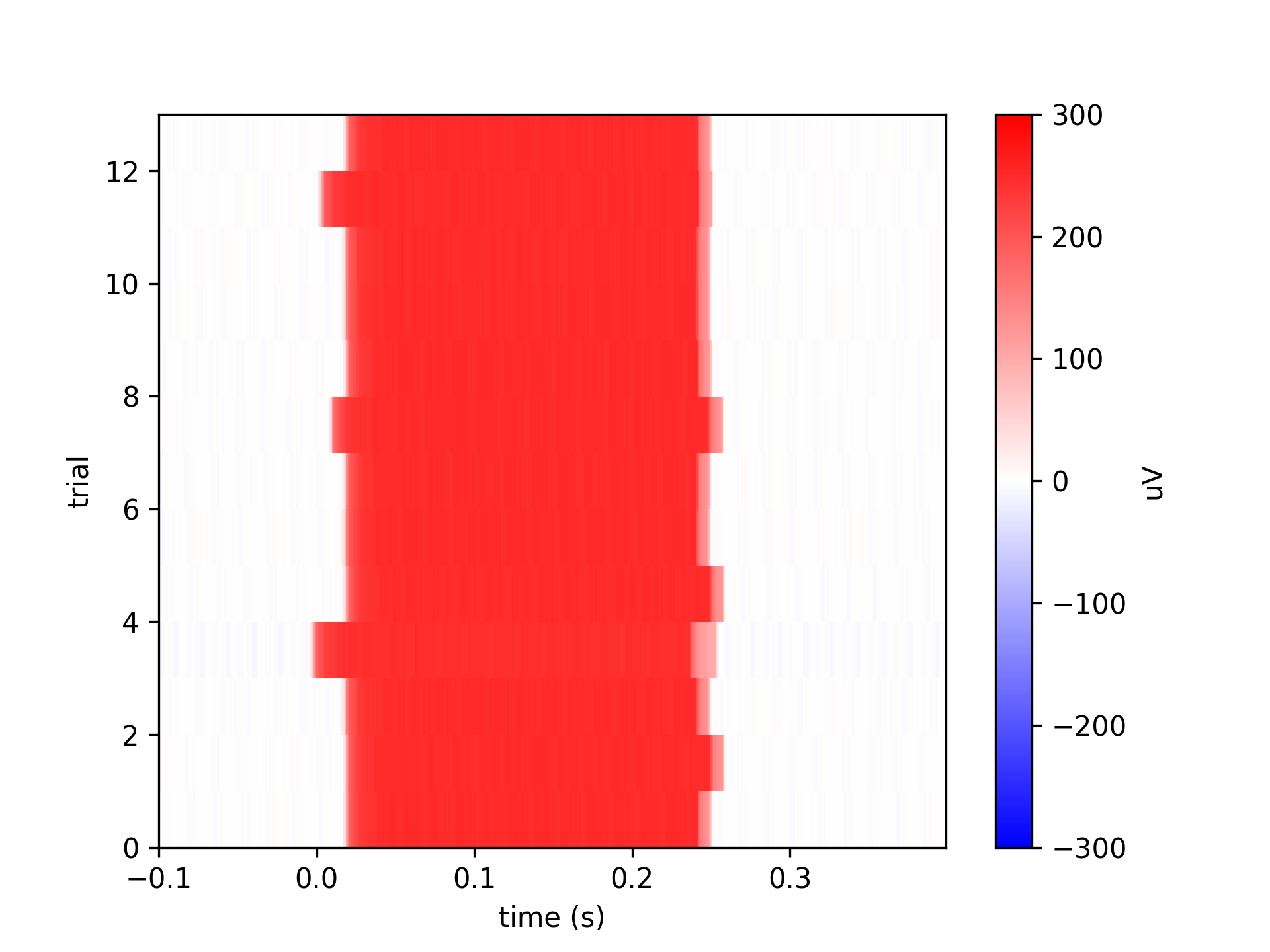
cycles = data['bmi3d_events']['time'][target_on_events]
flash_times = data['clock']['timestamp_sync'][cycles]
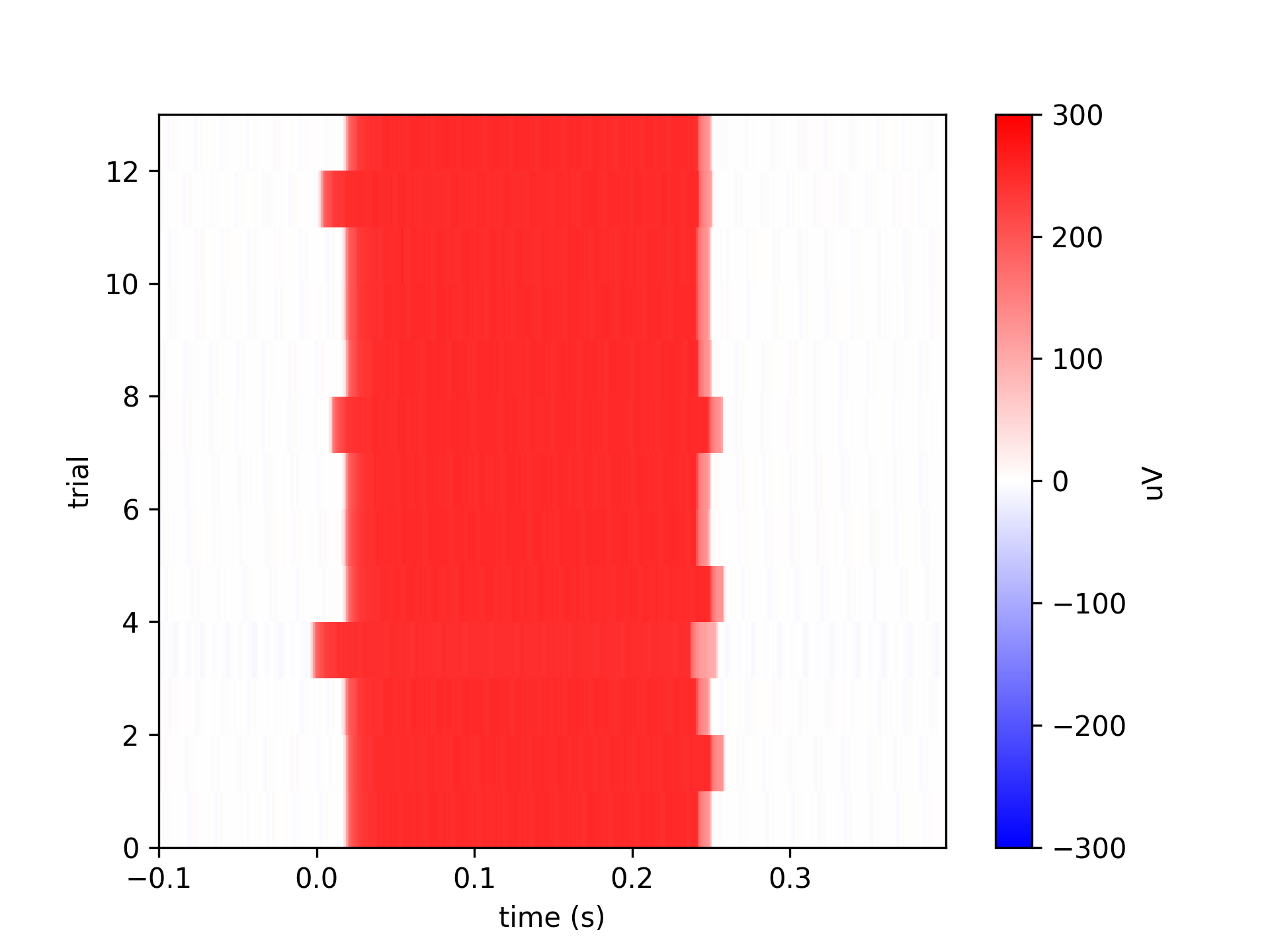
cycles = data['bmi3d_events']['time'][target_on_events]
flash_times = data['clock']['timestamp_measure_offline'][cycles]
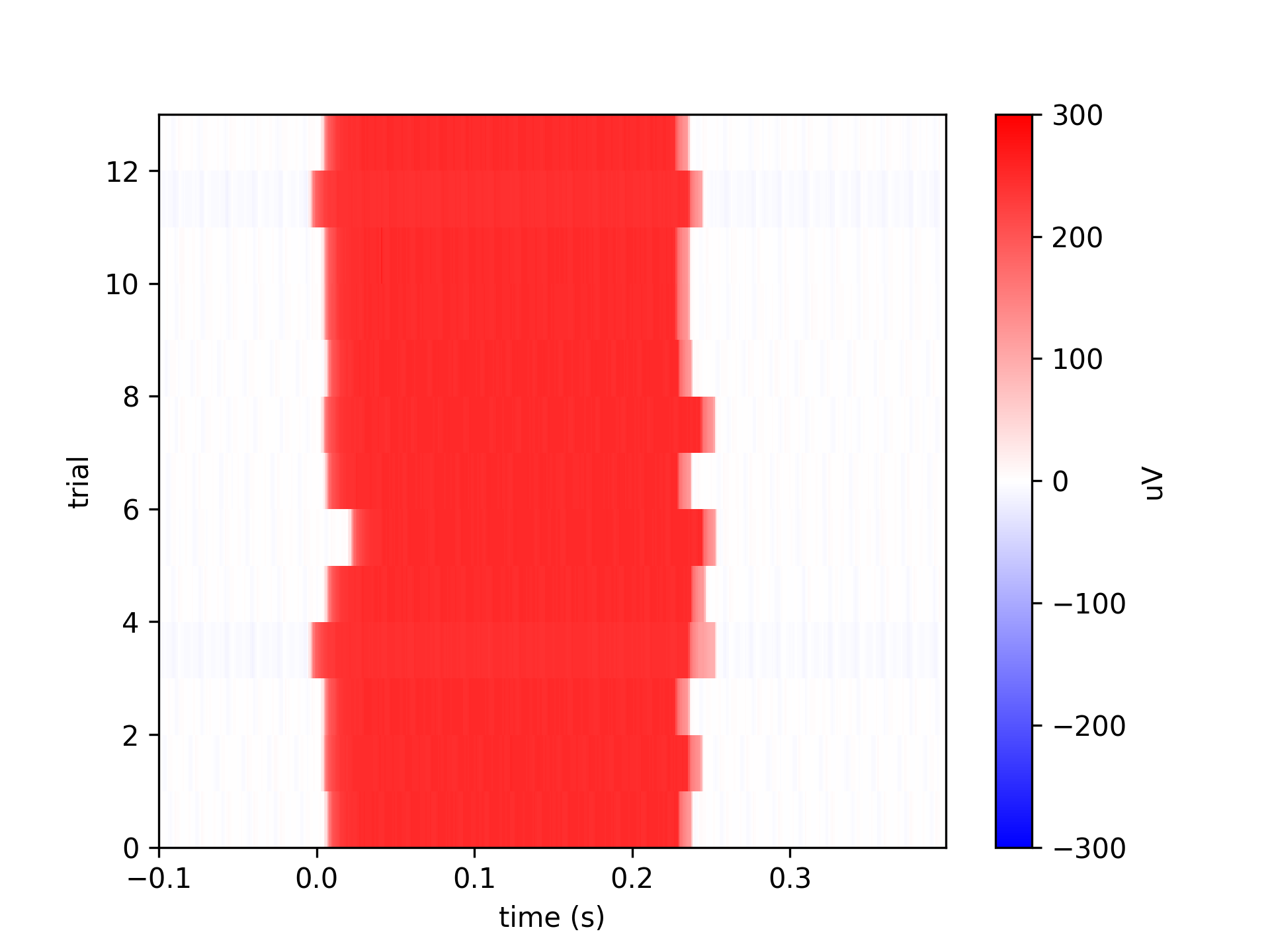
These are the most reliable benchmark of timing from BMI3D.
clean_hand_position
[type: ‘<f8’, shape: (52627, 3)]
Contains raw hand kinematics of each BMI3D cycle but cleaned to include NaNs where appropriate. In some versions of BMI3D the hand kinematics contained invalid data when the hand was not well tracked.
hand_interp
[type: ‘<f8’, shape: (457255, 3)]
Contains sampled hand kinematics (1000Hz, see hand_interp_samplerate) interpolated from the BMI3D hdf file using timing from the eCube digital input.
This can be used as if it were neural data from the eCube. It starts at t=0 and is sampled on the same clock as all the other neural data. The length won’t match the length of other recorded neural data.
cursor_interp
[type: ‘<f8’, shape: (457255, 2)]
Contains sampled cursor kinematics (1000Hz, see cursor_interp_samplerate) interpolated from the BMI3D hdf file using timing from the eCube digital input.
This can be used as if it were neural data from the eCube. It starts at t=0 and is sampled on the same clock as all the other neural data. The length won’t match the length of other recorded neural data.
cursor_analog_volts
[type: ‘<f8’, shape: (448647, 2)]
Contains sampled cursor kinematics (1000Hz, see cursor_analog_samplerate) captured from the eCube analog input connected to BMI3D analog output.
This can be used as if it were neural data from the eCube. It starts at t=0 and is sampled on the same clock as all the other neural data. The length will roughly match the length of other recorded neural data.
cursor_analog_cm
[type: ‘<f8’, shape: (448647, 2)]
Contains sampled cursor kinematics (1000Hz, see cursor_analog_samplerate) captured from the eCube analog input connected to BMI3D analog output, but also scaled to be in units of cm. Can sometimes slightly be off scale and is better used as a timing consistency check rather than as raw data. See cursor_interp instead.
This can be used as if it were neural data from the eCube. It starts at t=0 and is sampled on the same clock as all the other neural data. The length will roughly match the length of other recorded neural data.
task
[shape: (13132,), type: [(‘cursor’, ‘<f8’, (3,)), (‘sync_square’, ‘?’, (1,)), (‘manual_input’, ‘<f8’, (3,)), (‘trial’, ‘<u4’, (1,)), (‘plant_visible’, ‘?’, (1,))]]
Information about things that change on every cycle of the finite state machine loop.
Field |
Contents |
|---|---|
|
(x, z, y) cursor coordinates (in cm) |
|
State of the sync square |
|
(x, y, z) input before transformation to screen coordinates (only present if this was a manual input task) |
|
Current trial number as calculated by bmi3d |
|
Whether or not the cursor was visible |
trials
[shape: (56,), type: [(‘trial’, ‘<u4’), (‘index’, ‘<u4’), (‘target’, ‘<f8’, (3,))]]
List of conditions generated on each trial. Can have multiple indices corresponding to a single trial. Depending on the task, there can be multiple factors listed in this table, but it will always include trial number and index.
Field |
Contents |
|---|---|
|
Trial number |
|
Generator index |
|
Position of the target for this trial (if the task had targets) |
state
[shape: (325,), type: [(‘msg’, ‘S256’), (‘time’, ‘<u4’)]]
State machine log
Field |
Contents |
|---|---|
|
Usually the name of a state transition, but also includes annotations |
|
Cycle number on which this message occured |
reward_system
[shape: (6,), type: [(‘timestamp’, ‘<f8’), (‘state’, ‘?’)]]
State of the reward system, measured at the solenoid so it includes manual rewards.
raw bmi3d data
There are several other fields with the prefix _bmi3d. These contain raw data saved by bmi3d which has been
preprocessed into the format described above. They are there for debugging purposes.
qwalor_sensor
[shape: (11216169,), type: ‘int16’]
Analog sensor data from the qwalor laser.
qwalor_trigger
[shape: (726,), type: [(‘timestamp’, ‘<f8’), (‘value’, ‘<f8’)]]
Digital trigger information from the qwalor laser. These timestamps represent timing of the trigger signal that
turns on and off the laser. The laser, however, may take time to turn on and off, and is measured in qwalor_sensor.
See also find_stim_times() and get_laser_trial_times().
Experimental metadata
The exp_metadata dataset can contain:
Field |
Contents |
|---|---|
|
color of the background |
|
unique ID number for this experiment |
|
parser version number |
|
hdf filename where the raw bmi3d data came from |
|
timestamp recorded by bmi3d internally when the state machine starts (in ms) |
|
date the file was preprocessed |
|
version of aopy used to preprocess the data |
|
(x, -x, z, -z, y, -y) coordinates bounding the cursor (in cm) |
|
color of the cursor |
|
sampling rate of the interpolated version of the bmi3d cursor data |
|
radius of the cursor (in cm) |
|
raw data files used in preprocessing |
|
when the experiment took place |
|
duration of penalty for delay violations |
|
how long the cursor has to remain inside the target after the hold is satisfied but before the go cue |
|
range of digital channels on which events are recorded |
|
dictionary of event names and codes used for this experiment |
|
maximum value of event codes |
|
mask used to drive the national instruments card |
|
? |
|
cycle rate that bmi3d was targeting |
|
whether the fullscreen option was turned on |
|
name of the generator used in the experiment |
|
string containing the parameters used to initialize the generator |
|
sampling rate of the interpolated version of the bmi3d hand data |
|
whether the measured_timestamps_online and measured_timestamps_offline fields are available in clock |
|
whether the reward system was recorded |
|
range of headstage channels recorded on the ecube |
|
which headstage connector was recorded |
|
duration of penalty for leaving the target too soon before the hold time has elapsed |
|
length of time required to hold inside a target |
|
intraocular distance (for 3d displays) |
|
preprocessing statistic of estimated screen latency before correction |
|
preprocessing statistic of measured screen latency |
|
number of penalties before moving to the next condition in the sequence |
|
preprocessing statistic of consecutive missing frame markers |
|
number of cycles the bmi3d state machine ran |
|
preprocessing statistic of missing frame markers from the screen sensor |
|
number of trials the bmi3d state machine counted |
|
notes on this task entry from the bmi3d database |
|
for manual control tasks, the (x, y, z) offset applied to raw inputs (for optitrack, in m) |
|
sound file played for penalties |
|
rate at which the cursor is hidden? |
|
‘cursor’ is the only option |
|
whether or not the endpoint is visible to the subject |
|
(min, max) inter-trial interval duration. Drawn from a uniform distribution between the two. |
|
(min, max) delay duration. Drawn from a uniform distribution between the two. |
|
whether reward timing is randomized |
|
whether ecube headstage data is recorded by bmi3d |
|
the offline report saved to the bmi3d database |
|
analog channel used for measuring the reward system output |
|
sound file played during a reward |
|
duration of the rewards |
|
name of the rig where the experiment was run |
|
for manual control tasks, the name of the rotation matrix applied to raw inputs |
|
for manual control tasks, the multiplication factor applied to raw inputs |
|
for 3D tasks, the distance the display is located away from the subjects eyes |
|
for tasks with a window, the height of the display divided by 2 (in cm) |
|
the analog channel used to measure screen refresh rate |
|
the digital channel used to measure screen refresh rate |
|
the digital channel used to measure bmi3d’s sync clock |
|
pin used by bmi3d to send clock pulses |
|
the name of the bmi3d sequence used in this task |
|
the parameters used to generate the sequence |
|
maximum duration of the session. if 0, then the session can continue until the generator is depleted |
|
if true, a bounding box is shown in 3D around the workspace where the cursor is allowed to move |
|
directory where the source files for this preprocessed data were stored |
|
dictionary of files arranged by system that were used to generate this preprocessed data |
|
for cursor tasks, the position where the cursor starts (overridden if position control is used) |
|
name of the subject |
|
git hash of the commit being used to run the experiment |
|
color of the square used for screen sync in the “off” state |
|
color of the square used for screen sync in the “on” state |
|
where the square for screen sync is located on the display |
|
dictionary of events and event codes |
|
version to keep track of changes to the sync parameters |
|
width of clock and event pulses |
|
size of the square used for screen sync (in cm) |
|
hash of the git version of BMI3D that was used when running the experiment |
|
name of the color for targets |
|
radius of targets (in cm) |
|
name of the bmi3d task used to run this experiment |
|
duration of timeout penalties (in s) |
|
time without entering a target before a timeout penalty is applied (in s) |
|
how many successful trials are required before a reward is delivered |
|
for manual control tasks, whether the cursor is under velocity control (true) or position control (false) |
|
time between each trial (if autostart is disabled) |
|
width and height of the window (in cm) |
Motion capture data
optitrack
[(‘position’, ‘f8’, (3,)), (‘rotation’, ‘f8’, (4,)), (‘timestamp’, ‘f8’, (1,)]
Field |
Contents |
|---|---|
|
(x, y, z) position samples in time (in m) |
|
(x, y, z, w) rotation samples in time (quaternion) |
|
time at which each sample was recorded (in ecube reference frame) |
Motion capture metadata
Field |
Contents |
|---|---|
|
directory where the source files are located |
|
dictionary of source files organized by system from which this preprocessed data was generated |
|
sampling rate of the motion capture data |
<other metadata from motive> |
see motive documentation |
Examples
To access the data you can do one of the following
clock = aopy.data.load_hdf_data(result_dir, result_filename, 'clock', 'exp_data')
or
data = aopy.data.load_hdf_group(result_dir, result_filename, 'exp_data')
clock = data['clock']
To access fields inside the individual structured arrays,
timestamps = clock['timestamp']
first_timestamp = timestamps[0]
Note that you can also access structured arrays by row first, then by column
first_clock = clock[0]
first_timestamp = first_clock['timestamp']
Or at the same time
first_timestamp = clock['timestamp'][0]
API
Preproc wrappers
These functions are also available directly from aopy.preproc
- aopy.preproc.wrappers.proc_ap(data_dir, files, result_dir, result_filename, kilosort_dir=None, overwrite=False, max_memory_gb=1.0, filter_kwargs={})[source]
- Process ap data
neuropixels: filter data between 300-5k, downsample to 10k, synchronize timestamps with ecube. Drift correction is applied
- Saves ap data into the HDF datasets:
ap_data (nt, nch) ap_metadata (dict)
- Parameters:
data_dir (str) – where the data files are located
files (dict) – dictionary of filenames indexed by system
result_dir (str) – where to store the processed result
result_filename (str) – where to store the processed result
kilosort_dir (str) – data folder where preprocessed data of kilosort is saved
overwrite (bool, optional) – whether to remove existing processed files if they exist
max_memory_gb (float, optional) – max memory used to load binary data at one time
filter_kwargs (dict, optional) – keyword arguments to pass to
aopy.precondition.filter_lfp()
- aopy.preproc.wrappers.proc_broadband(data_dir, files, result_dir, result_filename, overwrite=False, max_memory_gb=1.0)[source]
- Process broadband data:
Loads ‘ecube’ headstage data and metadata
- Saves broadband data into the HDF datasets:
broadband_data (nt, nch) broadband_metadata (dict)
- Parameters:
data_dir (str) – where the data files are located
files (dict) – dictionary of filenames indexed by system
result_dir (str) – where to store the processed result
result_filename (str) – where to store the processed result
overwrite (bool, optional) – whether to remove existing processed files if they exist
max_memory_gb (float, optional) – max memory used to load binary data at one time
- Returns:
None
- aopy.preproc.wrappers.proc_emg(data_dir, files, result_dir, result_filename, overwrite=False)[source]
- Process emg data:
Loads emg hdf data from bmi3d
- Saves emg data into the HDF datasets:
emg_raw (nt, nch) emg_metadata (dict)
- Parameters:
data_dir (str) – where the data files are located
files (dict) – dictionary of filenames indexed by system
result_dir (str) – where to store the processed result
result_filename (str) – where to store the processed result
overwrite (bool, optional) – whether to remove existing processed files if they exist
- aopy.preproc.wrappers.proc_exp(data_dir, files, result_dir, result_filename, overwrite=False, save_res=True)[source]
Process experiment data files. Loads ‘hdf’ and ‘ecube’ (if present) data, parses, and prepares experiment data and metadata.
Note
Currently supports BMI3D only.
- The above data is prepared into structured arrays:
- exp_data:
task ([(‘cursor’, ‘<f8’, (3,)), (‘trial’, ‘u8’, (1,)), (‘time’, ‘u8’, (1,)), …]) state ([(‘msg’, ‘S’, (1,)), (‘time’, ‘u8’, (1,))]) clock ([(‘timestamp’, ‘f8’, (1,)), (‘time’, ‘u8’, (1,))]) events ([(‘timestamp’, ‘f8’, (1,)), (‘time’, ‘u8’, (1,)), (‘event’, ‘S32’, (1,)),
(‘data’, ‘u2’, (1,)), (‘code’, ‘u2’, (1,))])
trials ([(‘trial’, ‘u8’), (‘index’, ‘u8’), (condition_name, ‘f8’, (3,)))])
- exp_metadata:
source_dir (str) source_files (dict) bmi3d_start_time (float) n_cycles (int) n_trials (int) <other metadata from bmi3d>
- Parameters:
data_dir (str) – where the data files are located
files (dict) – dictionary of filenames indexed by system
result_dir (str) – where to store the processed result
result_filename (str) – where to store the processed result
overwrite (bool) – whether to remove existing processed files if they exist
- Returns:
None
- aopy.preproc.wrappers.proc_eyetracking(data_dir, files, result_dir, exp_filename, result_filename, debug=True, overwrite=False, save_res=True, **kwargs)[source]
Loads eyedata from ecube analog signal and calculates calibration profile using least square fitting. Requires that experimental data has already been preprocessed in the same result hdf file.
The data is prepared into HDF datasets:
- eye_data:
eye_closed_mask (nt, nch): boolean mask of when the eyes are closed raw_data (nt, nch): raw eye data calibrated_data (nt, nch): calibrated eye data coefficients (nch, 2): linear regression coefficients correlation_coeff (nch): best fit correlation coefficients from linear regression cursor_calibration_data (ntr, 2): cursor coordinates used for calibration eye_calibration_data (ntr, nch): eye coordinates used for calibration
- eye_metadata:
samplerate (float): sampling rate of the calibrated eye data see
aopy.preproc.parse_oculomatic()for oculomatic metadata
- Parameters:
data_dir (str) – where the data files are located
files (dict) – dictionary of filenames indexed by system
result_dir (str) – where to store the processed result
result_filename (str) – what to call the preprocessed filename
debug (bool, optional) – if true, prints additional debug messages
overwrite (bool, optional) – whether to recalculated and overwrite existing preprocessed eyetracking data
save_res (bool, optional) – whether to save the calculated eyetracking data
**kwargs (dict, optional) – keyword arguments to pass to
aopy.preproccalc_eye_calibration()
- Returns:
all the data pertaining to eye tracking, calibration eye_metadata (dict): metadata for eye tracking
- Return type:
eye_dict (dict)
Example
Uncalibrated raw data:
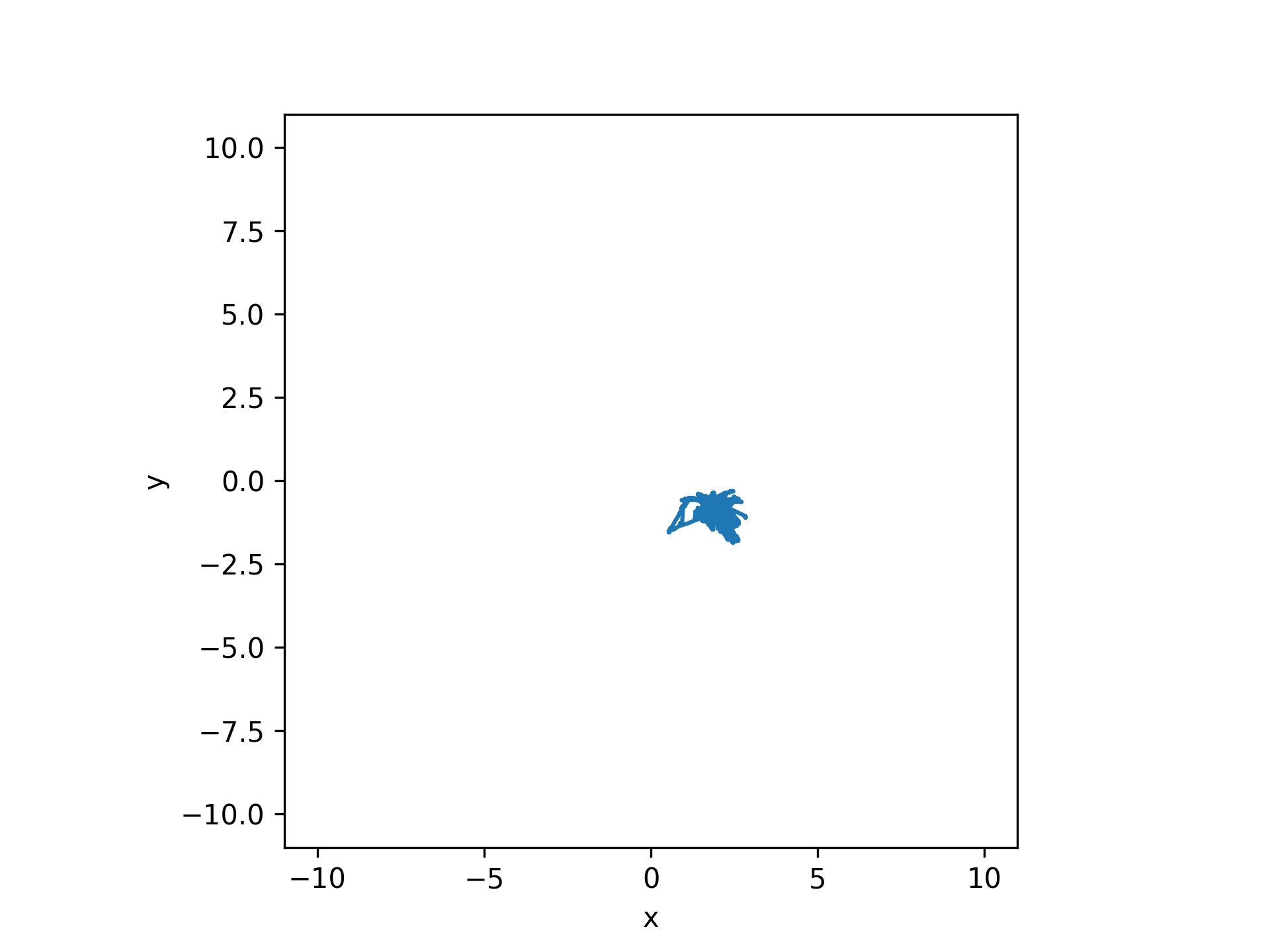
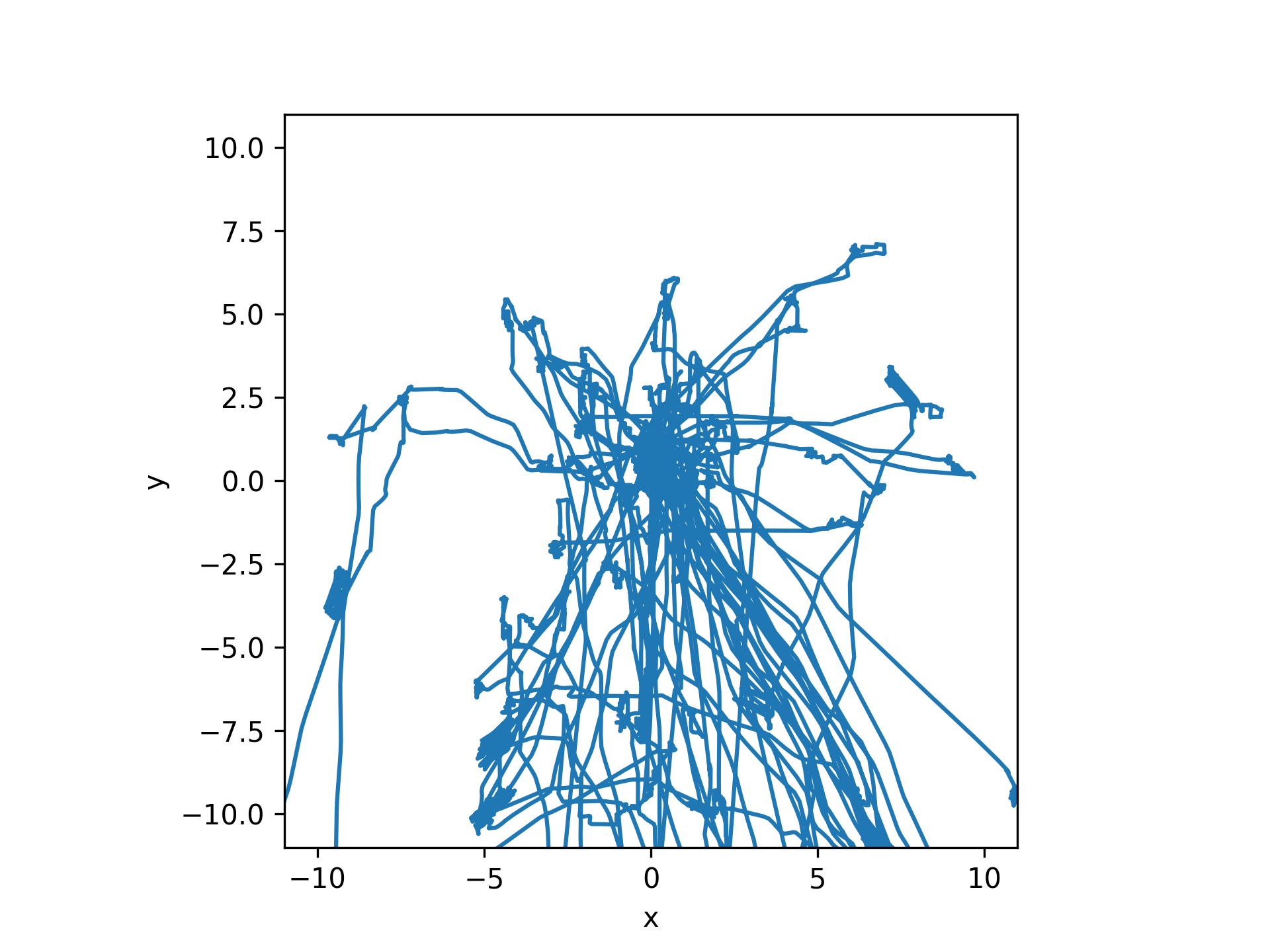
After calibration:
- aopy.preproc.wrappers.proc_lfp(data_dir, files, result_dir, result_filename, kilosort_dir=None, overwrite=False, max_memory_gb=1.0, filter_kwargs={})[source]
- Process lfp data:
Loads ‘broadband’ hdf data or ‘ecube’ headstage data and metadata neuropixels: low-pass filter data with 500Hz, downsample to 1k, synchronize timestamps with ecube. Destriping is applied
- Saves lfp data into the HDF datasets:
lfp_data (nt, nch) lfp_metadata (dict)
- Parameters:
data_dir (str) – where the data files are located
files (dict) – dictionary of filenames indexed by system
result_dir (str) – where to store the processed result
result_filename (str) – where to store the processed result
kilosort_dir (str) – data folder where preprocessed data of kilosort is saved
overwrite (bool, optional) – whether to remove existing processed files if they exist
max_memory_gb (float, optional) – max memory used to load binary data at one time
filter_kwargs (dict, optional) – keyword arguments to pass to
aopy.precondition.filter_lfp()
- aopy.preproc.wrappers.proc_mocap(data_dir, files, result_dir, result_filename, overwrite=False)[source]
- Process motion capture files:
Loads metadata, position data, and rotation data from ‘optitrack’ files If present, reads ‘hdf’ metadata to find appropriate strobe channel If present, loads ‘ecube’ analog data representing optitrack camera strobe
- The data is prepared along with timestamps into HDF datasets:
- mocap_data:
optitrack [(‘position’, ‘f8’, (3,)), (‘rotation’, ‘f8’, (4,)), (‘timestamp’, ‘f8’, (1,)]
- mocap_metadata:
source_dir (str) source_files (dict) samplerate (float) <other metadata from motive>
- Parameters:
data_dir (str) – where the data files are located
files (dict) – dictionary of filenames indexed by system
result_dir (str) – where to store the processed result
result_filename (str) – where to store the processed result
overwrite (bool) – whether to remove existing processed files if they exist
- Returns:
None
- aopy.preproc.wrappers.proc_single(data_dir, files, preproc_dir, subject, te_id, date, preproc_jobs, kilosort_dir=None, overwrite=False, **kwargs)[source]
Preprocess a single recording, given a list of raw data files, into a series of hdf records with the same prefix. :param data_dir: File directory of collected session data :type data_dir: str :param files: dict of file names to process in data_dir :type files: dict :param preproc_dir: Target directory for processed data :type preproc_dir: str :param subject: Subject name :type subject: str :param te_id: Block number of Task entry object :type te_id: int :param date: Date of recording :type date: str :param preproc_jobs: list of proc_types to generate :type preproc_jobs: list :param overwrite: Overwrite files in result_dir. Defaults to False. :type overwrite: bool, optional
- aopy.preproc.wrappers.proc_spikes(data_dir, files, result_dir, result_filename, kilosort_dir=None, overwrite=False)[source]
- Process spike data:
neuropixels: synchronize spike times with ecube. Extract waveforms from drift corrected data.
- Saves spike times and waveforms into the HDF datasets:
spikes (HDF5 group (dict)) : spike times for each drive waveforms (HDF5 group (dict)) : spike times for each drive metadata (dict)
- Parameters:
data_dir (str) – where the data files are located
files (dict) – dictionary of filenames indexed by system
result_dir (str) – where to store the processed result
result_filename (str) – where to store the processed result
kilosort_dir (str) – data folder where preprocessed data of kilosort is saved
overwrite (bool, optional) – whether to remove existing processed files if they exist
filter_kwargs (dict, optional) – keyword arguments to pass to
aopy.precondition.filter_lfp()
Preproc base
These functions are also available directly from aopy.preproc
- aopy.preproc.base.calc_eye_calibration(cursor_data, cursor_samplerate, eye_data, eye_samplerate, event_times, event_codes, align_events=range(81, 89), penalty_events=[64], offset=0.0, return_datapoints=False)[source]
Extracts cursor data and eyedata and calibrates, aligning them and calculating the least square fitting coefficients
- Parameters:
cursor_data (nt, 3) – cursor data in time
cursor_samplerate (float) – sampling rate of the cursor data
eye_data (nt, 2 or 4) – eye data in time (optionally for both left and right eyes)
eye_samplerate (float) – sampling rate of the eye data
event_times (nevent) – times at which events occur
event_codes (nevent) – codes for each event
align_events (list, optional) – list of event codes to use for alignment. By default, align to when the cursor enters 8 peripheral targets
penalty_events (list, optional) – list of penalty event codes to exclude. By default, events followed by hold penalties are excluded
offset (float, optional) – time (in seconds) to offset from the given events. Positive offset yields later eye data
return_datapoints (bool, optional) – if true, also returns cusor_data_aligned, eye_data_aligned
- Returns:
- tuple containing:
- coefficients (neyech, 2): coefficients [slope, intercept] for each eye channelcorrelation_coeff (neyech): correlation coefficients for each eye channel
- Return type:
tuple
- aopy.preproc.base.calc_eye_target_calibration(eye_data, eye_samplerate, event_times, event_codes, target_pos, align_events=range(81, 89), penalty_events=[64], cursor_enter_center_target=80, offset=0.0, duration=0.1, return_datapoints=False)[source]
Extracts eye data and calibrates, aligning eye data and calculating the least square fitting coefficients between eye positions and target positions
- Parameters:
eye_data (nt, 2 or 4) – eye data in time (optionally for both left and right eyes)
eye_samplerate (float) – sampling rate of the eye data
event_times (nevent) – times at which events occur
event_codes (nevent) – codes for each event
target_pos (ntarget, 3) – N target positions (x,y,z). This should be ordered by their target idx
align_events (list, optional) – list of event codes to use for alignment. By default, align to when the cursor enters 8 peripheral targets
penalty_events (list, optional) – list of penalty event codes to exclude. By default, events followed by hold penalties are excluded
cursor_enter_center_target (int, optional) – event code for cursor_enter_center_target
offset (float, optional) – time (in seconds) to offset from the given events. Positive offset yields later eye data
duration (float, optional) – duration (in seconds) to average eye trajectories in the interval from the given events + offset
return_datapoints (bool, optional) – if true, also returns cusor_data_aligned, eye_data_aligned
- Returns:
- tuple containing:
- coefficients (neyech, 2): coefficients [slope, intercept] for each eye channelcorrelation_coeff (neyech): correlation coefficients for each eye channel
- Return type:
tuple
- aopy.preproc.base.fill_missing_timestamps(uncorrected_timestamps)[source]
Fill missing timestamps by copying the subsequent timestamp over any NaNs. For example, if you have timestamps [0.01, 0.08, np.nan, np.nan, 0.25, np.nan, 0.38], then apply fill_missing_timestamps, the result would be [0.01, 0.08, 0.25, 0.25, 0.25, 0.38, 0.38]. Used by proc_exp() to give the times at which things appeared on the screen, since sometimes the screen will miss a refresh period and not display something until the next cycle.
- Parameters:
uncorrected_timestamps (nframes) – timestamps with missing data (np.nan) because they were recorded
frames (from a source which sometimes skips) –
- Returns:
measured timestamps with missing values filled in with the next non-nan value
- Return type:
corrected_timestamps (nframes)
- aopy.preproc.base.find_measured_event_times(approx_times, measured_times, search_radius, return_idx=False)[source]
Uses closest_value() to repeatedly find a measured time for each approximate time.
- Parameters:
approx_times (nt) – array of approximate event timestamps
measured_times (nt') – array of measured timestamps that might correspond to the approximate timestamps
search_radius (float) – distance before and after each approximate time to search for a measured time
return_idx (bool, optional) – if true, also return the index into measured time for each measured time
- Returns:
- tuple containing:
- parsed_ts (nt): array of the same length as approximate timestamps, but containing matching timestamps or np.nanprased_idx (nt): array of indices into measured_times corresponding to the parsed timestamps
- Return type:
tuple
- aopy.preproc.base.get_closest_value(timestamp, sequence, radius)[source]
Returns the value, within a specified radius, in given sequence closest to given timestamp. if none exist, returns none. If two are equidistant, this function returns the lower value.
- Parameters:
timestamp (float) – given timestamp
sequence (nt) – sequence to search for closest value
radius (float) – distance from timestamp to search for closest value
- Returns:
- tuple containing:
- closest_value (float): value within sequence that is closest to timestampclosest_idx (int): index of the closest_value in the sequence
- Return type:
tuple
- aopy.preproc.base.get_data_segment(data, start_time, end_time, samplerate, channels=None)[source]
Gets a single arbitrary length sengment of data from a timeseries
- Parameters:
data (nt, ndim) – arbitrary timeseries data that needs to segmented
start_time (float) – start of the segment in seconds
end_time (float) – end of the segment in seconds
samplerate (int) – sampling rate of the data
channels (list, optional) – list of channels to include in the segment. If None, include all channels. Useful for subselecting HDF data without loading it all into memory.
- Returns:
short segment of data from the given times
- Return type:
(nt’, ndim)
- aopy.preproc.base.get_data_segments(data, segment_times, samplerate)[source]
Gets arbitrary length segments of data from a timeseries
- Parameters:
data (nt, ndim) – arbitrary timeseries data that needs to segmented
segment_times (nseg, 2) –
samplerate (int) – sampling rate of the data
- Returns:
nt is the length of each segment (can be different for each)
- Return type:
list of 1d arrays (nt)
- aopy.preproc.base.get_dch_data(digital_data, digital_samplerate, dch)[source]
Transform digital data stored as integers into timestamps and values corresponding to a single channel or a set of channels.
- Parameters:
digital_data (nt,) – timeseries of digital data
digital_samplerate (float) – sampling rate of the digital data
dch (int or list) – channel(s) to get data from
- Returns:
structured np.ndarray of the form [(‘timestamp’, ‘f8’), (‘value’, ‘f8’)])
- Return type:
(nedges,)
- aopy.preproc.base.get_measured_clock_timestamps(estimated_timestamps, measured_timestamps, latency_estimate=0.01, search_radius=0.01)[source]
Takes estimated frame times and measured frame times and returns a time for each frame. If no closeby measurement can be found for a given estimate, that frame will be filled with np.nan
- Parameters:
estimated_timestamps (nframes) – timestamps when frames were thought to be displayed
measured_timestamps (nt) – timestamps when frames actually appeared on screen
latency_estimate (float, optional) – how long the display takes normally to update
search_radius (float, optional) – how far away to look for a measurement before giving up
- Returns:
measured timestamps, some of which will be np.nan if they were not displayed
- Return type:
nframes array
- aopy.preproc.base.get_trial_data(data, trigger_time, time_before, time_after, samplerate, channels=None)[source]
Get one chunk of data triggered by a trial start time. Chunks are padded with nan if the data does not span the entire chunk
- Parameters:
data (nt, nch) – arbitrary data, can be multidimensional
trigger_time (float) – start time of the trial
time_before (float) – amount of time [s] to include before the start of the trial
time_after (float) – time [s] to include after the start of the trial
samplerate (int) – sampling rate of data [samples/s]
- Returns:
trial aligned data chunk
- Return type:
(nt, nch)
- aopy.preproc.base.get_trial_segments(events, times, start_events, end_events, repeating_start_events=False)[source]
Gets times for the start and end of each trial according to the given set of start_events and end_events
- Parameters:
events (nt) – events vector
times (nt) – times vector
start_events (list) – set of start events to match
end_events (list) – set of end events to match
repeating_start_events (bool) – whether the start events might occur multiple times within one segment. Otherwise always use the last start event within a segment. May lead to segments spanning multiple trials if used improperly. Default False.
- Returns:
- tuple containing:
- segments (list of list of events): a segment of each trialtimes (ntrials, 2): list of 2 timestamps for each trial corresponding to the start and end events
- Return type:
tuple
Note
if there are multiple matching start or end events in a trial, the default is to only consider the first one. See
get_trial_segments_and_times()for more detail.
- aopy.preproc.base.get_trial_segments_and_times(events, times, start_events, end_events, repeating_start_events=False, return_idx=False)[source]
This function is similar to get_trial_segments() except it returns the timestamps of all events in event code. Trial align the event codes with corresponding event times.
- Parameters:
events (nt) – events vector
times (nt) – times vector
start_events (list) – set of start events to match
end_events (list) – set of end events to match
repeating_start_events (bool, optional) – whether the start events might occur multiple times within one segment. Otherwise always use the last start event within a segment. May lead to segments spanning multiple trials if used improperly. Default False.
return_idx (bool, optional) – whether to return the indices into events and times corresponding to the segments
- Returns:
- tuple containing:
- segments (list of list of events): a segment of each trialtimes (list of list of times): list of timestamps corresponding to each event in the event codeidx (list of list of indices, optional): list of indices into events and times corresponding to each event in the event code
- Return type:
tuple
Note
if there are multiple matching start or end events in a trial, the default is to only consider the first one. See examples for more detail.
Examples
For segments that do not contain multiple start events (e.g. trials from center-out reaching task):
task_codes = load_bmi3d_task_codes()
start_events = [task_codes['CENTER_TARGET_ON']]
end_events = [task_codes['TRIAL_END']]
print(start_events, end_events)

# example task data
events = [16, 80, 18, 32, 82, 48, 239, 16, 80, 19, 66, 239, 16, 80, 19, 32, 83, 48, 239]
times = np.arange(0,len(events))

# segments should contain only one 'CENTER_TARGET_ON' per segment, since the task is always to reach from the center to a random peripheral target
segments, times = get_trial_segments_and_times(events, times, start_events, end_events)
print(segments)
print(times)
For segments that contain multiple start events (e.g. trials from corners reaching task):
from aopy.data.bmi3d import load_bmi3d_task_codes
task_codes = load_bmi3d_task_codes()
start_events = [task_codes['CORNER_TARGET_ON']]
end_events = [task_codes['TRIAL_END']]
print(start_events, end_events)

# example task data
events = [18, 82, 19, 34, 83, 48, 239, 19, 83, 17, 66, 239, 19, 83, 17, 35, 81, 48, 239]
times = np.arange(0,len(events))
segments, times = get_trial_segments_and_times(events, times, start_events, end_events, repeating_start_events=True)

# segments should contain multiple 'CORNER_TARGET_ON' events within the same segment, since the task is to reach from one random corner to another
print(segments)
print(times)
For segments that do not contain multiple start events themselves but multiple start events may exist in the larger task structure (e.g. delay period from corners reaching task):
from aopy.data.bmi3d import load_bmi3d_task_codes
task_codes = load_bmi3d_task_codes()
start_events = [task_codes['CORNER_TARGET_ON']] # same as above, but now we want when the 2nd corner target in the sequence turns on
end_events = [task_codes['CORNER_TARGET_OFF']] # when 1st corner target turns off, indicating end of delay period
print(start_events, end_events)

# example task data (same as above)
events = [18, 82, 19, 34, 83, 48, 239, 19, 83, 17, 66, 239, 19, 83, 17, 35, 81, 48, 239]
times = np.arange(0,len(events))
segments, times = get_trial_segments_and_times(events, times, start_events, end_events, repeating_start_events=False)

# without repeating_start_events, segments skip over the 1st corner target in the sequence and start instead from when the 2nd corner target turns on (e.g when the delay period begins)
print(segments)
print(times)
- aopy.preproc.base.get_unique_conditions(trial_idx, conditions, condition_name='target')[source]
Gets the unique trial combinations of each condition set. Used to parse BMI3D data when there is no ‘trials’ array in the HDF file. Output looks something like this for a center-out experiment:
'trial'     'index'     'target'
0           0           (0, 0, 0)
0           5           (8, 0, 0)
1           0           (0, 0, 0)
1           2           (0, 8, 0)
...
- Parameters:
n_trials (int) – number of trials
trial_idx (int array) – which trials happen on each cycle
conditions (ndarray) – which conditions happen on each cycle
condition_name (str, optional) – what the conditios are called
- Returns:
- array of type [(‘trial’, ‘u8’), (‘index’, ‘u8’),
(condition_name, ‘f8’, (3,)))] describing the unique conditions on each trial
- Return type:
record array
- aopy.preproc.base.interp_timestamps2timeseries(timestamps, timestamp_values, samplerate=None, sampling_points=None, interp_kind='linear', extrapolate=False, remove_nan=True)[source]
This function uses linear interpolation (scipy.interpolate.interp1d) to convert timestamped data to timeseries data given new sampling points. Timestamps must be monotonic. If the timestamps or timestamp_values include a nan, this function ignores the corresponding timestamp value and performs interpolation between the neighboring values. To calculate the new points from ‘samplerate’ this function creates sample points with the same range as ‘timestamps’ (timestamps[0], timestamps[-1]). Either the ‘samplerate’ or ‘sampling_points’ optional argument must be used. If neither are filled, the function will display a warning and return nothing. If both ‘samplerate’ and ‘sampling_points’ are input, the sampling points will be used. The optional argument ‘interp_kind’ corresponds to ‘kind’. The optional argument ‘extrapolate’ determines whether timepoints falling outside the range of the input timestamps should be extrapolated or not. If not, they are copied from the first and last valid values, depending on whether they appear at the beginning or end of the timeseries, respectively.
Note
Enforces monotonicity of the input timestamps by removing timestamps and their associated values that do not increase.
Example
- ::
>>> timestamps = np.array([1,2,3,4])
>>> timestamp_values = np.array([100,200,100,300])
>>> timeseries, sampling_points = interp_timestamps2timeseries(timestamps, timestamp_values, samplerate=2)
>>> print(timeseries)
np.array([100,150,200,150,100,200,300])
>>> print(sampling_points)
np.array([1,1.5,2,2.5,3,3.5,4])
- Parameters:
timestamps (nstamps) – Timestamps of original data to be interpolated between.
timestamp_values (nstamps) – Values corresponding to the timestamps.
samplerate (float, optional) – Optional argument if new sampling points should be calculated based on the timstamps. Sampling rate of newly sampled output array in Hz. Default None.
sampling_points ((nt,) array, optional) – Optional argument to pass predefined sampling points. Default None.
interp_kind (str, optional) – Optional argument to define the kind of interpolation used. Defaults to ‘linear’
extrapolate (bool, optional) – If True, use scipy.interp1d’s built-in extrapolate functionality. Otherwise, use the first and last valid data.
remove_nan (bool, optional) – If True, remove nan values before interpolation. Default True.
- Returns:
- tuple containing:
- timeseries (nt): New timeseries of data.sampling_points (nt): Sampling points used to calculate the new time series.
- Return type:
tuple
- aopy.preproc.base.locate_trials_with_event(trial_events, event_codes, event_columnidx=None)[source]
Given an array of trial separated events, this function goes through and finds the event sequences corresponding to the trials that include a given event. If an array of event codes are input, the function will find the trials corresponding to each event code.
- Parameters:
trial_events (ntr, nevents) – Array of trial separated event codes
event_codes (int, str, list, or 1D array) – Event code(s) to find trials for. Can be a list of strings or ints
event_column (int) – Column index to look for events in. Indexing starts at 0. Keep as ‘None’ if all columns should be analyzed.
- Returns:
- Tuple containing:
- split_events (list of arrays): List where each index includes an array of trials containing the event_code corresponding to that index.split_events_combined (1D Array): Concatenated indices for which trials correspond to which event code. Can be used as indices to order ‘trial_events’ by the ‘event_codes’ input.
- Return type:
tuple
- Example::
>>> aligned_events_str = np.array([['Go', 'Target 1', 'Target 1'],
        ['Go', 'Target 2', 'Target 2'],
        ['Go', 'Target 4', 'Target 1'],
        ['Go', 'Target 1', 'Target 2'],
        ['Go', 'Target 2', 'Target 1'],
        ['Go', 'Target 3', 'Target 1']])
>>> split_events, split_events_combined = locate_trials_with_event(aligned_events_str, ['Target 1','Target 2'])
>>> print(split_events)
[array([0, 2, 3, 4, 5], dtype=int64), array([1, 3, 4], dtype=int64)]
>>> print(split_events_combined)
[0 2 3 4 5 1 3 4]
- aopy.preproc.base.sample_timestamped_data(data, timestamps, samplerate, upsamplerate=None, append_time=0, **kwargs)[source]
Convert irregularly spaced data into a timeseries at the given samplerate. First interpolates the data (by default to 100 times the samplerate), then downsamples to the given samplerate. Optionally adds extra time at the end of the timeseries.
- Parameters:
data (nt, ...) – A numpy array of shape (nt, …) containing the data to be sampled. The first dimension must represent the time index.
timestamps (nt,) – The timestamp (in seconds) for each data point in data.
samplerate (float) – The desired output sampling rate in Hz.
upsamplerate (float, optional) – (deprecated) No longer used.
append_time (float, optional) – The amount of extra time to add at the end of the timeseries, in seconds. Defaults to 0.
kwargs (dict, optional) – arguments to include in interpolation function
- Returns:
cursor_data_time containing the sampled data.
- Return type:
(ns, …)
Examples
np.random.seed(0)
duration = 4
freq = 5
samplerate = 25000
ground_truth_data = utils.generate_multichannel_test_signal(duration*2, samplerate, 2, freq, 1)

fps = 120
nt = fps*duration
offset = 0.01 # timestamps start strictly after time zero
framerate_error = 0.01*np.random.uniform(size=(nt,)) # 10 ms jitter
drift = np.cumsum(0.0001*np.random.uniform(size=(nt,))) # 0.1 ms drift
timestamps = offset + np.arange(nt)/fps + framerate_error + drift
samples = (timestamps * samplerate).astype(int)

frame_data = ground_truth_data[samples,:]
interp_samplerate = 120
interp_data = sample_timestamped_data(frame_data, timestamps, interp_samplerate)

fig, ax = plt.subplots(3,1, figsize=(5,6))
visualization.plot_timeseries(frame_data[:,0], fps, ax=ax[0])
visualization.plot_timeseries(interp_data[:,0], interp_samplerate, ax=ax[0])
ax[0].set_title(f'{freq} Hz signal')
ax[0].set_ylabel('pos (cm)')
ax[0].legend(['without sampling', 'with sampling'])

visualization.plot_freq_domain_amplitude(frame_data[:,0], fps, ax=ax[1])
visualization.plot_freq_domain_amplitude(interp_data[:,0], interp_samplerate, ax=ax[1])
ax[1].set_xscale('linear')
ax[1].set_xlim(0,30)
ax[1].set_ylabel('Peak amplitude')
ax[1].legend(['without sampling', 'with sampling'])
plt.tight_layout()

# Compare with different upsampling rates
visualization.plot_timeseries(ground_truth_data[:,0], samplerate, ax=ax[2])
interp_data = sample_timestamped_data(frame_data, timestamps, 1000)
visualization.plot_timeseries(interp_data[:,0], 1000, ax=ax[2])
interp_data = sample_timestamped_data(frame_data, timestamps, 10000)
visualization.plot_timeseries(interp_data[:,0], 10000, ax=ax[2])
ax[2].set_xlim(0.0,0.3)
ax[2].legend(['sampled at 120 Hz', 'sampled at 1 kHz', 'sampled at 10 kHz'])
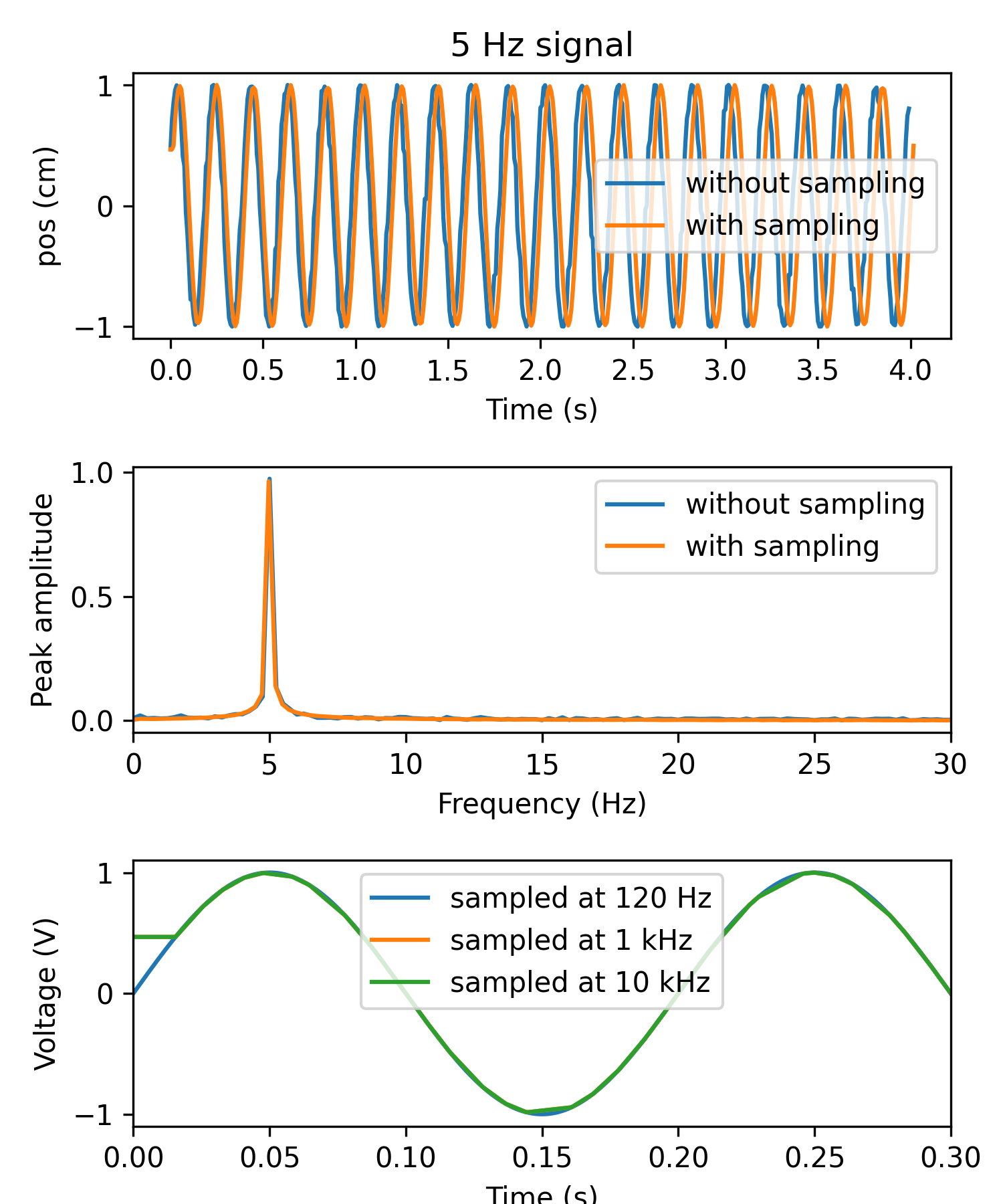
Modified July 2025: removed upsamplerate in favor of always interpolating to exactly the sampling rate. Filtering and downsampling is now done later, e.g. in
get_kinematics().
- aopy.preproc.base.trial_align_data(data, trigger_times, time_before, time_after, samplerate)[source]
Transform data into chunks of data triggered by trial start times. If trigger_times is too long relative to ‘data/samplerate’, only the triggers that correspond to data will be included, while others will be filled with np.nan.
- Parameters:
data (nt, nch) – arbitrary data, can be multidimensional
trigger_times (ntrial) – start time of each trial [s]
time_before (float) – amount of time [s] to include before the start of each trial
time_after (float) – time [s] to include after the start of each trial
samplerate (int) – sampling rate of data [samples/s]
- Returns:
trial aligned data
- Return type:
(nt, nch, trial)
Modified Sept. 2023 - transpose output
- aopy.preproc.base.trial_align_events(aligned_events, aligned_times, event_to_align)[source]
Compute a new trial_times matrix with offset timestamps for the given event_to_align. Any index corresponding to where aligned_events is empty will also be empty.
- Parameters:
aligned_events (n_trial, n_event) – events per trial
aligned_times (n_trial, n_event) – timestamps per trial
event_to_align (int or str) – event to align to
- Returns:
number of trials by number of events
- Return type:
(n_trial, n_event)
- aopy.preproc.base.trial_align_times(timestamps, trigger_times, time_before, time_after, subtract=True)[source]
Takes timestamps and splits them into chunks triggered by trial start times
- Parameters:
timestamps (nt) – events in time to be trial aligned
trigger_times (ntrial) – start time of each trial
time_before (float) – amount of time to include before the start of each trial
time_after (float) – time to include after the start of each trial
subtract (bool, optional) – whether the start of each trial should be set to 0
- Returns:
- tuple containing:
- trial_aligned (ntrial, nt): trial aligned timestampstrial_indices (ntrial, nt): indices into timestamps in the same shape as trial_aligned
- Return type:
tuple
- aopy.preproc.base.trial_separate(events, times, evt_start, n_events=8, nevent_offset=0)[source]
Compute the 2D matrices contaning events per trial and timestamps per trial. If there are not enough events to fill n_events, the remaining indices will be a value of ‘-1’ the events are ints or missing values if events are strings.
- Parameters:
events (nt) – events vector
times (nt) – times vector
evt_start (int or str or list) – event or events marking the start of a trial
n_events (int) – number of events in a trial
nevent_offset (int) – number of events before the start event to offset event alignment by. For example, if you wanted to align to “targ” in [“trial”, “targ”, “reward”, “trial”, “targ”, “error”] but include the preceding “trial” event, then you could use nevent_offset=-1
- Returns:
- tuple containing:
- trial_events (n_trial, n_events): events per trialtrial_times (n_trial, n_events): timestamps per trial
- Return type:
tuple
- aopy.preproc.base.validate_measurements(expected_values, measured_values, diff_thr)[source]
Corrects sensor measurements to expected values. If the difference between any of the measured values and the expected values fall outside the given threshold (diff_thr) then the expected value is used. If it is within the threshold, the measured value is used. The two input arrays must have the same lengths.
- Parameters:
expected_values (nt) – known or expected values
measured_values (nt) – measured data that may be spurious
diff_thr (float) – threshold above which differences are deemed to large and expected values are returned
- Returns:
- tuple containing:
- corrected_values (nt): array of the same length as the inputs but with validated valuesdiff_above_thr (nt): boolean array of values passing the difference threshold
- Return type:
tuple
Quality
- aopy.preproc.quality.bad_channel_detection(data, srate, num_th=3.0, lf_c=100.0, sg_win_t=8.0, sg_over_t=4.0, sg_bw=0.5)[source]
Checks input [nt, nch] data array channel quality
- Parameters:
data (nt, nch) – numpy array of data
srate (int) – sample rate
num_th (float, optional) – Constant to adjust threshold. Defaults to 3.
lf_c (int, optional) – low frequency cutoff. Defaults to 100.
sg_win_t (numeric, optional) – spectrogram window length. Defaults to 8.
sg_over_t (numeric, optional) – spectrogram overlap length. Defaults to 4.
sg_bw (float, optional) – spectrogram time-half-bandwidth product. Defaults to 0.5.
- Returns:
logical array indicating bad channels
- Return type:
bad_ch (nch)
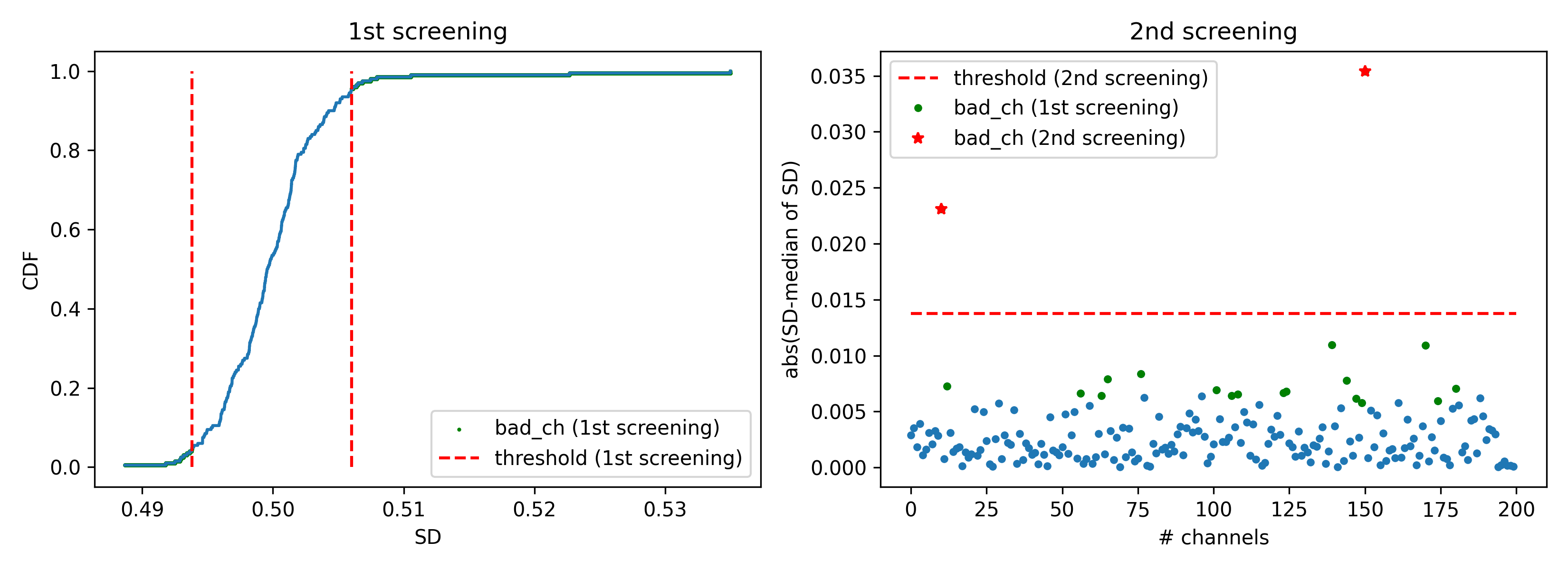
- aopy.preproc.quality.detect_bad_ch_outliers(data, nbins=10000, thr=0.05, numsd=5.0, debug=False, verbose=True)[source]
Detect badchannels. This code is originally Amy’s code in pesaran lab. This function has 2 steps. In the 1st step, it detects tentative bad channels whose SD is less than th or more than 1-th in CDF In the 2nd step, it extracts bad channels from tentative bad channels by finding conditions where (SD - median of SD) is outside numsd*SD[~badch]
- Parameters:
data (nt, nch) – neural data
nbins (int) – number of bins to make CDF
thr (float, optional) – threshold in the CDF to detect bad channels for 1st screening. 0.05 means data outisde 5% or 95% in the CDF is regarded as bad channels.
numsd (float, optional) – number of standard deviations above zero to detect bad channels for 2nd screening
debug (bool, optional) – if True, display a figure showing the threshold crossings
verbose (bool, optional) – if True, print bad channels
- Returns:
logical array indicating bad channels after 2nd screening
- Return type:
bad_ch (nch)
Example
test_data = np.random.normal(10,0.5,(10000, 200))
test_data[0, 10] = 25
test_data[5, 150] = 30
bad_ch = quality.detect_bad_ch_outliers(test_data, nbins=10000, thr=0.05, numsd=5.0, debug=True, verbose=False)
- aopy.preproc.quality.detect_bad_exp_data(preproc_dir, subjects, ids, dates)[source]
- Identifies preprocessed experiment data files that contain errors. Detected errors include:
preprocessed data could not be loaded, preprocessed data is missing event timestamps (likely the result of missing ecube data), and preprocessed data contains events that do not match bmi3d_events (likely the result of inaccurately sent digital events). The detected files should be re-preprocessed or otherwise debugged before being used in analysis!
- Parameters:
preproc_dir (str) – base directory where the files live
subjects (list of str) – Subject name for each recording
ids (list of int) – Block number of Task entry object for each recording
dates (list of str) – Date for each recording
- Returns:
entries (subject, date, id) of each preprocessed experiment data file that was identified to have errors
- Return type:
list of lists
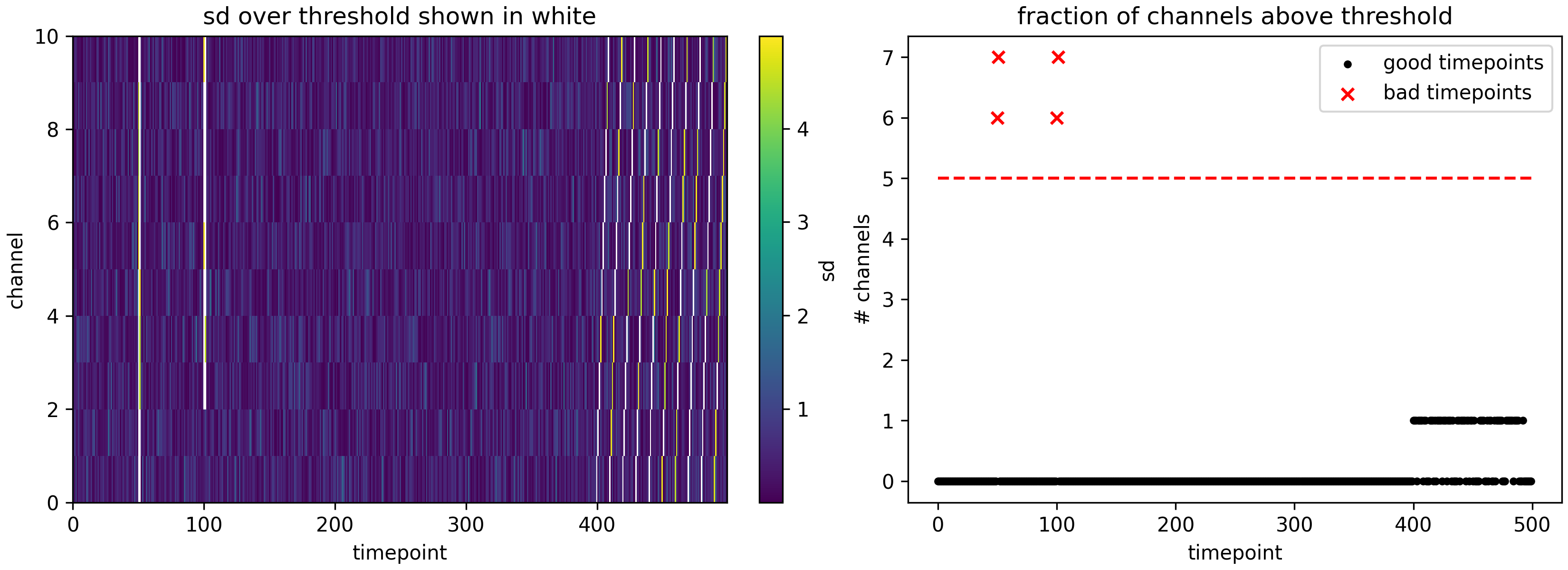
- aopy.preproc.quality.detect_bad_timepoints(data, sd_thr=5, ch_frac=0.5, debug=False)[source]
Finds timepoints where a given fraction of channels contain outlier data. For best results, you may need to first compute the power of the data before using this function.
- Parameters:
data (nt, nch) – continuous data
sd_thr (float, optional) – number of standard deviations away from the mean to threshold bad data. Default 5
ch_frac (float, optional) – fraction (between 0. and 1.) of channels containing bad data to consider a trial as bad. Default 0.5
debug (bool, optional) – if True, display a figure showing the threshold crossings
- Returns:
True for bad timepoints, False for good timepoints
- Return type:
(nt,) boolean mask
Example
nt = 200
nch = 10
np.random.seed(0)
data = np.random.normal(size=(nt, nch))
data[0:50,:] += 10 # timepoint is noisy across all electrodes
data[50:100,8:] -= 10 # timepoint is noisy on most electrodes
for t in range(100,nt):
    data[t,t%nch] -= 10 # single timepoint is noisy but different timepoint for each channel

bad_timepoints = quality.detect_bad_timepoints(data, sd_thr=5, ch_frac=0.5, debug=True)
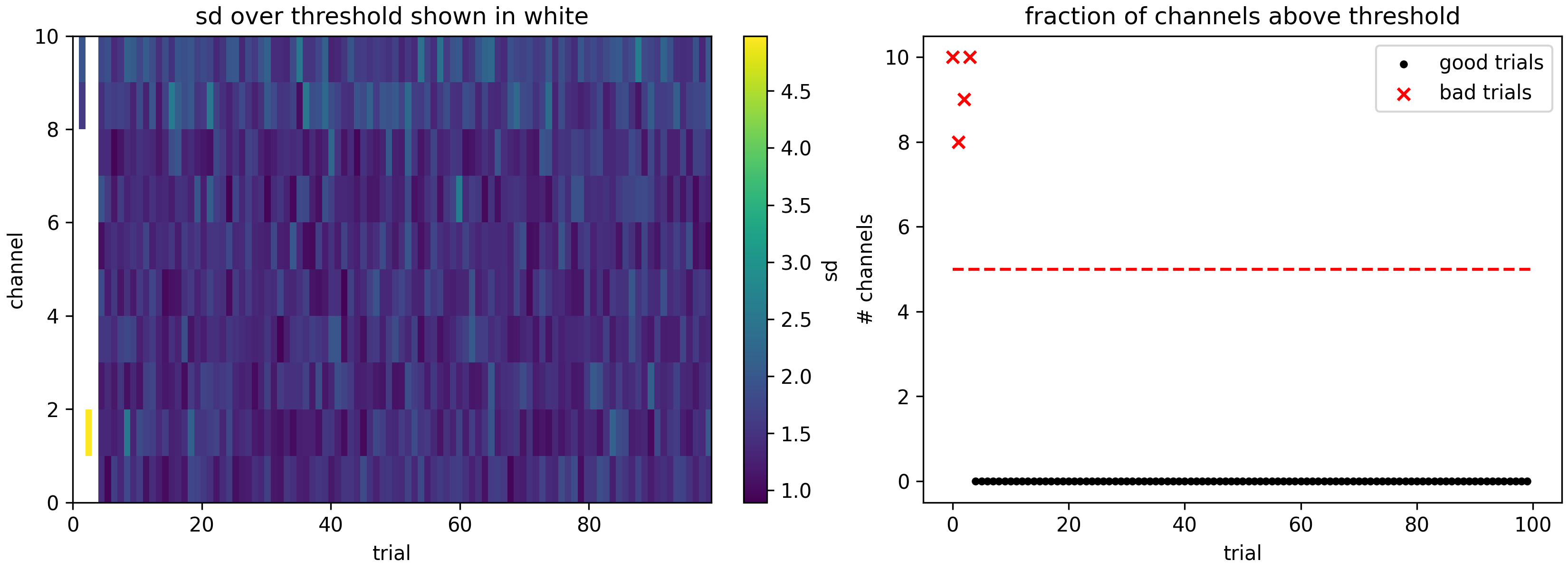
- aopy.preproc.quality.detect_bad_trials(erp, sd_thr=5, ch_frac=0.5, debug=False)[source]
Finds trials where a given fraction of channels contain outlier data.
- Parameters:
erp (nt, nch, ntr) – trial-aligned continuous data
sd_thr (float, optional) – number of standard deviations away from the mean to threshold bad data. Default 5
ch_frac (float, optional) – fraction (between 0. and 1.) of channels containing bad data to consider a trial as bad. Default 0.5
debug (bool, optional) – if True, display a figure showing the threshold crossings
- Returns:
True for bad trials, False for good trials
- Return type:
(ntr,) boolean mask
Example
nt = 50
nch = 10
ntr = 100
erp = np.random.normal(size=(nt, nch, ntr))
erp[:,:,0] += 10 # entire trial is noisy across all electrodes
erp[:,:8,1] -= 10 # entire trial is noisy on most electrodes
erp[0,:,2] += 10 # single timepoint within the trial is noisy on all electrodes
for t in range(nt):
    erp[t,t%nch,3] -= 10 # single timepoint is noisy but different timepoint for each channel

bad_trials = detect_bad_trials(erp, sd_thr=5, ch_frac=0.5, debug=True)
- aopy.preproc.quality.high_freq_data_detection(data, srate, bad_channels=None, lf_c=100.0, sg_win_t=8.0, sg_over_t=4.0, sg_bw=0.5)[source]
Checks multichannel numpy array data for excess high frequency power. Returns a logical array of time locations in which any channel has excess high power (indicates noise)
- Parameters:
data (nt, nch) – timerseries data across channels
srate (numeric) – data sampling rate
bad_channels (boolean array, optional) – Array-like of boolean values indicating bad channels. Defaults to None.
lf_c (numeric, optional) – low frequency cutoff. Defaults to 100.
- Returns:
boolean array indicating timepoints with detected high-frequency noise on any channel bad_data_mask_all_ch (nt, nch): boolean array indicating time points at which any channel had high-frequency noise
- Return type:
bad_data_mask (nt)
- aopy.preproc.quality.histogram_defined_noise_levels(data, nbin=20)[source]
Automatically determine bandwidth in a signal
- Parameters:
data (np.array) – single-channel data array
nbin (int, optional) – number of histogram bins. Defaults to 20.
- Returns:
lower, upper bound values
- Return type:
noise_bounds (tuple)
- aopy.preproc.quality.saturated_data_detection(data, srate, bad_channels=None, adapt_tol=1e-08, win_n=20)[source]
Detects saturated data segments in input data array
- Parameters:
data (nt, nch) – numpy array of multichannel data
srate (numeric) – data sampling rate
bad_channels (bool array, optional) – boolean array indicating bad data channels. Default: None
adapt_tol (float, optional) – detection tolerance. Default: 1e-8
win_n (int, optional) – sample length of detection window. Default: 20
- Returns:
boolean array indicating saturated data detection bad_all_ch_mask (nt, nch): boolean array indicated separate channel saturation detected
- Return type:
sat_data_mask (nt)
BMI3D
- aopy.preproc.bmi3d.decode_event(dictionary, value)[source]
Decode a integer event code into a event name and data
- Parameters:
dictionary (dict) – dictionary of (event_name, event_code) event definitions
value (int) – number to decode
- Returns:
2-tuple containing (event_name, data) for the given value
- Return type:
tuple
- aopy.preproc.bmi3d.decode_events(dictionary, values)[source]
Decode a list of integer event code into a event names and data
- Parameters:
dictionary (dict) – dictionary of (event_name, event_code) event definitions
values (n_values) – list of integer numbers to decode
- Returns:
2-tuple containing (event_names, data) for the given values
- Return type:
tuple
- aopy.preproc.bmi3d.get_laser_trial_times(preproc_dir, subject, te_id, date, laser_trigger='qwalor_trigger', laser_sensor='qwalor_sensor', debug=False, **kwargs)[source]
Get the laser trial times, trial widths, and trial powers from the given experiment. Returned values are computed from the laser sensor in combination with the expected laser events from BMI3D’s hdf records.
- Parameters:
preproc_dir (str) – base directory where the files live
subject (str) – Subject name
te_id (int) – Block number of Task entry object
date (str) – Date of recording
laser_trigger (str, optional) – Specifies the name of the digital laser trigger
laser_sensor (str, optional) – Specifies the name of the analog laser sensor
kwargs (dict) – to be passed to :func:~aopy.preproc.laser.find_stim_times
- Returns:
- tuple containing:
- times (nevent): laser timings (seconds)widths (nevent): laser widths (seconds)gains (nevent): laser gains (fraction)powers (nevent): calibrated laser powers (mW)
- Return type:
tuple
- aopy.preproc.bmi3d.get_peak_power_mW(exp_metadata)[source]
Estimate the peak power from the date
- Parameters:
exp_metadata (dict) – bmi3d metadata
- Returns:
peak power in mW
- Return type:
float
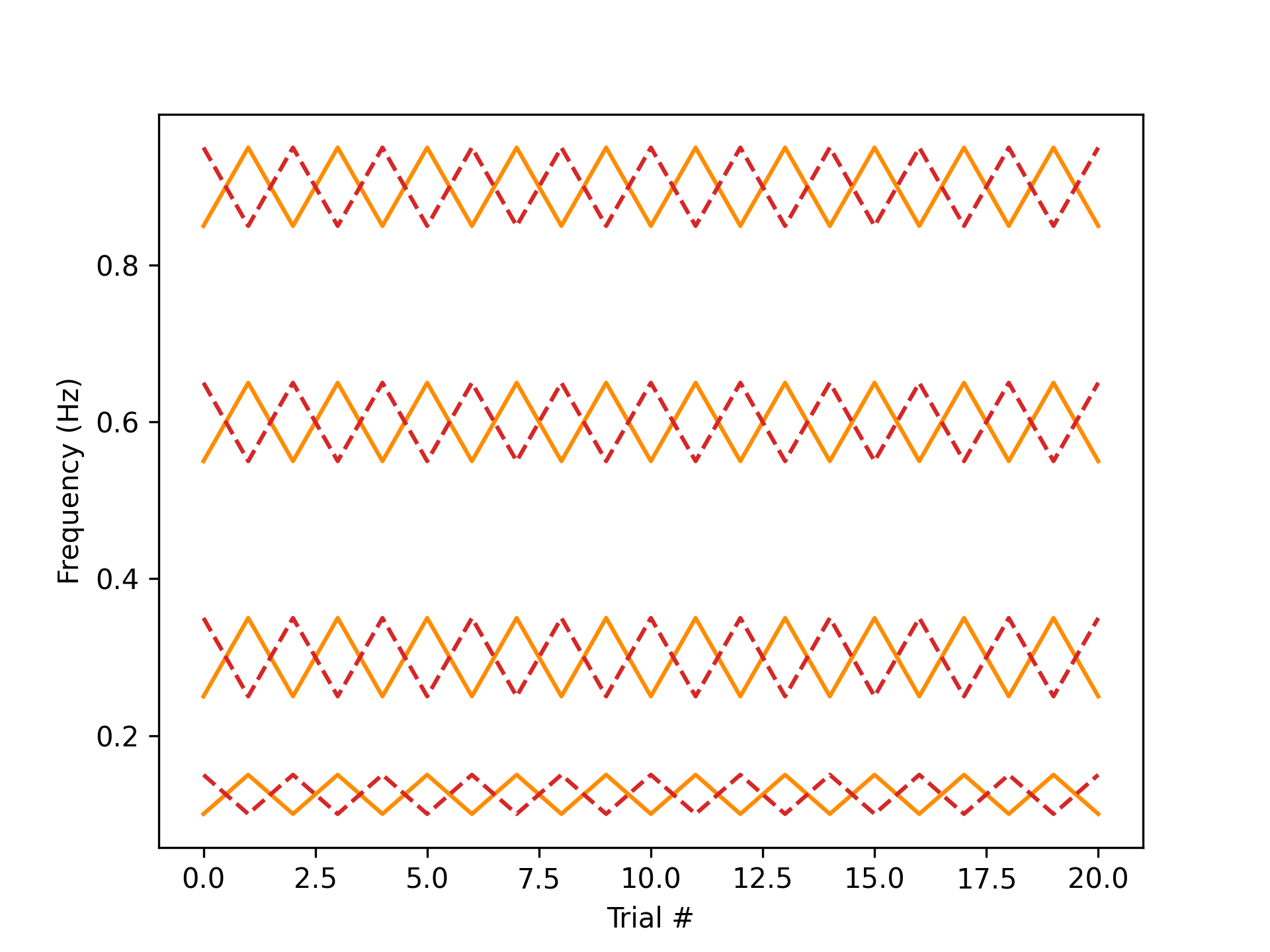
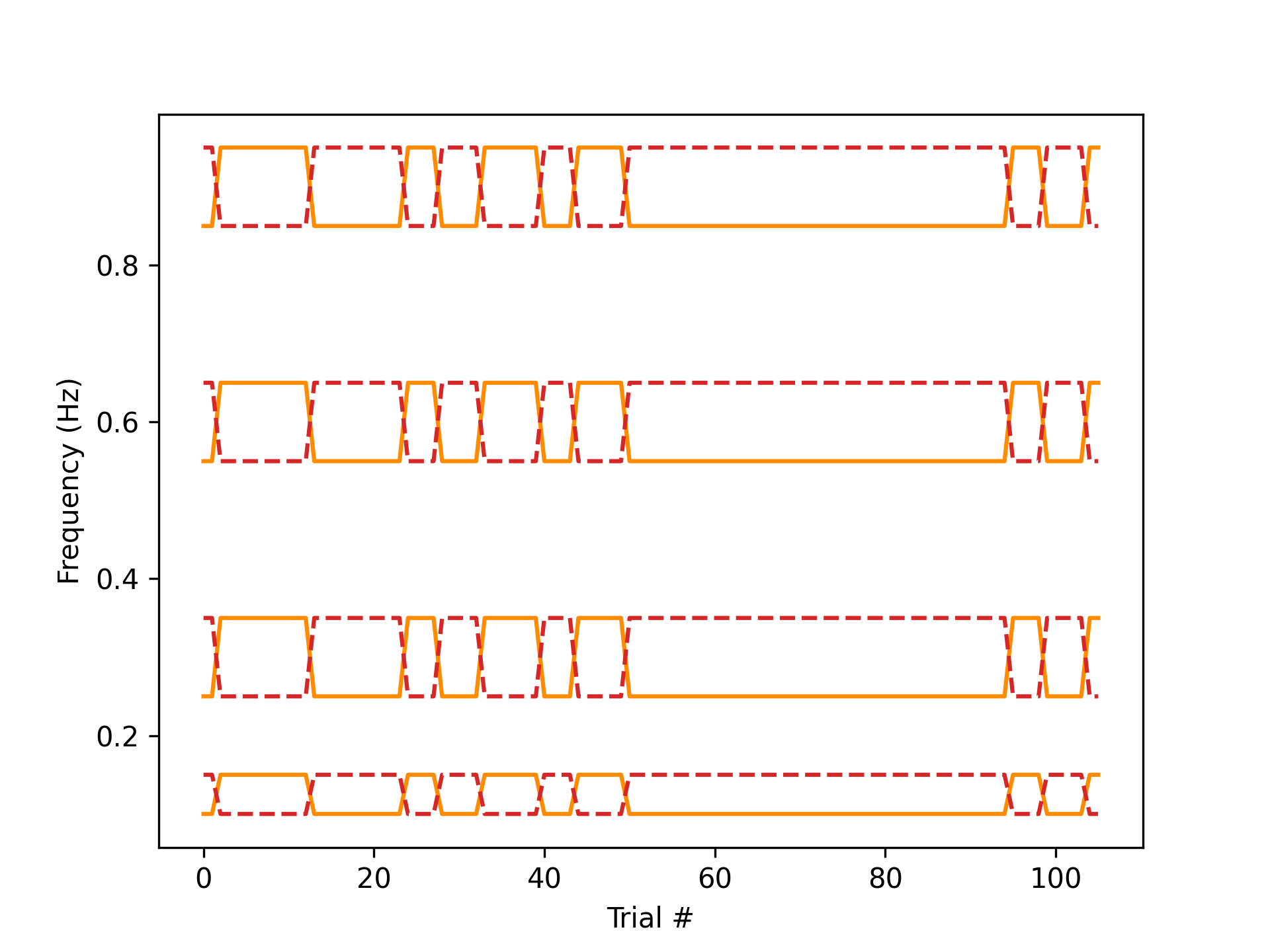
- aopy.preproc.bmi3d.get_ref_dis_frequencies(data, metadata)[source]
For continuous tracking tasks, get the set of frequencies (in Hz) used to generate the reference and disturbance trajectories that were preesented on each trial of the experiment.
Note
This function should be used with caution on task entries that have mismatched sync and bmi3d events! Prior to 11-16-2022, bmi3d did not allow the number of experimental frequencies to be set by the experimenter,
and this parameter defaulted to 8.
- Prior to 2-23-2023, bmi3d did not save the generator index in the task data, and this had to be calculated
by the number of times bmi3d entered the ‘wait’ state.
- Parameters:
data (dict) – A dictionary containing the experiment data.
metadata (dict) – A dictionary containing the experiment metadata.
- Returns:
- Tuple containing:
- freq_r (list of arrays): (ntrial) list of (nfreq,) frequencies used to generate reference trajectoryfreq_d (list of arrays): (ntrial) list of (nfreq,) frequencies used to generate disturbance trajectory
- Return type:
tuple
Examples
subject = 'test'
te_id = '8461'
date = '2023-02-25'

data, metadata = load_preproc_exp_data(data_dir, subject, te_id, date)
freq_r, freq_d = get_ref_dis_frequencies(data, metadata)

plt.figure()
plt.plot(freq_r, 'darkorange')
plt.plot(freq_d, 'tab:red', linestyle='--')
plt.xlabel('Trial #'); plt.ylabel('Frequency (Hz)')
subject = 'churro'
te_id = '375'
date = '2023-10-02'

data, metadata = load_preproc_exp_data(data_dir, subject, te_id, date)
freq_r, freq_d = get_ref_dis_frequencies(data, metadata)

plt.figure()
plt.plot(freq_r, 'darkorange')
plt.plot(freq_d, 'tab:red', linestyle='--')
plt.xlabel('Trial #'); plt.ylabel('Frequency (Hz)')
- aopy.preproc.bmi3d.get_switched_stimulation_sites(preproc_dir, subject, te_id, date, trigger_timestamps, return_switch_ch=False, debug=False)[source]
Get the stimulation sites at the given timestamps from an experiment where an optical switch was used.
- Parameters:
preproc_dir (str) – base directory where the files live
subject (str) – Subject name
te_id (int) – Block number of Task entry object
date (str) – Date of recording
trigger_timestamps (nt,) – timestamps of interest
return_switch_ch (bool, optional) – also return the switch channel at the computed times
debug (bool, optional) – print a plot of the optical switch channel at the computed times
- Returns:
stimulation sites at the given timestamps, or np.nan if no site was selected.
- Return type:
(nt,)
- aopy.preproc.bmi3d.get_target_events(exp_data, exp_metadata)[source]
For target acquisition tasks, get an (n_event, n_target) array encoding the position of each target whenever an event is fired by BMI3D. The resulting sequence is used to generate a sampled timeseries in
get_kinematic_segments(). When targets are turned off, their position is replaced by np.nan.- Parameters:
exp_data (dict) – A dictionary containing the experiment data.
exp_metadata (dict) – A dictionary containing the experiment metadata.
- Returns:
position of each target at each event time.
- Return type:
(n_event, n_target, 3) array
- aopy.preproc.bmi3d.parse_bmi3d(data_dir, files)[source]
Wrapper around version-specific bmi3d parsers
- Parameters:
data_dir (str) – where to look for the data
files (dict) – dictionary of files for this experiment
- Returns:
- tuple containing:
- data (dict): bmi3d datametadata (dict): bmi3d metadata
- Return type:
tuple
Oculomatic
- aopy.preproc.oculomatic.detect_noise(eye_data, samplerate, min_step=None, step_thr=3, t_closed_min=0.1)[source]
Detect noise in oculomatic eye data. Searches for repeated data which indicates that the subject’s eyes were closed and returns a mask for each eye. Uses the minimum step size in the data to estimate when the voltage has “changed” versus when it is fluctuating because of measurement noise.
- Parameters:
eye_data ((nt,nch) array) – unfiltered raw or calibrated eye position data
samplerate (float) – sampling rate of the eye data
min_step (float, optional) – minimum step size in the data. If None, it will be calculated automatically. Default None.
step_thr (float, optional) – multiple of the minimum step size to use as a threshold for detecting changing values in the eye data
t_closed_min (float, optional) – number of seconds the data must remain unchanged to be included in the eye closed mask
- Returns:
boolean mask, True for each eye when it was probably closed.
- Return type:
(nt, nch) eye_closed_mask
- aopy.preproc.oculomatic.parse_oculomatic(data_dir, files, samplerate=1000, max_memory_gb=1.0, debug=True, **filter_kwargs)[source]
Loads eye data from ecube and hdf data.
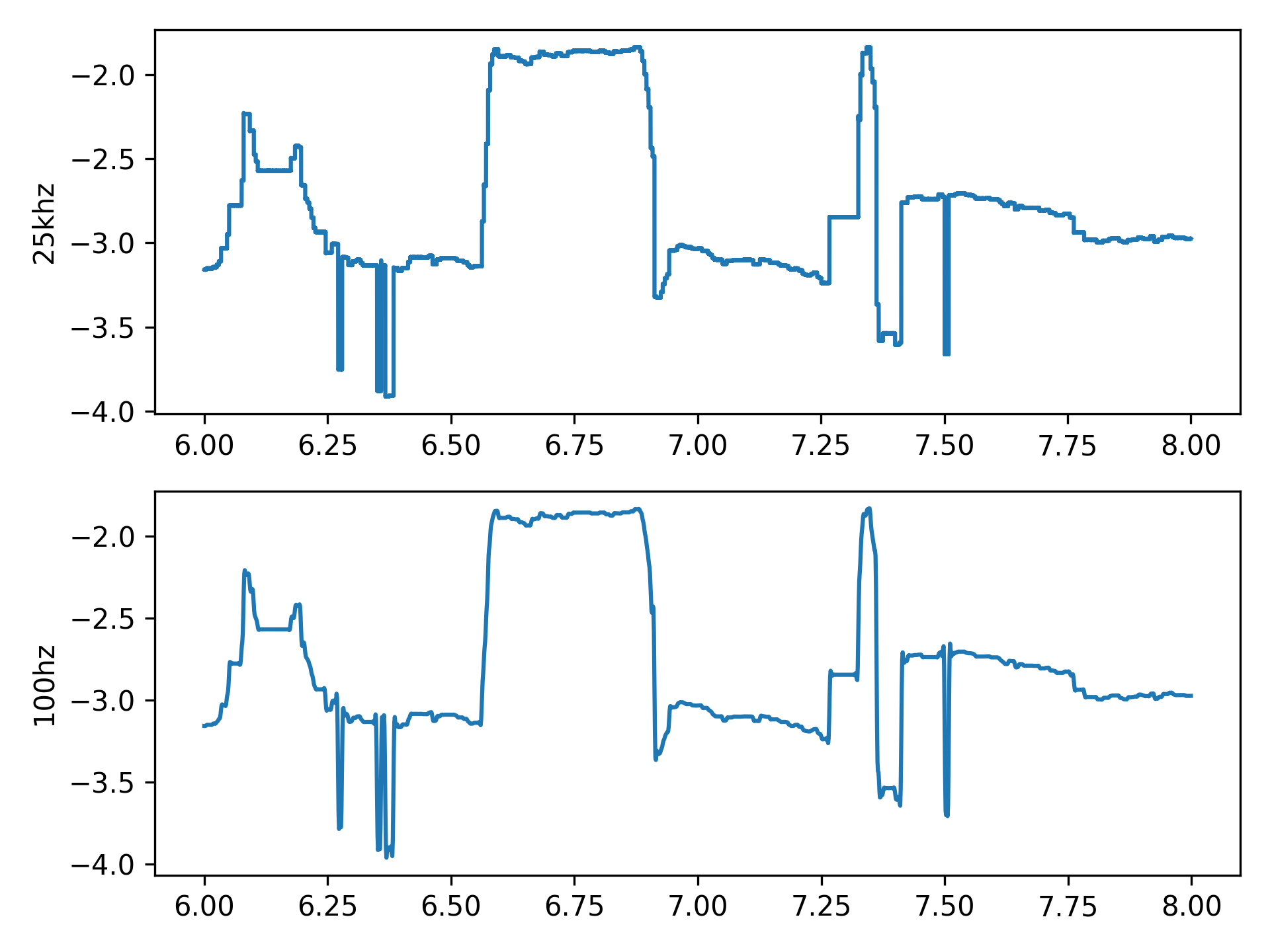
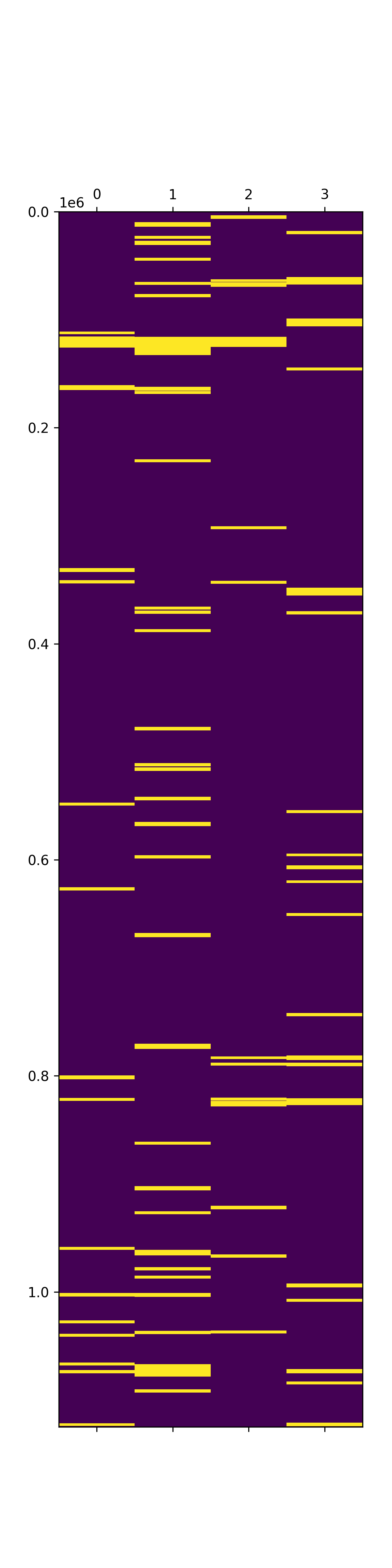
- Data includes:
data (nt, nch): eye data in volts mask (nt, nch): boolean mask of when the eyes are closed
- Metadata includes:
channels (nch): analog channels on which eye data was recorded labels (nch): string labels for each eye channel samplerate (float): sampling rate of the eye data units (str): measurement unit of eye data
- Parameters:
data_dir (str) – folder containing the data you want to load
files (dict) – a dictionary that has ‘ecube’ as the key
samplerate (float, optional) – sampling rate to output in Hz. Default 1000.
max_memory_gb (float, optional) – max memory used to load binary data at one time
debug (bool, optional) – prints debug information
filter_kwargs (kwargs, optional) – optional keyword arguments to send to filter_eye()
- Returns:
- tuple contatining:
- eye_data (nt, neyech): voltage per eye channel (normally [left eye x, left eye y, right eye x, right eye y])eye_metadata (dict): metadata associated with the eye data, including the above labels
- Return type:
tuple
Optitrack
- aopy.preproc.optitrack.parse_optitrack(data_dir, files)[source]
Parser for optitrack data
- Parameters:
data_dir (str) – where to look for the data
files (dict) – dictionary of files for this experiment
- Returns:
- tuple containing:
- data (dict): optitrack datametadata (dict): optitrack metadata
- Return type:
tuple
Neuropixel
- aopy.preproc.neuropixel.classify_ks_unit(spike_times, spike_label)[source]
Classify unit activity identified by kilosort into each single unit
- Parameters:
spike_times (nspikes) – spike times generated by kilosort
spike_label (nspikes) – cluster labels of each spike generated by kilosort
- Returns:
spike times for each unit
- Return type:
spike_times_unit (dict)
- aopy.preproc.neuropixel.concat_neuropixels(np_datadir, kilosort_dir, subject, te_ids, date, port_number, concat_number=1, max_memory_gb=0.1)[source]
Concatenate continuous.dat files of different sessions specified by multiple task ids (te_ids) The concatenated data is saved into a port folder of the kilosort preproc directory
- Parameters:
np_datadir (str) – neuropixel data directory where the data files are located (ex. ‘/data/raw/neuropixels’)
kilosort_dir (str) – kilosort directory (ex. ‘/data/preprocessed/kilosort’)
subject (str) – subject name
te_ids (list) – list of task ids to concatenate
date (str) – date of recording (ex. ‘2023-04-14’)
port_number (int) – port number which a probe connected to. natural number from 1 to 4.
concat_number (int) – the nubmer of concatenation used to make a folder to save concatenated data
max_memory_gb (float) – max memory used to load binary data at one time
- Returns:
None
- aopy.preproc.neuropixel.destripe_lfp_batch(lfp_data, save_path, sample_rate, bit_volts, max_memory_gb=1.0, dtype='int16', min_batch_size=21)[source]
Destripe LFP data in each batch to save memory. The result is saved in save_path.
- Parameters:
lfp_data (nt, nch) – LFP data. This should be a memory mapping array.
save_path (str) – file path to save destriped lfp data
sample_rate (float) – sampling rate in Hz
bit_volts (float) – volt per bit
max_memory_gb (float) – memory size in GB to determine batch size. default is 1.0 GB.
dtype (str, optional) – dtype for data. default is int16.
min_batch_size (int) – the number of size in integer to ensure that batch size is more than min_batch_size to run destripe_lfp
- Returns:
None
- aopy.preproc.neuropixel.parse_ksdata_entries(kilosort_dir, concat_data_dir, port_number, kilosort_version='kilosort4')[source]
Parse concatenated data processed by kilosort into the task entries and save relevant data (spike_indices, spike_clusters, and ks_label)
- Parameters:
kilosort_dir (str) – kilosort directory (ex. ‘/data/preprocessed/kilosort’)
concat_data_dir (str) – data directory that contains concatenated data and kilosort_output (ex. ‘2023-06-30_Neuropixel_ks_affi_bottom_port1’)
port_number (int) – port number which a probe connected to. natural number from 1 to 4.
kilosort_version (str, optional) – kilosort version. This should be kilosort4 or kilosort2.5. Default is kilosort4
- Returns:
None
- aopy.preproc.neuropixel.proc_neuropixel_spikes(datadir, np_recorddir, ecube_files, kilosort_dir, port_number, result_filename, node_idx=0, ex_idx=0, version='kilosort4')[source]
Preprocess neuropixels data saved by openephys. Kilosort must be performed before this functions. Synchronize spikes detected by kilosort with ecube’s timestamps. Extract waveforms from drift corrected ap band data.
- Parameters:
datadir (str) – data directory where the data files are located
np_recorddir (str) – data folder where neuropixels data for a specific task id is saved
ecube_files (str) – data folder where ecube data for a specific task id is saved
kilosort_dir (str) – data folder where preprocessed data of kilosort is saved
port_number (int) – port number which a probe is connected to. This number corresponds to drive number.
result_filename (str) – where to store the processed result
node_idx (int, optional) – record node index. this is usually 0.
ex_idx (int, optional) – experiment index. this is usually 0.
version (str, optional) – kilosort version, ‘kilosort4’ or ‘kilosort2.5’ is permitted
- Returns:
- tuple containing:
- spike_group (HDF5 group): spike times for each drive saved like nested dictionary (ex. drive1/spikes)waveform_group (HDF5 group): spike waveforms for each drive saved like a nested dictionary (ex. drive1/waveforms)metadata (dict): dictionary of exp metadata
- Return type:
tuple
- aopy.preproc.neuropixel.proc_neuropixel_ts(datadir, np_recorddir, ecube_files, kilosort_dir, datatype, port_number, result_filename, delete_file=True, node_idx=0, ex_idx=0, max_memory_gb=1.0)[source]
Prerocess neuropixels time-series data saved by openephys. To use this function when datatype is ‘ap’, kilosort must be applied before this function. lfp data is destriped, low-pass filtered with 500 Hz, and then downsampled to 1000 Hz For ap data, the drift corrected whitened data computed by kilosort is used The whitened data is multipled by inverse whitened matrix, band-pass filtered between 300-5000, then downsampled to 10k Hz. Both ap and lfp time-series data are synchronized with ecube timestamps.
- Parameters:
datadir (str) – data directory where the data files are located
np_recorddir (str) – data folder where neuropixels data for a specific task id is saved
ecube_files (str) – data folder where ecube data for a specific task id is saved
kilosort_dir (str) – data folder where preprocessed data of kilosort is saved
datatype (str) – data type. ‘lfp’ or ‘ap’
port_number (int) – port number which a probe is connected to. natural number from 1 to 4.
result_filename (str) – where to store the processed result
delete_file (bool) – whether to delete the saved file created by destripe_lfp or multiply_mat_batch
node_idx (int, optional) – record node index. this is usually 0.
ex_idx (int, optional) – experiment index. this is usually 0.
max_memory_gb (float, optional) – max memory in performing destripe_lfp or multiply_mat_batch
- Returns:
- tuple containing:
- dset (dict): time series data of preprocessed lfp or apmetadata (dict): dictionary of exp metadata
- Return type:
tuple
- aopy.preproc.neuropixel.sync_neuropixel_ecube(raw_timestamp, on_times_np, off_times_np, on_times_ecube, off_times_ecube, inter_barcode_interval=20, bar_duration=0.02, verbose=False)[source]
This function is specfic to synchronization between neuropixels and ecube.
- Parameters:
raw_timestamp (nt) – raw timestamp that is not synchronized
on_times_np (ndarray) – timings when sync line rises to 1 in neruopixel streams
off_times_np (ndarray) – timings when sync line returns to 0 in neruopixel streams
on_times_ecube (ndarray) – timings when sync line rises to 1 in ecube streams
off_times_ecube (ndarray) – timings when sync line returns to 0 in ecube streams
bar_duration (float) – duration of each bar that is sent to each stream
verbose (bool) – print barcode times and barcodes for each stream
- Returns:
- tuple containing:
- sync_timestamps (nt): synchronized timestampsscaling (float): scaling factor between streams
- Return type:
tuple
- aopy.preproc.neuropixel.sync_ts_data_timestamps(data, sync_timestamps)[source]
Synchronize time series data by padding nan or cropping datapoints based on synchronized timestamps so that data would begin at 0 on the synchronized time axis
- Parameters:
data (nt, nch) – time series data to preprocess
sync_timestamp (nt) – synchronized timestamps
- Returns:
synchronized time series data. The shape of data changes.
- Return type:
sync_data (sync_nt, nch)